Advanced Serial Data LoggerTrust In Confidence! For Windows 2000 - Windows 11 (2022) (incl. Server, x86 and x64). Latest version: 4.7.7 build 417. April 17, 2024. Write data to an XLS file without Microsoft Excel installedDownload a Free Trial Version. It allows you to try all features! Plugins can be downloaded separately here
Task: I have a piece of equipment that transmits serial data to a terminal program. Can the data be sent directly to Excel? Requirements:
It is assumed that: You've prepared parser items for export. For this tutorial, all items were prepared in the previous part. Also, you may read other examples:
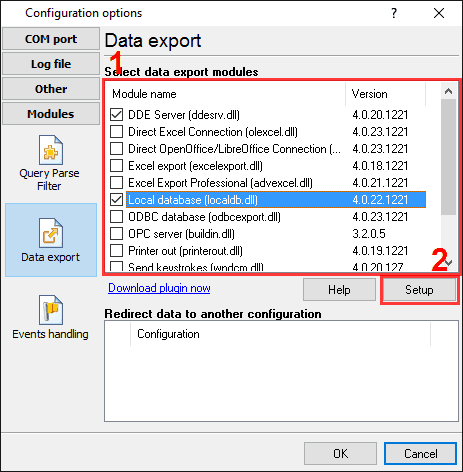
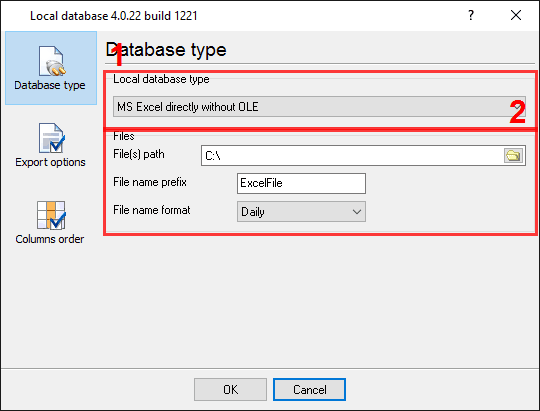
Solution: All parser items are now ready for export to an Excel spreadsheet. Please, open the configuration window of the "Local database" plugin (fig.1 and 2).
All other options are optional. On the second "Data formats" page, you can specify a representation of your data. Because all our variables have the "string" data type, it is unnecessary to change format settings. On the next "Columns order" page, you can specify how variables will be exported to a spreadsheet. Suppose you do not specify a column's order number. In that case, the program will write all variables in the following order: internal variables (FULL_DATA_PACKET, DATA_PACKET, and DATE_TIME_STAMP), parser variables, in the order, as you've specified in the parser configuration. Related articles:
|
|
| Copyright © 1999-2024, AGG Software. All rights reserved. Terms of use | Privacy policy |