The Code repository (Tools->Code repository) (fig.1) provides templates for new projects and blocks of a most uses code. The Repository is maintained in Repository directory (under directory, where CNC Syntax Editor had been installed), that contains a files with all items in the Repository. It is not designed to save large files, but segments of code up to 16 KB.
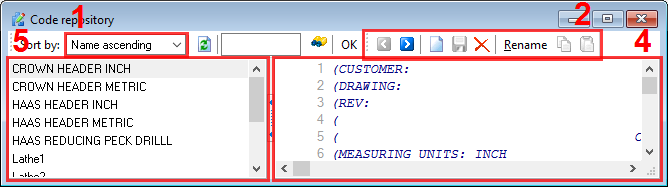
Fig.1 Code repository dialog box
Choose Tools->Repository or click on the Code repository button  to display the Object Repository dialog box.
Items description
1. Sorting tool bar - allows you to select a sort order of the item list #5.
2. Buttons toolbar - contains buttons for quick access to repository functions:
• Previous - select previous item in the item list;
• Next - select next item in the item list;
• New - adds new item into the item list. After a click on the button CNC Syntax Editor will add new item to the list and will allow you to change an item description. For changing the item description you should click an item name twice (click-pause-click);
• Save - saves modified item;
• Delete - deletes current selected item;
• Copy - copy a content of the current item to the clipboard;
• Paste - paste content of the clipboard to the repository window.
Search toolbar - allows you search a text within all item in the item list. Type any text and click the Search  button. CNC Syntax Editor will try to find an occurrence of searching text. Click the Search button again for searching a next occurrence. You can use wildcard characters ? and * while searching, where ? is any one character and * is a group of one or more characters.
3. The Repository editor window - here you can see or edit your repository items. The Repository editor window uses same syntax and editing options as other editor windows;
4. The item list - this list contains names of all items in the Repository. Click any item in the list for selecting the item and load their content to the Repository editor.
Adding a new code item:
1. Click the New button to add new item into the Repository;
2. Type your item name;
2. Type or paste your code into the Repository editor window;
4. Click the Save button.
Inserting a code item into a CNC file:
1. Click the name of the code item in the item list;
2. Click the Copy button;
3. Minimize or close Code Store;
4. Press Ctrl+V, click a toolbar button or right-click the mouse and select the Paste menu ite.
Removing a code item:
Click the name of the item in the item list and click the Delete button.
Searching all code items for a text:
1. Type your text;
2. Click the Search button.