Configuration
The manual mode is used to send and receive files under the control of the PC user. Depending on the granted permissions, the user can load files either from the specified folder or from any folder on the disk. The same is true for receiving files.
The behavior of the user and the program is determined by the settings specified on the "Manual mode - Directories and files" tab (fig. 9).
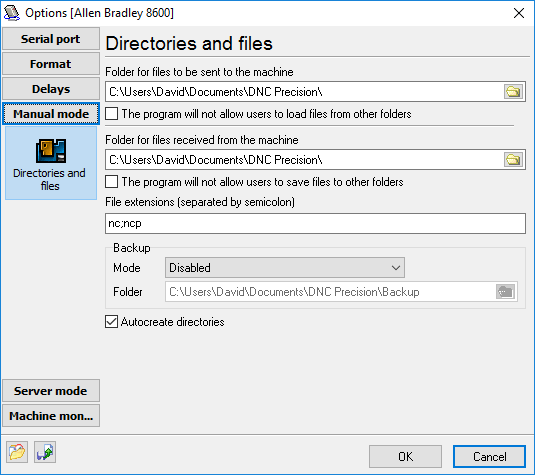
Fig. 9. Manual mode. Configuration.
Folder for files to be sent to the machine,
Folder for files received from the machine - these two folders define the location on the disk to be used by default for loading and unloading files. If you check the "Do not allow users to save/load files to/from other folders" option, the user will be able to choose files only from the folder specified in this field.
Do not allow users to save files to other folders,
Do not allow users to load files from other folders - this option restricts the user in choosing the location of files and prevents casual loss of information resulting from mistakes in his actions. If this option is on, files are always found in the specified location.
While transmitting files from the machine to the computer, sometimes it happens so that the transmitted file already exists on the disk in the specified folder. In this case, the program will follow the instructions specified in the "Backup" group.
Mode - defines what the program should do if it detects that the same file already exists on the disk:
•Disabled - no backup copies are created. The old file is replaced by the new one
•Copy old files to the backup folder - the file that already exists in the folder specified for saving will be moved to another folder (specified below)
•Rename the old file - the file existing in the folder will not be moved, but only renamed. An identification number 1, 2, 3 etc. will be added to its name.
•Rename the new file - the files existing in the folder will remain unchanged, while the new file will be renamed. Renaming is done as described above.
If mode #2 is selected, the "Folder" input field becomes available for editing. Here, you can specify the location on the disk where backup copies of files will be placed.
Auto-create directories - is this option is on, all the folders specified above will be created automatically. It means that you will not have to create them before launching the program. If the folder already exists, it will remain unchanged.
Transmitting files from the machine to the computer
You should do the following to transmit a file in this mode:
| 1. | Select a machine from the list in the main program window. |
| 2. | Press the "Receive" button. |
| 3. | Specify or choose the filename and the path. If the file exists, you will be asked with the "Replace the file?" dialog, where you can click "Yes" to confirm your action. |
| 4. | Click "OK". |
After this, the program will switch to the mode for receiving files. After that, you should quickly press the PUNCH button on the machine itself. If the machine was configured correctly, the message log will reflect the process of receiving the file. The final message will be that the file is successfully received. In any other case, an error message will be displayed.
If for any reason you decide to cancel receiving the file, press the "Stop" button on the toolbar in the main program window.
Transmitting files from the computer to the machine
You should do the following to transmit a file in this mode:
| 1. | Select a machine from the list in the main program window. |
| 2. | Press the "Send" button. |
| 3. | Specify or choose the filename and the path. |
| 4. | Click "OK". |
After this, the program will switch to the mode for sending files and will wait until the receiving device is ready. After that, you should press the READ button on the machine itself. If the machine was configured correctly, the message log will reflect the process of sending the file. The final message will be that the file is successfully sent. In any other case, an error message will be displayed.
If for any reason, you decide to cancel sending the file, press the "Stop" button on the toolbar in the main program window.