{Available only in the full Professional version}
While transmitting and receiving files, processing requests in the automatic mode, it is sometimes necessary to inform the operator about the operation performance status. It can be done with the help of reports. The DNC server can generate the following types of reports:
•the file has been successfully received from the NC;
•the file has not been successfully received from the NC;
•the request has not been completed.
To edit report parameters, you should switch to the "Server mode - Reports" tab (fig. 13).
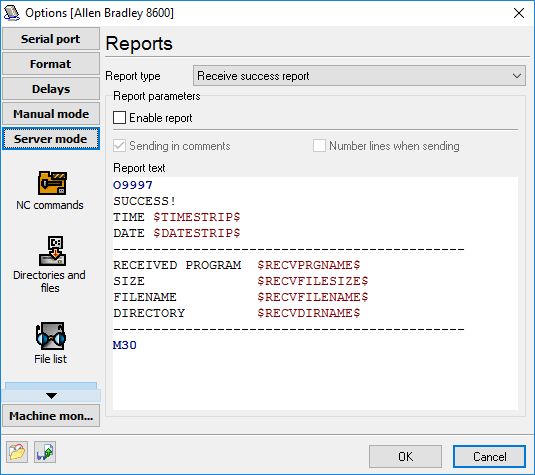
Fig. 13. Reports parameters editing.
Report type - selecting the report type which parameters you want to edit.
Enable report - if you enable this option, the current report will be generated and sent to the machine.
Send in comments - the lines of the report generated from the template will be included between the comments.
Number lines when sending - lines of the report generated from the template will be numbered starting at 1000 with the step of 10.
Report text - the report text template you want to send. You can use special variables in the report text that the program replaces with the corresponding value before sending to a machine.
Note: If you enable the "Number lines when sending" and "Send in comments" options, but you want to transmit some lines unchanged (without numbers and comments), put the '!' character at the beginning of the line (see the example below).
Template text example:
!:9997
SUCCESS!
TIME $TIMESTRIP$
DATE $DATESTRIP$
--------------------------------------------
RECEIVED PROGRAM $RECVPRGNAME$
SIZE $RECVFILESIZE$
FILENAME $RECVFILENAME$
DIRECTORY $RECVDIRNAME$
--------------------------------------------
!M30