{Available only in the full Professional version}
It is the most "advanced" and intellectual working mode of the program. In this mode, all the program actions are performed automatically without the PC user actions. When the program is launched, it is automatically switched to the mode for receiving information from the machine. When receiving some data, the program analyzes their contents and depending on the processed information performs responds in one way or another:
•transmits a program file to the machine.
•receives a program file from the machine.
•transmits the information about files located in the specified or requested folder.
•deletes files in the specified folder.
•renames files located in the specified folder.
Folders for receiving and sending files are specified in the same way as in the previous section - "Manual mode".
Commands from the machine to the computer can be transmitted in two ways:
•As commands in the control header of the transmitted data block - the set of these commands is limited and directly depends on the machine manufacturer. Some machines may have no such commands. Often the control header is present in the machines with the feature of loading the programs from an external disk drive, working via the RS232 interface.
•As commands transmitted in the program body - is the most convenient way of transmitting the information between the machine and the PC. Nearly any information can be transmitted in this form. In this case, the data transmission format is determined by the message protocol, accepted on the DNC server. Using this way, the NC operator can request the information (folder contents, files) from the DNC server. The NC operator sends a small program to DNC Precision with the requests, to which he would like to receive responses.
The commands are extracted from the header according to the parameters specified in the "Server mode/NC commands format" tab (fig. 10)
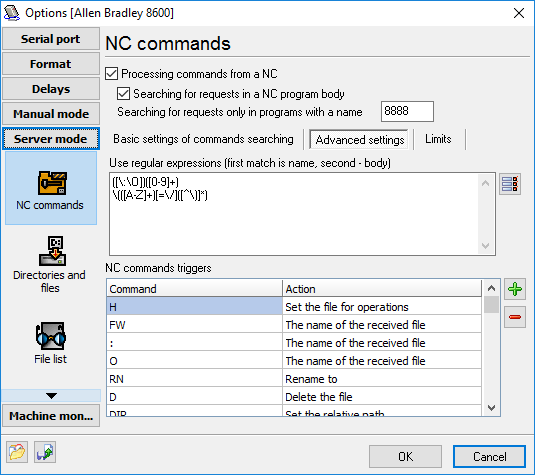
Fig. 10. NC command format.
If you are sure, that your machine uses service commands in the header (for example, you have found it out analyzing the log file), first it is necessary to enable this mode in the "Processing commands from NC" field. After that, it is necessary to specify the parameters by which the commands will be extracted from the general information flow.
Basic settings
Start - the parameter indicating the beginning of a command. This parameter is a character string, and it can contain usual ASCII characters ranging from 32 to 127 as well as any other character with the code specified as #XX, where XX is the hexadecimal code of the necessary character. All data received before this byte sequence are not considered as commands and are ignored. For example, if you enter the "#1B#26" character sequence, two ASCII characters - ESC (ASCII 27) and & - will be considered as the command start parameter.
End - the parameter indicating the end of a command. This parameter is a character string, and it can contain usual ASCII characters ranging from 32 to 127. The format of this value is identical to the previous parameter. All data received after this byte sequence are ignored.
The first N characters are the command name - after a command is separated from the program header or body using the parameters specified above, it is also necessary to identify its name and possible value. To achieve it, specify how many of the first characters are the name of the program. In addition to it, you can specify (only letters) that the name of the program can contain only letters. Thus, the maximum size of the command name is limited, but if the last characters are not letters, they will be cut off from the command name and added to the beginning of the command body.
Command name and name body are separated by - this field allows you to specify a separator between a command name (H,FW, etc.) and command body (file name, message etc.).
Advanced settings
These settings allow you to reveal all command extraction features, but require additional knowledge in regular expressions.
Use regular expressions - to separate commands from the service header or from the program body, we will use Perl-like regular expressions widely used to process text data. Having specified one or more regular expressions (each regular expression is specified on a separate line), you will define the corresponding number of rules for processing incoming data. When specifying a regular expression, you should have two matches as the result of its work. The DNC server will consider the first match to be the name of the command, while the second match will be considered the body of the command.
The DNC server can process commands transmitted in the program body. For a command to be correctly identified, the following conditions should be observed:
| 1. | All commands sent to DNCP must be transmitted in the NC program that has the name specified in the "Search for requests only in programs with a name" field (fig. 10). |
| 2. | The name of the NC program must be transmitted in the first line, and it must use the format specified in the "Program format" section. |
An example of the program for the NC operator to type:
O8888
N0010 (DIR=/VIPROS)
N0020 (PRG=0010)
%
The first line specifies the program name. In the DNC settings for the current machine, this name should match the one specified in the "Search for requests only in programs with a name" field because DNCP will search for requests from the NC only in programs with this name.
The second line contains the DIR =/VIPROS command that defines the folder for the operation of receiving a file or folder contents to be performed in.
The third line contains the PRG=0010 command, telling the DNC server to send the file named 0010 to the machine. To obtain the actual name of the file, the DNC server generates it from the prefix (it will be added before 0010), the suffix (will be added after 0010) and the extension (will be added at the end and separated from the suffix with a dot). After that, it will search for the file in the specified folder.
The last line with the % character indicates the end of the program, and it must match the one specified in "Program format".
After the NC operator sends a request, he should switch to the mode for receiving data from the DNC server within 3 minutes. If he does not do it, the DNC server will switch back to the mode for expecting requests from DNC. The request will result in either a file, or the disk contents, or the status of performing the operation.
If all the above-mentioned conditions are observed, the process will result in identifying one or several commands that the DNC server will be able to execute. Now it is necessary to match the identified command names with those supported by the DNC server. It is done in the "NC command triggers" list. The DNC server supports and can execute the following commands:
•Send a file - once the DNC server receives this command, it will queue the file the name of which was transmitted in the command body for sending. The final filename is generated from the prefix, the suffix and the extension specified on the "Folders and files" tab (fig. 11).
•File list - once the DNC server receives this command, it will queue the contents of the folder (or folders) specified on the "Directories and files" tab (fig. 11) in the "Folder for files to be sent to the machine" list for sending.
•Set the relative path - the name of the folder where the DNC server should search for programs to be sent to the machine. The folder name is defined relative to the folders specified on the "Directories and files" tab. For example, suppose C:\NC is specified in the DNC settings for the current machine and the body of the received command is VIPROS, in this case, the server will search for files in the C:\NC\VIPROS\ folder. If this command is not specified, the search for files is performed only in the folder specified in the DNC settings for the current machine.
•Skip - if you specify this action for a command, the command with this name will be skipped and there will be a record added to the message log informing that this command has been ignored.
•Set the file for operations - when this command is executed, the filename transmitted in the program body will be remembered and used for further operations (for example, renaming). If this command is the last one in the list of the processed commands, it will mean the request for sending the file with this name.
•The name of the received file - this command tells the DNC server that the command body is the name of the program that is being sent to the DNC server at the moment. Depending on this name, the server searches for commands in the program body because the name of the program to search for commands in is specified in the options (fig. 10). In case of non-service programs, this filename is used for saving the program file to the disk.
•Delete the file - the file the name of which is specified in the command body is deleted. The file is removed from the first found folder specified in the "Folder for files to be sent to the machine" list in the options.
•Rename to - the file the name of which was set earlier by the "Set the file for operations" command will be renamed to the file specified in the command body. Renaming is done in the first found folder specified in the "Folder for files to be sent to the machine" list in the options.
•Cancel current operation in the queue - this command instructs the DNC Precision to immediately cancel current command. This command is used if you want to cancel a current drip-feed operation and request a new file.
•Cancel all operations in the queue - this command instructs the DNC Precision to immediately cancel the current command and clear all commands in the queue. This command is used if you want to cancel a drip-feed operation and request a new file, but you queue some files to send before.
•Operator name - this command sets the operator's name. The operator's name is used in the machine monitor later. If you are using the machine monitor function, you can instruct your operators to use this command when the operator starts their job.
•Tool break - this command requests a file partially when a tool is broken, and you stopped your machine. The command is described in the following section.
•Tool break: add before, Tool break: add after - these commands are used in conjunction to the tool break command. These commands are described in the following section.
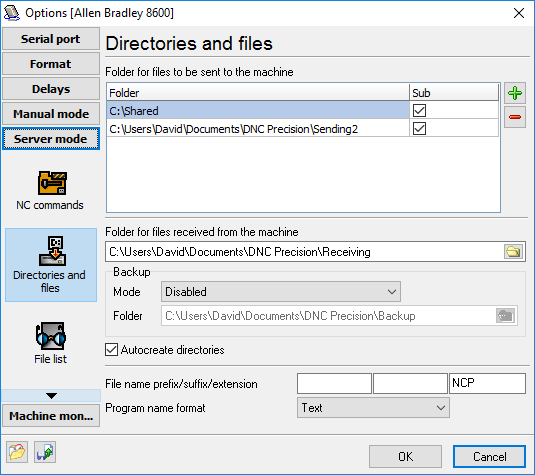
Fig. 11. Directories and files.
You may define multiple folders with subfolders to search a program requested. DNC Precision will send first found file that match your file name prefix, suffix and extension (see fig. 11). If your folders contain files with different extensions, you may define all your extensions in the "Extension" field. In this case, all extensions are semicolon delimited. For example, if your folders contain files like *.nc, *.ncp, *.iso, then you may define the extension string like "nc;ncp;iso" (w/o quotes). In this case, the program will use all these extensions for search.