When you send and receive data, character replacement allows you to get rid of those characters that are unnecessary or unwanted for the DNC server, unacceptable for sending to a machine or incompatible with it. Character replacement is configured separately for each direction of data transmission. (fig. 7)
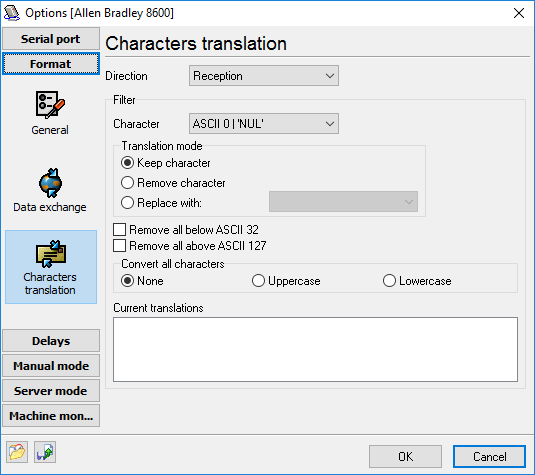
Fig. 7. Configuring character replacement.
Use the "Direction" field to specify the direction to be configured. Once it is specified, you will see what character replacement rules that are already set for this direction in the "Current translations" field. To define a rule, you should select the character code in the "Character" field and select the rule after that.
•Keep character - the selected character will not be changed. This action is default for all characters;
•Remove character - the selected character will be removed;
•Replace with - the selected character will be replaced with the one specified.
The following additional options are available:
Removing all below ASCII 32 - all characters with a code less than 32 will be removed. It means all unprintable characters.
Removing all above ASCII 127 - all characters with a code greater than 127 will be removed. It means all characters with the code requiring 8 bits of data.