The "Monitor options" page (fig. 2.7.6) allows you to customize the program's mode. By default, the options are configured so that the program logs all events to the database that comes with the program.
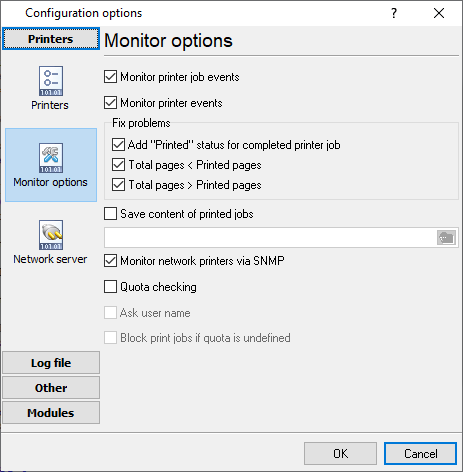
Fig. 2.7.6. Additional options
Monitor printer events. The program will monitor all events related to the printer: "new job", "task deletion", "no paper", etc.
Monitor print job events. The program will monitor all events related to each print job: "sending to the printer", "printing", "printed", etc.
Error correction
Sometimes, due to the drawbacks in the printer driver or firmware (because the printer is supposed to give information about printed pages), the program receives notifications with invalid data. For example, the number of pages in the document turns out to be less than the number of printed pages. For you to be able to fix these problems, the program has a group of options called "Error correction":
Add the "Printed" status for finished jobs. Sometimes the program may fail to receive the notification that the print job has been finished. In this case, the printer's data will not be included in the report that will be generated in the administrative part of the program. If this option is enabled, the program will monitor the print queue's status and automatically set the "Printed" parameter for finished jobs.
Total pages < Printed pages. . Suppose an event contains data where the "Total pages" information field has a value that is less than the one in the "Printed pages" field. In that case, the program will automatically set "Total pages" = "Printed pages".
Total pages > Printed pages. It is the same as the previous, but the reverse ratio is checked.
Save content of printer jobs. If this option is enabled and specified a folder for saved files, the server program and remote clients will try to capture spool files (SPL) and convert them to PDF. Remote clients will transfer captured files to the central server.
Quota checking. This option instructs remote clients to ask for a user name and password before each print job. Then the client sends a quota checking request to a server and executes an action returned from the server. You should configure quotas in the Accurate Printer Monitor Administrator.
Ask user name. If this option is enabled, the remote client asks for a user name. Otherwise, it uses the name of the current user. If this option is disabled, a user cannot print a file under another account name.
Block print jobs if quota is undefined. If this option is enabled, the remote client blocks all print jobs if a remote server is offline or unreachable for 5 seconds, or quota is not defined for a current computer printer and user.