
USB Software: USB Sniffer, USB HID Logger, USB-Serial Tools
"USB software" means three different things depending on what is plugged in. A USB-to-serial adapter shows up as a COM port and needs serial tools. A scale, meter or scanner that reports as a USB HID device needs a HID logger. And a driver or device under development needs a USB protocol analyzer. This page sorts the three cases and lists the tool for each.
On this page: Which case is yours · USB sniffer and analyzer · USB HID logger · USB-to-serial adapters · All-in-one download · USB pinouts · FAQ
Which USB tool do you need?
| Your situation | Tool |
|---|---|
| You develop or debug a USB device or driver and need to see packets, descriptors, URBs and timing | Advanced USB Port Monitor |
| You want to measure the throughput of a USB drive or device | Advanced USB Port Monitor, performance test |
| A scale, meter, barcode, RFID or fingerprint reader, or UPS talks as a USB HID device and you want its values in a file, Excel or a database | USB HID Logger |
| Your device came with a USB cable but appears in Device Manager as a COM port | Serial tools: Advanced Serial Port Monitor to look, Advanced Serial Data Logger to collect |
| You want a USB-serial device to be reachable from another computer | TCP COM Bridge |
USB sniffer and protocol analyzer: Advanced USB Port Monitor
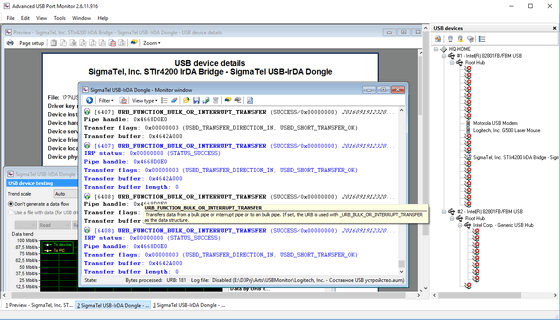
Advanced USB Port Monitor captures the traffic between a USB device and its driver with a kernel-mode driver, then decodes it: descriptors, requests, URBs and IRPs, with timing and statistics. It monitors low, full and high speed devices (1.5, 12 and 480 Mbit/s), filters the capture to the devices and request types you care about, shows a detailed device tree, measures device and driver performance, and exports reports to PDF, XML or Word.

Advanced USB Port Monitor
USB Port Monitor & Analyzer Software for USB Traffic Capture. It is a software alternative to a hardware USB analyzer for driver development, peripheral testing and troubleshooting.
USB HID data logger
Many instruments use the USB HID class instead of a virtual COM port because it needs no driver. USB HID Logger connects to one or several HID devices directly, reads their reports, decodes the values, and writes them to log files, Excel or a database, with filters and events on the way. It runs as a Windows service. Guides: USB barcode scanner to Excel, HID data to Excel, HID data to a database, to SQL Server, to MySQL. It belongs to the same family as our serial, TCP/IP and OPC loggers, compared on the data logger software page.

USB-to-serial adapters and USB devices with a virtual COM port
If Device Manager lists your device under "Ports (COM & LPT)", it is a serial device in USB clothing. Everything on the COM port software page applies: Advanced Serial Port Monitor to see the traffic and try commands, Advanced Serial Data Logger to collect data around the clock, TCP COM Bridge to reach the port from another computer. Guides for the usual adapter problems: test the adapter in the browser, find which COM port number the adapter received, COM port not working, reset or restore a COM port in Windows 11.
Advanced Serial Port Monitor
Serial Port Monitor is a terminal, sniffer and analyzer for COM, RS232, RS485 ports. Works with COM ports emulated by USB adapters exactly as with built-in ports.

TCP COM Bridge
TCP COM Bridge - connects two physical or virtual COM ports to each other over network! Forwards any USB-based COM port to the network.
All USB tools in one download
The USB Software Bundle installs Advanced USB Port Monitor, USB HID Logger and TCP COM Bridge from one setup file. Each program keeps its own trial and licence.
USB pinouts and cables
- USB 2.0 connectors and sockets
- USB 3 signals, pinout and wire colours
- USB-C signals and wire colours
- All USB pinout pages
Frequently asked questions
How do I know whether my device is HID or a COM port?
Open Device Manager. A COM device is under "Ports (COM & LPT)" with a COM number; a HID device is under "Human Interface Devices". Some devices have a switch or a driver that changes the mode.
Can Advanced USB Port Monitor capture a device that is already in use?
Yes. It captures at the driver level, so the device keeps working with its own application while you watch the traffic.
Does USB HID Logger need a driver for my device?
No. HID devices use the driver built into Windows, and the logger reads the reports through it.
Which Windows versions are supported?
Windows 11 and 10, Windows Server, 32-bit and 64-bit.
Related categories
COM port software · RS232 software · Data logger software · TCP/IP and UDP software