
RS232 Software: Terminal, Sniffer, Data Logger, RS232 to TCP
RS232 is the serial interface behind most industrial and laboratory devices: scales, meters, PLCs, barcode scanners, GPS receivers, modems, printers. This page covers the RS232 software we make for Windows, from a terminal for the first connection to a logger for years of unattended collection, and links our reference pages on RS232 cables and pinouts. RS485 and RS422 devices use the same tools through a converter.
On this page: Which tool for which job · Terminal and sniffer · Data logger · RS232 over Ethernet · Emulation and testing · All-in-one download · Cables and pinouts · FAQ
Which RS232 tool do you need?
| You want to | Tool |
|---|---|
| Talk to a new device: send commands, read replies in ASCII or hex, find the right baud rate | Advanced Serial Port Monitor, terminal mode |
| Capture the traffic between a device and the software that already uses it | Advanced Serial Port Monitor, spy mode, or a monitoring cable between two devices |
| Collect readings continuously into files, Excel or a SQL database | Advanced Serial Data Logger |
| Poll MODBUS RTU or ASCII devices and log the registers | Advanced Serial Data Logger with the MODBUS plugin |
| Reach an RS232 device from another computer over Ethernet, or share it between programs | TCP COM Bridge |
| Connect two serial programs on one PC without a cable | Virtual Null Modem |
| Simulate an RS232 device while you develop or configure software | COM Port Data Emulator (free) |
| Check quickly whether a port, cable or USB adapter works, with a loopback plug and nothing to install | Serial Port Tester (free, in the browser) |
| Test a port, cable or USB adapter under sustained load | COM Port Stress Test (free) |
| Replace a serial dot-matrix or line printer with PDF or Word files | Serial Printer Logger |
Each product's order page shows the price for your country. Every paid tool has a free trial.
RS232 terminal, monitor and sniffer
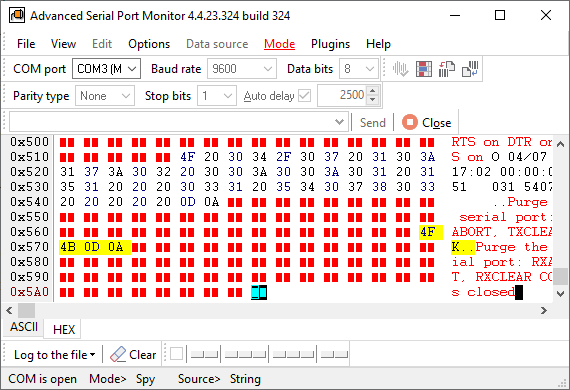
Advanced Serial Port Monitor opens any COM port at any baud rate, including non-standard ones, with configurable data bits, parity, stop bits and flow control. In terminal mode you send text, hex or a whole file and see replies with timestamps. In spy mode it attaches to a port that another program has open and shows both directions of the exchange, which is how you recover an undocumented protocol. A dual-port mode shows two ports side by side, and everything can be written to a log file.
Plugins turn it into a MODBUS RTU/ASCII master or slave, an ASCII or binary device emulator, a test-sequence runner or a scripted automation tool.
Guides: RS232 terminal, RS232 monitor, RS232 analyzer, serial port sniffer, UART monitor, HyperTerminal replacement for Windows 11, Docklight comparison, six serial port monitors compared.
Advanced Serial Port Monitor
Serial Port Monitor is a terminal, sniffer and analyzer for COM, RS232, RS485 ports
RS232 data logger
Advanced Serial Data Logger collects from one or many RS232, RS485 and RS422 ports at the same time, around the clock, as a Windows service. It can send requests to the device, parse replies with fixed positions, delimiters or regular expressions, and export the values to log files, Excel, Google Sheets, SQL Server, MySQL, PostgreSQL, Oracle, Access and cloud databases, or publish them as an OPC or DDE server and over MQTT. A spy mode logs a port that another application is using.
Worked examples: RS232 to Excel, four methods, RS232 to a database, to SQL Server, to MySQL, via ODBC, scale weight to Access, barcode scanner, GPS receiver, pressure transmitter. Background: where RS232 loggers are used, RS232 port logger overview. The other loggers in the family are on the data logger software page.

Advanced Serial Data Logger
Serial Data Logger software - COM port data acquisition and logging software
RS232 over Ethernet and port sharing
TCP COM Bridge is a software RS232-to-TCP/IP converter. On the computer with the device it publishes the COM port as a TCP or UDP server; on any other computer it creates a virtual COM port that connects to it, so the remote device looks local to your software. The same program splits one port between several applications and can serve up to 256 ports on one machine. Guides: serial over Ethernet, serial port to TCP, serial-to-IP converter, serial port redirector, sharing a port on the network.

TCP COM Bridge
TCP COM Bridge - connects two physical or virtual COM ports to each other over network!

Virtual Null Modem
It emulates pairs of RS232 ports joined by a null-modem cable on one computer, for testing serial software without hardware.
RS232 emulation and stress testing (free)

COM Port Data Emulator - Freeware
COM Port Data Emulator for RS232 and TCP/IP Device Traffic. Replays a recorded data stream or a file to a COM port, so you can build and test against a device you do not have on the desk.

COM Port Stress Test - Freeware
COM Port Stress Test Tool for Serial Port Performance & Stability. Pushes high-volume traffic with random settings through a port to find unstable cables, adapters and drivers.
All RS232 tools in one download
The RS232 Software Bundle installs Advanced Serial Port Monitor, Advanced Serial Data Logger and TCP COM Bridge from a single setup file. Each program keeps its own trial and licence, so you can buy only the ones you keep.
RS232 cables, pinouts and signals
Most first-day problems with RS232 are wiring, not software. Our reference pages cover the connector pinouts, the meaning of each signal, and the cables you need for each situation:
- RS232 pinout: the full 25-pin DB-25 connector, male and female, with every signal
- RS232 signals explained, with the DB9 and DB25 connectors of PC COM ports
- The serial port interface: voltage levels, DTE and DCE, handshaking
- RS232 connector pinouts: DB9, DB15, DB25 and RJ45 on one page
- Null modem DB9 to DB9 and other null modem layouts
- Loopback plugs for testing a port without a device
- Monitoring cable for sniffing between two devices with a third port
- Serial printer connectors and cables
- All RS232 cable diagrams
Frequently asked questions
My computer has no RS232 port. What do I do?
Use a USB-to-RS232 adapter. Windows presents it as a COM port and all tools on this page work with it. Read how to find which COM port number the adapter received.
Can I use these tools with RS485 or RS422?
Yes, through an RS232-to-RS485 or USB-to-RS485 converter. The monitor and the logger have an RS485 mode that drives the direction line. Details are on the RS485 software page.
How do I capture the traffic between two devices, with no PC involved?
Wire a monitoring cable that taps both data lines into one or two ports on the PC, then watch them in Advanced Serial Port Monitor's dual-port mode.
The device uses a strange baud rate. Is that a problem?
No. The monitor and the logger accept custom baud rates in addition to the standard list, as long as the port driver supports them.
Which Windows versions are supported?
Windows 11 and 10, Windows Server, 32-bit and 64-bit. Older releases back to Windows 2000 still work.
Related categories
COM port software · RS485 software · USB software · TCP/IP and UDP software · Data logger software · MODBUS software