

Advanced Serial Data Logger: RS232 Data Logger for Windows
For Windows 2000 - Windows 11 (2022) (incl. Server, x86 and x64). Latest version: 5.1.8 build 924. September 24, 2026.
What it does
Advanced Serial Data Logger records the data that devices send to a serial port and puts it where you need it. It reads any real or virtual COM port: built-in RS232 ports, USB-to-serial adapters, and RS485 or RS422 buses through a converter. It can simply save everything to a file, or split each data packet into values, such as a weight, a meter reading or a lab result, and write those values to Excel, an SQL or ODBC database, a cloud database, CSV files, an OPC server or a web service. It runs as a Windows service, so logging continues around the clock without anyone logged in.
What you can do with it
Collect weights from scales and balances straight into Excel or Access instead of typing them by hand. Poll energy meters, inverters and PLCs over MODBUS, IEC 62056-21 or M-Bus and keep the readings in a database. Read results from laboratory analyzers that speak ASTM or HL7 and pass them to your own system. Capture barcode scanner and RFID reader data with a timestamp for every read. Replace an old alarm or report printer with a searchable log and email or messenger notifications. Keep a raw, rotating log of everything a device sends, for diagnosis or audit.
Parsing and export need the Professional or Enterprise edition. The Standard edition records raw data to log files; the Home edition, for non-commercial use, can combine any two plugins. The feature matrix lists every difference.Getting started
- Install the program and open Configuration options. Select the COM port and set the baud rate, data bits, parity, stop bits and flow control your device uses.
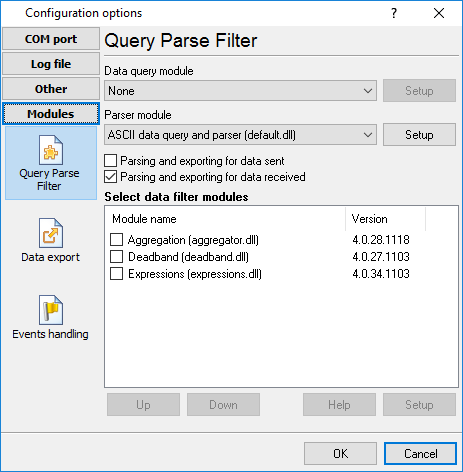
- On the Modules page, choose a parser: the ASCII Data Query and Parser for text and fixed-length records, the MODBUS plugin for registers, or a protocol plugin for your device. Define the values you want to extract.
- On the Data export page, choose where the values go, for example an Excel sheet, a database table or a CSV file, and start logging. When it works, switch on the Windows service mode in Program options so logging continues after you log off. The video lesson installing and first steps walks through a first configuration.
Features
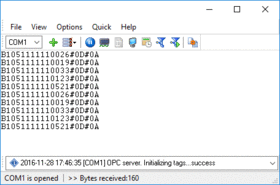
Several data sources at once. Log several data sources at the same time. A configuration usually covers one port; identical devices on different ports can share one configuration, so they are managed in one place. The number of configurations depends on the edition.
Any port settings. Any baud rate, including custom rates, any number of data bits and stop bits, all parity types, and hardware or software flow control.
RS485 and RS422. Controls the RTS line to switch the data direction on RS485 converters that need it. See RS485 software.
Spy (sniffer) mode. Records the traffic between a device and another Windows program that already has the port open.
Raw data logging. Saves everything received, unchanged, to log files with rotation by date, time or size, automatic deletion of old logs and file access control.
Data query modules. Sends requests or commands out of the port to poll instruments that only answer when asked, in ASCII, MODBUS or another supported protocol.
Data parsers. Split data packets into values by fixed position, delimiter or regular expression with the ASCII Data Query and Parser; CSV, JSON and XML parsers and protocol plugins cover the rest.
Filters and calculations. Expressions for math, string and boolean formulas, Deadband to drop insignificant changes, and the Aggregator to join values from several packets into one record (Enterprise edition).
Databases. Writes to any ODBC database, to SQL Server, MySQL, PostgreSQL, Oracle and others through SQL Database Professional, and to cloud databases such as Microsoft Azure, MariaDB, MongoDB, Amazon Aurora and Amazon Redshift.
Excel and other files. Writes values directly into rows and columns of an open Excel or Calc sheet, or into Excel, CSV, XML, HTML, RTF, PDF and text files, the Windows clipboard or Google Sheets.
Industrial interfaces. Publishes live values as an OPC UA server, OPC DA or DDE server for SCADA and HMI software.
Internet and IoT. Sends data by HTTP POST or GET, to InfluxDB, to an MQTT broker, over SFTP or FTP, or by email.
Alarms and notifications. Sends alerts by email, messengers such as Telegram and Slack, or SMS when a value crosses a limit or data stops arriving. See events and notifications.
Keystrokes into any program. Types the received values into the window of any Windows application, like a keyboard wedge. See send keystrokes.
Scripts. Processes data with your own Python scripts or runs external programs and scripts on events.
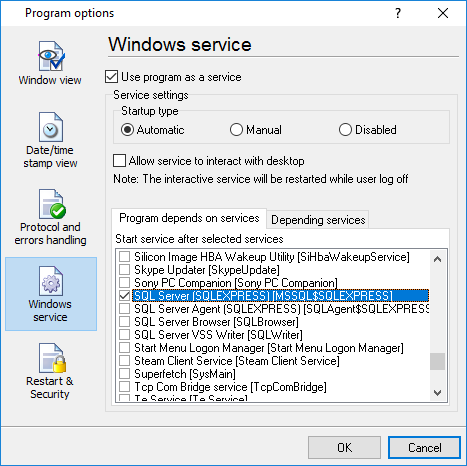
Windows service. Starts with Windows, needs no logged-in user, can wait for other services such as SQL Server, and can restart the program or reopen the port at a set time.
How it works: capture, parse, export
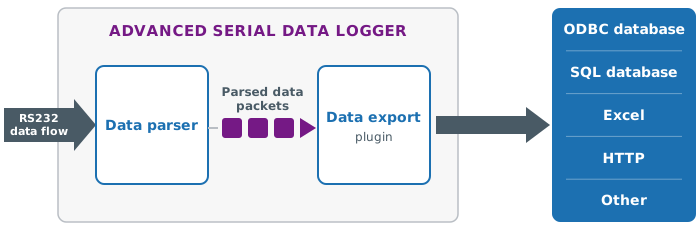
Every configuration is a small pipeline. The port delivers the raw data stream. A query module, if you need one, sends the requests that make a device answer. The parser cuts the stream into data packets and each packet into named values: a date, a weight, a register value, a test result. Optional filters calculate, round, drop unchanged values or combine several packets into one record. Finally one or more export modules write the values to their targets, and event modules react to them, for example with an email when a limit is exceeded.
Each stage is a plugin with its own settings dialog, so a configuration is built by choosing and filling in forms rather than by programming. The raw stream can be logged to a file at the same time, which helps when you need to check later what the device actually sent. The plugins page lists every module with its manual.
Devices and protocols
Anything that sends text or binary records over a serial line can be logged with the generic ASCII parser. For common devices and protocols there are ready plugins and step-by-step tutorials:
- Energy meters and inverters: MODBUS RTU, TCP and ASCII, IEC 62056-21, DLMS/COSEM, M-Bus, DL/T 645-2007, CJ/T 188 and Kamstrup KMP. Register maps for hundreds of meters and inverters, with an in-browser reader to test the connection first, are in the MODBUS device library; SunSpec inverters are covered too.
- PLCs and controllers: Siemens S7-200, S7-300, S7-400 and S5, GE Fanuc (CCM, SNP, SNP-X), DNP3, EtherNet/IP, BACnet/IP, and ADAM, ICP-CON and NuDAM modules.
- Laboratory and medical equipment: ASTM and HL7 analyzers.
- Scales and balances: a dedicated scale parser; see weight data to Access and scale data to Excel.
- Barcode and RFID: barcode scanner data to Excel and RFID readers over LLRP.
- GPS and NMEA receivers: GPS data logging and NMEA to OPC.
The same plugins also read devices on the network through TCP/IP Data Logger and other AGG data loggers, so a configuration can move with the device when it gets an Ethernet adapter.
Where the data goes
Data usually ends up in one of four places, and each has a worked example:
- Excel. Values can go straight into the rows and columns of an open workbook, into Excel files, or into Excel through DDE. RS232 to Excel compares the four methods, and real-time charts in Excel shows a live chart.
- A database. Any database with an ODBC driver, and SQL Server, MySQL, PostgreSQL and Oracle directly: RS232 to SQL Server, RS232 to MySQL, RS232 to ODBC, MODBUS to a database.
- Files. CSV for other programs, or PDF and RTF reports: write data to a CSV file.
- Other software. OPC UA or DDE for SCADA, MQTT and HTTP for IoT platforms and InfluxDB, or keystrokes into any window for programs without an interface.
One configuration can export to several targets at once, for example a database for the record and an Excel sheet for the people on the floor.
Unattended logging as a Windows service
Who uses it
- Laboratories and clinics pass results from analyzers to their information systems. See ASTM and HL7.
- Energy and facility managers collect readings from electricity, heat and water meters and from solar inverters. See data logging for electricity meters.
- Production and quality staff record weights, checkweigher results and counters. See serial data acquisition in a checkweigher system.
- Warehouses and logistics log barcode and RFID reads with timestamps.
- Maintenance and IT replace alarm line printers and keep raw logs of equipment that has no network interface.
- Integrators and developers use the API and SDK, Python scripting and the ActiveX component to build the logger into their own systems.
Compared with other tools
Keyboard wedge programs type serial data into a window. The logger can do that too, but it also parses, filters and writes to databases and files without an application in the foreground. Two comparisons are kept current: WinWedge vs. Advanced Serial Data Logger and TWedge vs. Advanced Serial Data Logger.
If you want to watch a port interactively, send commands by hand or find out what a device sends before you set up logging, use Advanced Serial Port Monitor. Do I need a COM port logger? explains the difference, and the data logger software page compares the whole AGG family, including the loggers for TCP/IP, OPC, USB HID and PBX systems.
Editions
The program is the same for all editions; the licence key sets the edition, and you can upgrade later by paying the difference in price.
- Enterprise: three or more configurations, all plugins including the Expressions, Deadband and Aggregator filters.
- Professional: two configurations, query, parser, export and event plugins.
- Standard: one configuration, raw data logging to files without plugins.
- Home: one configuration for non-commercial use, any two plugins at the same time.
A configuration usually covers one data source or port. Identical devices connected to different ports can be grouped into one configuration, so they are managed in one place.
Plugins with "Professional" in the name, such as SQL Database Professional, Cloud Database Professional and Google Sheets Professional, are paid options. The feature matrix has the complete list.
Price and licence
Prices depend on the edition and on your country. The order page shows the current price of each edition in your currency, together with the plugins that are priced separately (those with "Professional" in the name) and the payment options.
The free trial is the full program for 21 days. Each work session in the trial is limited to 2 hours or 100 parsed data records. A licence key turns the same installation into the edition you bought and removes the limits, so there is nothing to reinstall.
System requirements
- Windows 11, Windows 10, Windows 8 and Windows 7, and Windows Server 2012, 2016, 2019, 2022 and 2025.
- Any COM port Windows can see: built-in, on a PCI or PCIe card, a USB-to-serial adapter, a Bluetooth serial link, or a virtual port.
- RS485 and RS422 devices through a converter.
- Download size about 25 MB. Database drivers are needed only for the database you export to.
Guides and tutorials
Getting started: installing and first steps (video) · all tutorials · RS232 data logger overview · RS232 port logger
MODBUS: MODBUS data logging · configuring MODBUS RTU polling · MODBUS polling how-to · copy settings from Modbus Poll · MODBUS to MySQL · write to a MODBUS device · device register maps
Devices: Siemens Sentron PAC3200 · SunSpec inverters · IEC 62056-21 meters · ASTM · HL7 · RFID over LLRP · RFID to a database
Export: RS232 to Excel · OpenOffice Calc in real time · RS232 to a database · Access · data aggregation from several ports
Reference: plugins · feature matrix · screenshots · version history
What's new
[September 11, 2026] Ann: New build 5.0.1 build 909 of SQL Database Professional is available. Added support of new versions of popular databases.[September 11, 2026] ODBC Export has been updated. Added support of new versions of popular databases.
The version history lists the notable changes; builds with small fixes are not always listed there. The version and release date at the top of this page come from the current installer.
Frequently asked questions
Which edition do I need?
If you only need a raw copy of what the device sends, Standard is enough. To split the data into values and write them to Excel, a database or another program, you need Professional; it runs two configurations. Enterprise adds three or more configurations and the Expressions, Deadband and Aggregator filters. Home has any two plugins but is for non-commercial use only. You can upgrade later by paying the difference.
Can it log several COM ports at the same time?
Yes. A configuration usually covers one port, and the edition sets how many run at the same time: three or more in Enterprise, two in Professional, one in Standard and Home. Identical devices on different ports, for example several scales of the same model, can be grouped into one configuration.
Does it keep logging when nobody is logged in?
Yes, in Windows service mode. It starts with Windows, runs without a user session, and can wait for services it depends on, such as SQL Server, before it opens the port.
Can it read MODBUS devices?
Yes. The MODBUS plugin polls RTU and ASCII devices on a serial port and MODBUS TCP devices on the network, and writes the register values to any export target. The MODBUS device library has register maps for hundreds of meters and inverters and lets you read a device from the browser before you install anything.
Can it write straight into Excel?
Yes, into the rows and columns of an open workbook, into Excel files, or through DDE. RS232 to Excel compares four methods.
What is the difference between this and Advanced Serial Port Monitor?
The monitor is interactive: you open a port, send, look and save what you saw. The logger runs unattended, parses the data into values and exports them continuously. Many customers use the monitor to understand a device and the logger to collect from it.
Is there a free trial?
Yes, for 21 days. The download is the full program; in the trial each work session is limited to 2 hours or 100 parsed data records. When you buy, the licence key turns the same installation into your edition and removes the limits.
Does it run on Linux or macOS?
No. It is a Windows program. It runs in a Windows virtual machine if the serial port or USB adapter is passed through to the guest.