
RS232 Connector Pinouts: DB9, DB25, DB15 and RJ45 (Diagrams)
This page collects the RS232 pinout of the connectors found on serial equipment: the 9-pin DB9 of PC COM ports, the DB15 of X.21 equipment, the 25-pin DB25 of the original RS232 standard and the RJ45 modular jack of EIA-561. Every RS232 connector is shown with its pin numbers and signal names. The complete 25-pin signal set is on the full RS232 port pinout (DB-25) page, and the electrical meaning of each line is explained under RS232 signals and flow control.
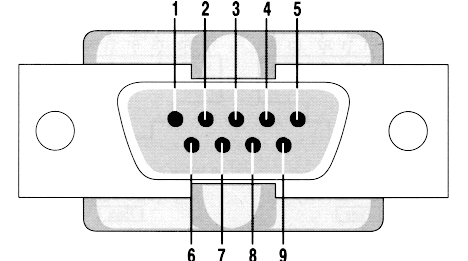
Fig.1 RS232/V.24 DB9
| Pin | Name | Description |
|---|---|---|
| 1 | CD | Carrier Detect |
| 2 | RXD | Receive Data |
| 3 | TXD | Transmit Data |
| 4 | DTR | Data Terminal Ready |
| 5 | GND | System Ground |
| 6 | DSR | Data Set Ready |
| 7 | RTS | Request to Send |
| 8 | CTS | Clear to Send |
| 9 | RI | Ring Indicator |
The DB9 pinout page lists the same nine pins with the signal direction for a PC. Two DB9 ports are connected with a null modem cable; simpler variants with looped handshake lines are on the serial data transfer cable page. If you are not sure which COM ports your computer has, see how to list the serial ports in Windows; if a program reports the port as already in use, see COM port in use or access denied.
X.21 interface on a DB 15 connector
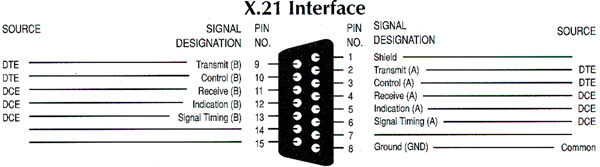
Fig. 2. X.21 interface on a DB15 connector
The complete X.21 pin table, how it differs from RS232, and the 15-pin RS232 cables of internal modems are on the DB15 serial pinout page.
RJ-45 RS232 connector
EIA-561 defined RS232 on RJ 45 (modular) connector. It can be used only for non-synchronous applications because it does not have synchronous clocking signals. Note: The RI pin (#1) sometimes can be used as DSR.
Console ports of routers and switches use a different RJ45 layout (Yost, adopted by Cisco). Both assignments, and the wiring of the RJ45 to DB9 adapter, are on the RS232 RJ45 pinout page.
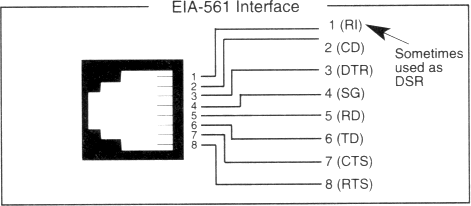
Fig.3. RJ-45 RS232 connector
RJ45 RS232D connectors (same as telephone connectors)
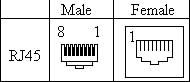
| Pin No. | Signal Description | Abbr. | DTE | DCE |
|---|---|---|---|---|
| 1 | DCE Ready, Ring Indicator | DSR/RI | ← | → |
| 2 | Received Line Signal Detector | DCD | ← | → |
| 3 | DTE Ready | DTR | → | ← |
| 4 | Signal Ground | SG | ||
| 5 | Received Data | RxD | ← | → |
| 6 | Transmitted Data | TxD | → | ← |
| 7 | Clear To Send | CTS | ← | → |
| 8 | Request To Send | RTS | → | ← |
DB25 V.24 pinout and signals
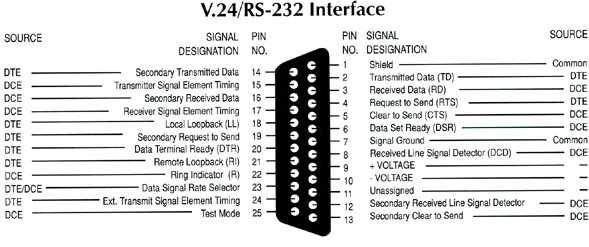
Fig.4. RS232 V.24 connector
DB25 V.24 pinout and signals (ALT A connector)
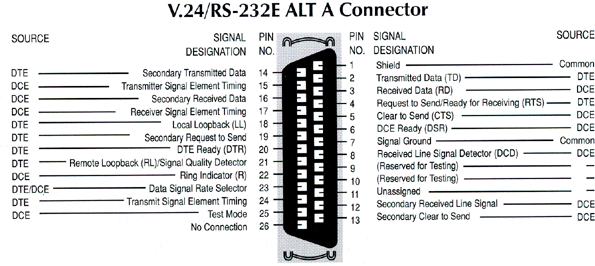
Fig.5. RS232 V.24 (ALT A) connector
RS232 DB25 all pins (some applications require more pins)
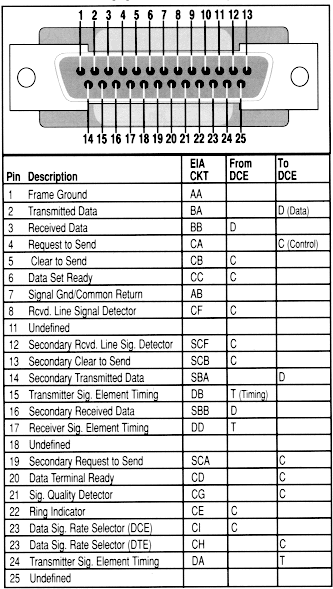
Fig.6. RS232 DB25 connector
A PC COM port with a 25-pin connector uses only nine of these signals: see the DB25 pinout of the PC serial port. Cables between DB25 and DB9 equipment: modem cable (DB9-DB25), null modem cable (DB9-DB25) and serial printer cable (DB9-DB25).