Brief description:
The purpose of a null-modem cable is to permit two RS-232 "DTE" devices to communicate with each other without modems or other communication devices (i.e., "DCE"s) between them.
Virtual Null Modem is a utility whose purpose is to emulate one or more RS232 serial ports connected via virtual null-modem cable. Otherwise, you can create any number of pure virtual serial ports in your system (COM10, COM11, COM127, etc.) that will be connected to each other via virtual null-modem cable.
What problems can be solved with Virtual Null Modem?
If you have two applications and want to connect to each other using serial ports, you need a null-modem connection. A null-modem is basically a cable to connect two serial ports to each other. You usually need two computers or two physical ports on one computer to achieve this. Using Virtual Null Modem software, you can emulate the null modem and run the two applications on the same computer without any additional hardware.
Example:
You can create two virtual serial ports: COM10 and COM12, and connect two different applications to them. Everything that application #1 will send to COM10 will be received by application #2 at COM12, and all that application #2 sends to COM12 will be received by application #1 at COM10.
Getting started is easy. Virtual Null Modem is ready!
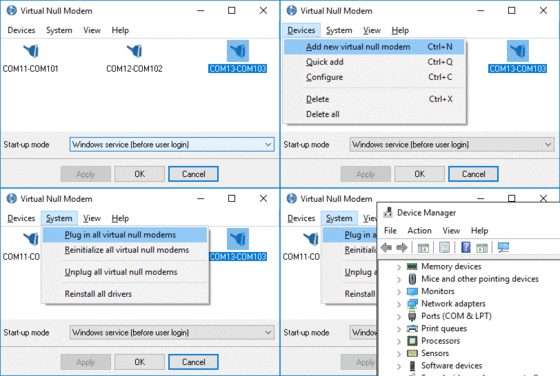
After installing Virtual Null Modem, start it from the "Start->Programs" group. The program will ask you about creating a new null modem device. You should click the "Yes" button and select two serial ports number in a dialog window. Click the "OK" button in the dialog window and click the "OK" button in the main window. Now, your virtual serial ports are ready.
Features:
No reboot is required for a virtual serial port. Creating, installing and removing of virtual serial ports occurs at real-time;
No borders. You can create any number of virtual serial port pairs with various schematics (with a handshake, without a handshake, with a parial handshake, etc.);
Virtual serial ports are fully independent. Any other hardware or virtual serial ports are not used or occupied. You even can have no serial ports in your system;
99.9% emulation. Other applications will never see the difference between real serial port and virtual serial ports, created by Virtual Null Modem software;
Performance. The link between two virtual serial ports is faster then real null-modem cable connection and depends on your computer system speed;
Hardware reliability. The virtual link is much more reliable than common physical link;
Software reliability. Our drivers for virtual serial ports had been tested with the verifier under Windows XP SP2 and with Microsoft HCT 12.10;
Hi-tech. Virtual Null Modem uses kernel driver technology and supports WDM, WMI, Power Management, PNP, etc.;
Easy-to-use. Virtual Null Modem software has a simple, menu-driven step by step set-up. Programming is not required to configure the software to configure virtual serial ports and virtual serial ports pairs;
Additional features. If you are a software developer, you can configure each port to simulate a real-world data exchange with errors in data;
Scalability and integrability. You can add, remove virtual null modems from your application by using a command line interface;
On-line help. Press the F1 key at any time, and on-line help will appear, providing concise and up to date documentation.
Virtual Null Modem supplies a three cut down versions called Professional, Standard and Lite. Standard and Lite versions omit some of the advanced features found in the Professional edition. They are ideal for users who either want a low cost or free solution or are not interested in more advanced features. Read more here.