
Nitsuko DX2E-32i - SMDR/CDR call logging & accounting
This data is being extracted with help of the "Advanced PBX Data Logger" software only. It may not be applicable for other software titles.
SMDR programming commands
CMD0422: 35-01-03 - SMDR Header Language - English
CMD0404-03: 35-01-01 - SMDR Output Port Type - COM or LAN
CMD0404-03: 35-01-02 - SMDR Output Destination Number. This option specifies the SMDR printer output port (CTA/CTU port number).
CMD0404-04: 35-01-06 - SMDR Minimum Duration - 0 (All calls)
CMD0404-05: 35-01-07 - SMDR Minimum Ring Time - 0 (All calls)
CMD0404-06: 35-01-08 - SMDR Format - FORMAT2
COM port setup
10-21-02 NTCPU Hardware Setup: COM Port Baudrate - 19200
15-02-19 CTA Data Communication Mode - Select "Direct Print Mode" if the dip switches are set to printer connection (1-2=on, 3-8=off).
15-02-20 Baudrate for CTA Port - 19200
LAN setup
CMD0151-1: 10-20 LAN setup for External Equipment (for SMDR)
CMD0151-2: 10-12-01 Network IP address
CMD0151-4: 10-12-02 Network subnet mask
CMD0151-5: 10-20 LAN Port setup - 5555 (1000-65500)
Configuring PBX Data Logger as a TCP client
Our software should work in the TCP client mode. It means that our software will initiate connection with the PBX and the PBX will work as a server. Add one or several PBX IP addresses here (the IP address of the Nitsuko DX2E). The port number should match the port that you have defined within the PBX (5555 in the example below).
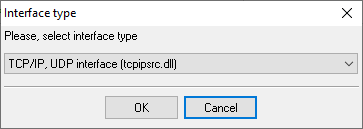
1. Add a new configuration with the TCP data source (if you didn't it before).
2. Configure the TCP settings as shown below.
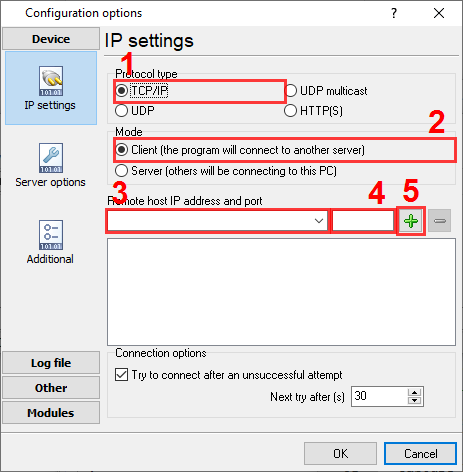
192.168.1.220
5555
192.168.1.220:5555
Selecting the correct parser for Nitsuko DX2E-32i
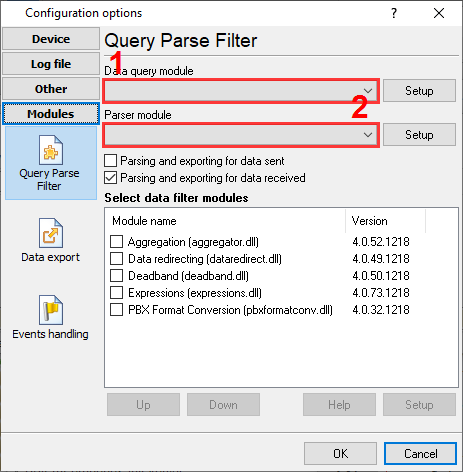
Nitsuko DX2E-32i
Nitsuko DX2E-32i
Data items
| Description | Data type | Column name |
|---|---|---|
| Call type | string | CALL_TYPE |
| Direction | string | DIRECTION |
| Call time | datetime | CALL_TIME |
| Trunk | string | TRUNK |
| Call duration | datetime | CALL_DURATION |
| Call duration (s) | integer | CALL_DURATION_S |
| Ext | string | EXT |
| Dialed phone | string | DIALED_PHONE |
| Ring | datetime | RING |
| Cost | float | COST |
| Account | string | ACC |
Interested in reports for PBX usage?
Choose our PBX Reports utility, equipped with manual, scheduled, and email reporting options, a built-in web server, and more. Implement your call accounting system for Nitsuko DX2E-32i. Check our PBX Reports utility.
Want PBX call logs in a database?
Capturing and exporting SMDR or CDR data in real-time to your database is a standard feature of the logger. Check our article about call logging to a database.
Nitsuko DX2E-32i related connection settings
Nitsuko Businesscom DSNitsuko 384i
Nitsuko
Nortel CS1000 (2 rows)
Quick jump to the connection settings for other PBXs or connection formats ↴
Note: Products and companies mentioned here are used only for definition and identification purposes and can be trademarks and/or registered trademarks of the respective companies.
Related topics: Advanced PBX Data Logger
hereCall logging Call accounting SMDR to SQL SMDR Listener Cables and signals