
Serial Port Spy Mode in Advanced Serial Port Monitor
The serial port spy mode is the same as a serial port sniffer or monitoring tool.
The RS232 spy allows you to analyze data traffic of external devices and Windows programs.
Usually, the spy mode does require special cables to monitor data packets sent or received from a peripheral device.
This type of application "drops in" between the serial interface and the studied/investigated program.
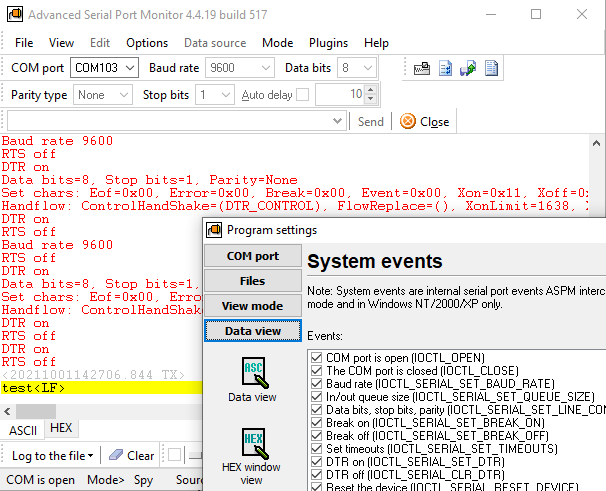
How can I spy on an RS232 serial port?
- Launch our Serial Port Monitor.
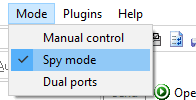
- Obviously, select the "Spy" mode :).
- Select the necessary RS232 port number from a drop-down box in the left top corner. The program automatically detects all device types: RS232-USB cables or dongles, attached RS232-LAN, Bluetooth, virtual COM ports (VCP).
- Start monitoring by clicking the "Open" button _before_ another application starts using that port.
- The program captures all activities by default, but you can select the necessary device control code (IOCTL) in the program settings (Menu - Options - Data view - System events).
- Monitor RS232 traffic in real-time using HEX or ASCII windows.
- At the same time, you can write RX or TX data to files using the "Write to file" button.
- Close the monitoring session by clicking the "Close" button.
FAQ
Does your software use a driver?
Yes, our port monitoring tool requires a specific driver for devices that connect to RS232 ports. This driver regulates all communication and system requests that happen via the serial port. Most serial port sniffers use the same technique.
Is it compatible with Windows 10 or Windows 11 and 64-bit operating systems?
Absolutely, our serial spy driver is fully compatible with a wide range of modern operating systems, ensuring seamless integration. Moreover, it comes equipped with all the essential digital signatures required for secure and reliable operation.
Do I need admin rights to run this serial port software?
An administrator can install the program, and you can use our software solution without elevated administrator privileges.
Can I spy on full-duplex communications of a serial device?
It works by default because it inserts our driver in the middle of a serial device driver and another program. So, you can realize bidirectional data sniffing.
Serial Port Monitor Features
| Monitors Windows kernel-level I/O packets (output control codes, IOCTL) sent/received between serial port device drivers. | Yes |
| Sniffer cable | Optional |
| Show info about port parameters used by another serial application (baud rate, number of data bits, etc.) | Yes |
| Monitoring activity of other software applications | Yes |
| Capturing serial port traffic with an external device via RS232 port | Yes |
| Virtual environment and virtual machines | All popular |
| Logging to a file that you can use for future analysis | Yes (Binary or Text) |
| Proprietary protocol analyzer | Limited |
| Advanced Features (scripts, plugins for various functions) | Yes |
| MODBUS RTU & ASCII monitoring | Yes |
Who can get benefits from a serial port sniffer:
- Serial protocol development by software system engineers.
- Industrial control equipment support teams can test industrial equipment and industrial automation systems.
- Hardware developers while creating new hardware solutions.
- DIY: Arduino, STM32, and other IoT devices with the UART interface.
Eliminate RS232 cables
Using the serial port sniffer mode, you can monitor serial port activity without cables and additional hardware.
High-performance
The program can work with baud rates and capture up to 1M bytes per second with the corresponding communication settings.
Multitasking
We will start several instances of our COM port sniffer to keep an eye on the communication with your peripheral devices. You can store the settings individually for each copy of the program.
Easy-to-use
Students and professionals can use the tool to test serial communication without having to know much about it. Without programming skills, you can use the monitor and get desired results.
Free serial port sniffers on the market
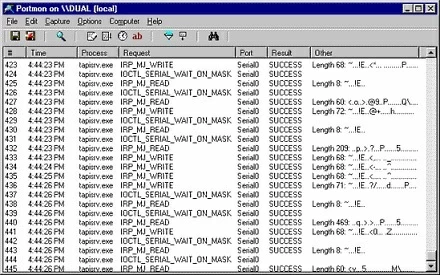
Portmon monitors Windows kernel-level I/O packets sent/received between serial port device drivers. It didn't update for a while and may not work on newer versions of Windows.
Conclusion
How can our software help with serial communications?
1. Our serial software lets you see what's going over the RS232 cable without breaking it.
2. It helps eliminate the need for external hardware taps and break boxes because a wide variety of applications require uninterrupted RS232 communications, or a cost of a hardware solution does not make it possible.
3. With this technology, you don't have to worry about terminal equipment, serial device class, and a connector (DB-25 or DB-9 connectors, male or female connector) because our serial spy solution works at the software level on Windows.
See also
RS232 Analyzer from Advanced Serial Port Monitor
RS232 Monitor is a unique monitoring tool for communications via RS-232
Capture and analyze COM port traffic with our Windows RS232 serial port sniffer
Spying on a serial port or RS232 port using our Serial Port Monitor software
RS232 terminal
UART monitoring using our Serial Port Monitor
COM port scanner
5 common errors with COM port operations in Windows
How to find application COM port and list all COM ports in Windows
Related topics: Advanced Serial Port Monitor
hereRS232 monitor RS232 analyzer COM Port Debug RS232 terminal Serial port sniffer Serial port spy UART monitor RS232 pinout and signals Data monitor cables.