RS232 to MySQL Bridge - RS232 to MySQL. Logging data from RS-232 to MySQL database
RS232 to MySQL using our data logger softwareComplete the following steps to configure our software for data logging from RS232 to MySQL. If you are not familiar with the SQL dialect, please use the RS232 to ODBC method instead. In this case, you should install Connector/ODBC for MySQL. 1. Download RS-232 Logger SoftwareDownload and install our software.
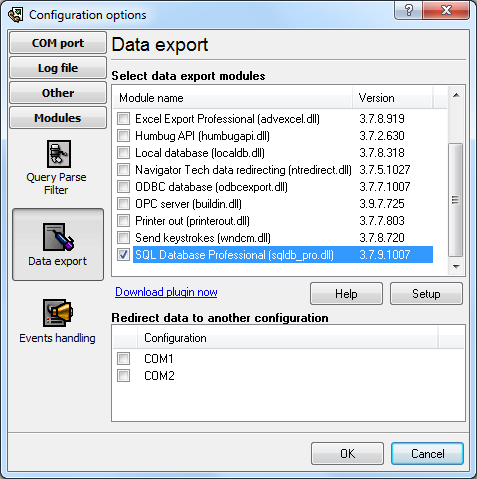
You will need the following plugins:
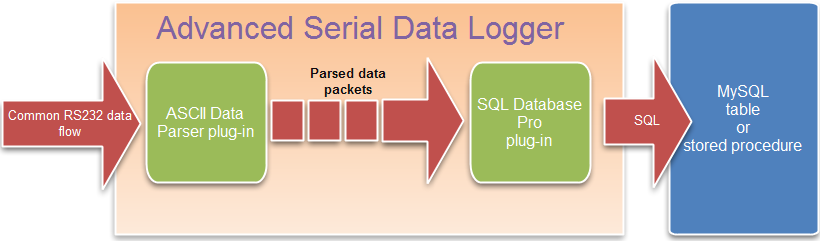
The following diagram illustrates the internal data flow from RS232 to MySQL.
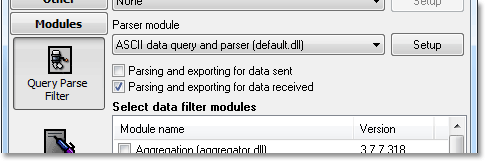
2. Configure the ASCII data parser
3. Create a MySQL database and table with the necessary structure
4. Configure a connection in the SQL Database Pro plugin
5. Specify a SQL statement to insert RS232 data to MySQL
RS-232 to MySQL GlossaryRS232 Port, RS232, RS-232 - usually identifies serial ports more or less compliant to the RS-232 standard. MySQL - relational database management system (RDBMS) that runs as a server providing multi-user access to a number of databases. Advanced Serial Data Logger related topics:hereSerial port interface RS232 port logger Com port logger RS232 data logger Data Logger Software For Electricity Meter RS232 to ODBC RS232 to MySQL RS232 to MS SQL Server RS232 to database |
|||||||||