
Data Logger Software for Windows: Serial, TCP, OPC, MODBUS
AGG Software data loggers are Windows programs that read data from a device or a server, extract the values you need, and write them to a file, Excel, a database, or another application. They run unattended as a Windows service and are configured through dialogs, not code. This page helps you choose the logger for your data source and then points you to the guide for your output target.
On this page: Which logger for your data source · Where the data can go · Protocols and devices · How a logger works · Editions and licensing · Guides and examples · Free tools · FAQ · Product pages
Which data logger do you need?
The loggers share the same parsing, filtering and export engine. What differs is the data source each one connects to, so pick by the interface of your device. Every product has a free trial; its order page shows the price for your country.
| Your data source | Logger |
|---|---|
| A device on an RS232, RS485 or RS422 port, or on a USB-to-serial adapter: scales, barcode scanners, meters, PLCs, GPS receivers, laboratory instruments | Advanced Serial Data Logger |
| A device or server reachable over TCP/IP or UDP: Ethernet sensors, MODBUS TCP meters, IoT gateways, syslog senders, HTTP clients | Advanced TCP/IP Data Logger |
| An OPC server (OPC DA, OPC UA, HDA, AE): SCADA systems, PLCs behind an OPC server | Advanced OPC Data Logger |
| SNMP agents: switches, routers, UPS units, printers, environmental sensors | SNMP Data Logger |
| A USB HID device: scales and meters in HID mode, barcode, RFID and fingerprint readers, UPS units | USB HID Logger |
| A GPS or AIS receiver, or any NMEA 0183 stream | Advanced NMEA Data Logger |
| Vehicle or personal GPS trackers reporting over GPRS/TCP | GPS Tracker Data Logger |
| Call records (SMDR, CDR) from a PBX over RS232, RS485, TCP or UDP | Advanced PBX Data Logger |
| The print stream of a serial or parallel printer that you want to replace with PDF or Word files | Serial Printer Logger |
| Log files written by other programs on the same or a network computer | Log Monitor & Export |
| Several of the sources above in one application (serial, TCP, OPC, MODBUS, SNMP, MQTT) | Data Logger Suite |
Not sure whether your device is serial or network? Check its manual for "RS-232", "RS-485", "COM" or "USB" (serial) versus "Ethernet", "TCP", "IP address" or "MODBUS TCP" (network). If the device offers both, the serial logger is simpler to set up on a bench and the TCP/IP logger is easier to run from a server room.
Where the data can go
Every logger writes raw and parsed data to log files out of the box. The other targets are export plugins, installed once and shared by all loggers. The guide links show a worked example for each target.
| Target | How | Guide |
|---|---|---|
| Text, CSV or binary log files with rotation by time or size | Built in | Logging to a file |
| Excel, live cells and charts | Direct Excel / LibreOffice Calc connection plugin | Four ways to get data into Excel, real-time charts |
| XLS or XLSX files on a computer without Excel | Excel Export Professional plugin | Write an XLS file without Excel |
| Google Sheets | Google Sheets Professional plugin | Plugin page |
| Microsoft SQL Server, MySQL, PostgreSQL, Oracle, Firebird, Access, any ODBC source | SQL Database Professional or ODBC plugin | Serial data to a database, SQL Server, MySQL, stored procedures |
| Cloud databases: Azure SQL, Amazon Aurora, Amazon Redshift, MongoDB, MariaDB | Cloud Database Professional plugin | Plugin page |
| OPC clients (the logger acts as an OPC UA or OPC DA server) | OPC UA Server plugin, built-in OPC DA server | GPS data to OPC, length meter to OPC |
| MQTT brokers, publish and subscribe | MQTT plugin | Plugin page |
| HTTP POST or GET to your web service, InfluxDB | HTTP export plugin | Plugin page |
| Any Windows program that accepts typed input | Send keystrokes plugin, DDE server | Excel via DDE |
| A dashboard with gauges and indicators | Web Server plugin, or OPC Scada Viewer | Serial data on a dashboard |
| E-mail, sound or a script when a value crosses a limit or data stops | Events notification and Alarms plugins | Alert on data timeout, replace an alarm printer |
| Another COM or TCP port, after transformation | Redirect data plugins | Redirect scale data |
Protocols and devices the loggers understand
Data arrives as text, binary packets or a protocol that must be polled. The loggers cover the common cases with parser and query plugins; the plugin catalogue lists all of them with documentation.
- Plain text and structured text: fixed-position and delimited fields, regular expressions, CSV, XML, JSON, syslog (RFC 3164), HTTP requests from devices.
- MODBUS: RTU and ASCII over serial, TCP over Ethernet. Poll registers, write values, log to a database. See the MODBUS software page and the library of ready-made register maps for 180 power meter brands.
- PLCs: Siemens SIMATIC S7-200/300/400 and S5, GE Fanuc (CCM, SNP, SNP-X), Allen-Bradley ControlLogix, PLC-5, SLC 500 and MicroLogix over EtherNet/IP, DNP3.
- Energy and utility meters: M-Bus, IEC 62056-21, DLMS/COSEM, DL/T 645-2007, CJ/T 188-2004, Kamstrup KMP, BACnet/IP, Sunspec inverters. Worked examples: electricity meter, IEC 62056-21 meter, BACnet/IP meter.
- Scales and balances: a dedicated parser with ready formats for hundreds of scale models, plus examples for weight to Access and weight to Excel.
- Barcode and RFID readers: barcode scanner to a log or a database, barcode to Excel, RFID readers over LLRP and ISO 18000-6B/6C (LLRP example).
- Laboratory and medical equipment: ASTM, HL7, JOIA, and generic lab instrument to Excel.
- Data acquisition modules: Advantech ADAM, ICP-CON and NuDAM series.
- Anything else: the device-specific parser examples, a Python scripting plugin, and an API for your own parser.
How a logger works
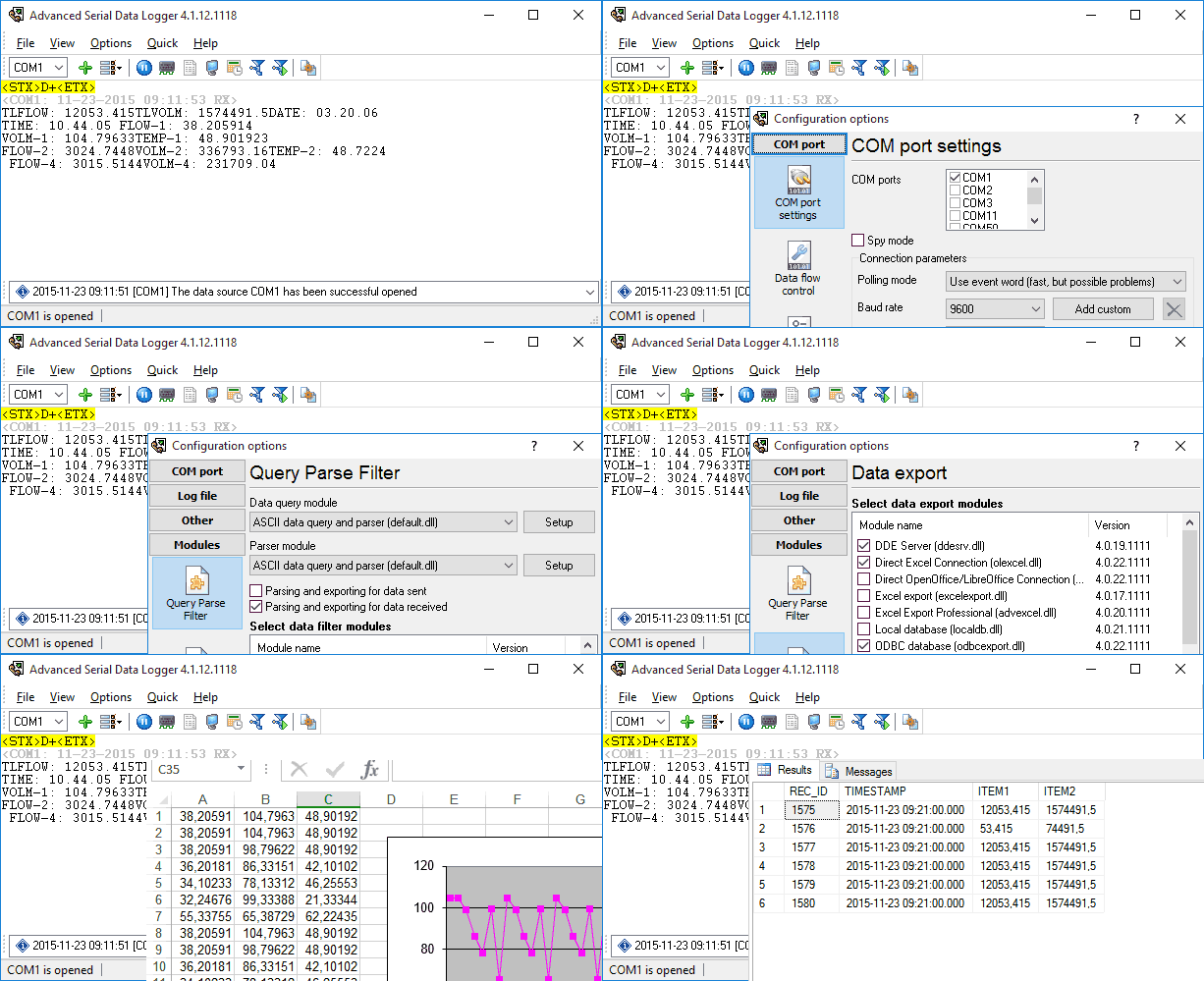
Each logger is a pipeline with four stages, and you configure only the stages you need.
- Data source. One or more ports, connections or servers, each with its own settings. A single instance can log several ports at the same time, and several instances can run side by side.
- Query and parsing. Optional requests sent to the device (for example a MODBUS poll every five seconds), then rules that turn the reply into named variables.
- Filters. Deadband, expressions, aggregation over an interval, summary statistics, timeouts, failover to a backup target, or a script.
- Export. One or more targets from the table above, written in real time as data arrives.
Raw data is always written to a log file as well, so nothing is lost if a target is unavailable. The programs reopen data sources automatically, can restart themselves on a schedule, and keep a message log for diagnostics.
Editions and licensing
Most loggers come in Standard, Professional and Enterprise editions, and the serial and TCP/IP loggers also have a Home edition. Editions differ in the plugins included and in a few features, for example the Home edition runs a single instance. Every product page has a full comparison: Serial Data Logger, TCP/IP Data Logger, OPC Data Logger, SNMP Data Logger, USB HID Logger.
A licence covers one computer or server and never expires. Details, volume pricing and purchase orders are on the order page.
Guides and worked examples
Getting started (video lessons)
Installation and first steps · Logging to a file · Installing plugins · Parsing data · Exporting to Excel · Exporting to a database · Events and alerts
By output
All Excel and Calc guides · All database guides · Write to two databases at once · Charts in LibreOffice Calc
By protocol
All MODBUS guides · All parsing guides · OPC Data Logger guides · SNMP to Excel · USB HID to a database
By device
Pressure transmitter · Aircraft engine monitor · Garmin GPS receiver · PBX call records · Checkweigher · HMI scale indicator · VKT-7 heat meter · Two COM ports into one table
Background reading
What data acquisition is and where a software logger fits · When you need a COM port logger · Typical RS232 data logging setups · WinWedge comparison · TWedge comparison
Free tools that go with the loggers
- COM Port Data Emulator generates serial or TCP data from a file, so you can configure a logger before the real device arrives.
- COM Port Stress Test checks a port and its driver under load.
- MODBUS RTU device scanner and register map scanner run in the browser and need no installation.
- NMEA 0183 decoder and AIS decoder explain a captured sentence field by field.
Frequently asked questions
Which Windows versions are supported?
Windows 11, Windows 10 and the current Windows Server releases, 32-bit and 64-bit. Older versions back to Windows 2000 still work.
Can a logger run without anyone logged in?
Yes. The loggers install as a Windows service, start before login and keep running through user logoff. Service mode is included in the Standard edition and above.
How many devices can one logger handle?
As many ports or connections as the computer can serve. Each source has its own configuration, and heavy installations can split sources across several instances.
Do I need to program anything?
No. Sources, parsers and exports are configured in dialogs. Regular expressions and expression filters are available when you want them, and a Python plugin exists for unusual devices.
Which logger handles MODBUS?
The serial logger for MODBUS RTU and ASCII, the TCP/IP logger for MODBUS TCP, and Data Logger Suite when you need both. The MODBUS software page compares the options.
Is there a trial?
Every product has a free trial download on its page. Buying a licence unlocks the same installation.
Do you support Linux or macOS?
No. All products are Windows applications. They do run in a Windows virtual machine.
Product pages and downloads
Advanced Serial Data Logger
Serial Data Logger software - COM port data acquisition and logging software
Advanced TCP/IP Data Logger
Advanced TCP/IP Data Logger: Capture & Log Network Traffic Data

Specialized loggers
Advanced NMEA Data Logger
NMEA Data Logger - capture and save NMEA 0183, GPS, AIS data
GPS Tracker Data Logger
Data Logger for GPS trackers, vehicle trackers and personal trackers. It shows vehicle positions on a map and sends notifications about movements.
Advanced PBX Data Logger
PBX Data Logger - captures and logs phone calls for more than 260 PBX
Serial Printer Logger
Serial Printer Logger: Convert RS232/LPT Printer Data to Digital Files. It can emulate and replace an old dot-matrix printer.

Log Monitor & Export
Log Monitor & Export - Real-time log monitoring with export features
Data Logger Suite
Data Logger Suite: Logging and Monitoring. One application for serial, TCP, OPC, MODBUS, SNMP and MQTT sources when you would otherwise need several loggers.
Related categories
COM port software · RS232 software · RS485 software · TCP/IP and UDP software · USB software · MODBUS software · OPC software