
MODBUS Software: Logger, Slave Simulator, Scanner, Gateway
MODBUS comes in three forms: RTU and ASCII over a serial line, usually RS485, and TCP over Ethernet. The tools on this page cover the whole life of a MODBUS installation on Windows: find the devices, read and simulate them, log their registers to files and databases, and connect them to networks and other systems.
On this page: Which tool for which job · Logging registers · Master, slave simulator and test · Scanning a network · RTU to TCP conversion · MODBUS to SQL, MQTT and OPC · RTU, ASCII or TCP? · FAQ
Which MODBUS tool do you need?
| You want to | Tool |
|---|---|
| Log registers from MODBUS RTU or ASCII devices on a serial port to files, Excel or a database | Advanced Serial Data Logger with the MODBUS plugin |
| Log registers from MODBUS TCP devices on the network | Advanced TCP/IP Data Logger with the MODBUS plugin |
| Log MODBUS together with OPC, SNMP or MQTT sources in one program | Data Logger Suite |
| Read or write registers by hand, check a device's responses, act as a master on the bench | Advanced Serial Port Monitor with the MODBUS plugin |
| Send a single request from the browser and see every byte of the response decoded | Online MODBUS tester (free) |
| Check the CRC of a frame, or decode a frame copied from a log or a manual | MODBUS CRC calculator and frame parser (free) |
| Simulate one or more slave devices to test a master, SCADA or HMI | Advanced Serial Port Monitor MODBUS plugin, or the online slave simulator (free) |
| Find which addresses answer on an RS485 bus | Online device scanner (free) or the device scan plugin |
| Discover a device's register map when the manual is missing | Online register map scanner (free) |
| Let MODBUS TCP masters talk to RTU slaves, or RTU masters to TCP slaves | MODBUS Gateway |
| Keep MODBUS registers in sync with a SQL database, an MQTT broker or an OPC server, in both directions | Datatag Link |
| Write values from a database or a script into a MODBUS device | Advanced Serial or TCP/IP Data Logger, write guide |
Each product's order page shows the price for your country. Every paid tool has a free trial, and the browser tools need no installation.
Logging MODBUS registers to files, Excel and databases
Both loggers share one MODBUS plugin. You add a device by address, list the registers to read with their data types, set a poll interval, and the logger polls in the background. Parsed values go to log files, Excel, Google Sheets, SQL Server, MySQL, PostgreSQL, Oracle and other databases, or to OPC, MQTT and HTTP targets. The loggers run as a Windows service and can handle many devices on several ports at once.
For power meters and multimeters, the MODBUS power meter library holds ready register maps for 178 brands and models, from ABB and Schneider to Eastron and Carlo Gavazzi, so the logger is configured by selecting the model rather than typing register numbers.
Guides: configuring the master station, polling how-to: verifying requests, viewing register values, polling several devices, MODBUS to a database, registers to separate SQL Server columns, MODBUS to MySQL, two tables and two databases, Sunspec inverters and meters, Siemens Sentron PAC3200, moving settings from Modbus Poll or Simply Modbus, controlling PLC coils by rule, SQL to MODBUS, all MODBUS guides.

MODBUS RTU Data Logging
Polls MODBUS RTU and ASCII devices on RS232 and RS485 ports with the MODBUS plugin and exports the registers to files, Excel or databases, 24/7.

MODBUS TCP Data Logging
Polls MODBUS TCP devices on the network with the same plugin and the same export targets. Both loggers run as a Windows service.
MODBUS master, slave simulator and test tool
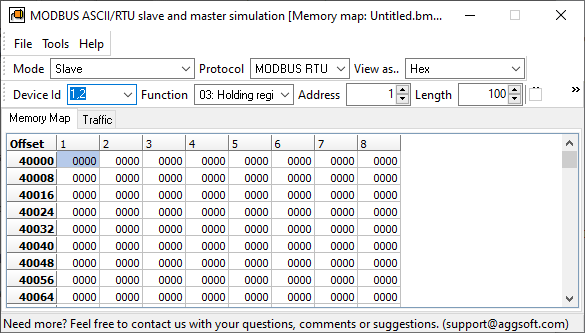
The MODBUS plugin for Advanced Serial Port Monitor works as a master or as a slave, in RTU or ASCII mode. As a master it reads and writes data points in one or more slaves and shows the raw request and response next to the decoded values, which is what you need to verify a new device or a wiring change. As a slave it emulates a device with the registers you define, so a PLC, SCADA or your own software can be tested without hardware. It supports function codes 01 to 06, 07, 08, 11, 12, 15, 16, 17 and 22, and lets you send custom command strings to exercise a device's special features. Read the plugin guide.
The online MODBUS RTU/ASCII slave simulator does the slave part in the browser, using the Web Serial interface, with dynamic data generation and no installation.
MODBUS master and slave in Serial Port Monitor
A serial terminal and sniffer whose MODBUS plugin polls and emulates RTU and ASCII devices. Included in the program.
Scanning a MODBUS network
Two browser tools, free and with nothing to install, help when the documentation is gone. The device scanner tries every address on an RS485 bus with a chosen speed and framing and lists the ones that answer. The register map scanner then reads the holding registers of one device and shows the map, so you can find where a value lives and check its offset. Inside Advanced Serial Port Monitor, the device scan plugin does the same job offline.
MODBUS TCP to RTU conversion
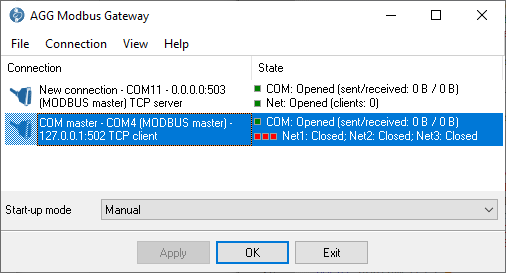
MODBUS Gateway is a software protocol converter. It accepts MODBUS TCP connections and forwards the requests to RTU slaves on a serial port, or the reverse, in real time, with address mapping so that one RS485 bus can be shared by several TCP masters and slaves can be renumbered without touching them. It runs as a service and replaces a hardware gateway when a PC is already next to the bus. Read the product page.

MODBUS Gateway
Real-time bidirectional MODBUS TCP to MODBUS RTU converter with address and IP mapping, so MODBUS TCP systems can reach devices that only speak RTU.
MODBUS to SQL, MQTT and OPC
Datatag Link links tags between data sources in both directions, in real time. As a MODBUS master it can write register values into a SQL database and read set points back from it, publish them to an MQTT broker, or expose them to an OPC client, without a logger in between. Guides: MODBUS device to a SQL database, linking tags in two MODBUS slaves.

Datatag Link
Connects a MODBUS device to SQL, MQTT and OPC and sends data in both directions. The program acts as a MODBUS master.
RTU, ASCII or TCP: which one is your device?
| MODBUS RTU | MODBUS ASCII | MODBUS TCP | |
|---|---|---|---|
| Physical link | RS485 (also RS232, RS422) | RS485 or RS232 | Ethernet, TCP port 502 by default |
| Framing | Binary, CRC-16, silent gaps between frames | Readable hex characters, LRC, colon start and CR/LF end | Binary inside a TCP stream with a 7-byte header |
| Addressing | Slave ID 1 to 247 on a shared bus | Slave ID 1 to 247 | IP address plus a unit ID |
| Typical devices | Energy meters, drives, sensors, small PLCs | Older instruments, some meters | PLCs, inverters, gateways, network meters |
| Our tools | Serial Data Logger, Serial Port Monitor plugin, Gateway, Datatag Link | Serial Data Logger, Serial Port Monitor plugin | TCP/IP Data Logger, Gateway, Datatag Link |
All three forms use the same data model: coils and discrete inputs (single bits), input registers (read-only 16-bit words) and holding registers (read-write 16-bit words). Values wider than 16 bits, such as 32-bit floats, occupy two consecutive registers, and the order of the two halves varies by manufacturer; the register map scanner and the polling how-to guide show how to check it.
Frequently asked questions
Can one program log both RTU and TCP devices?
Data Logger Suite does. With the single-interface loggers, run Advanced Serial Data Logger for the serial devices and Advanced TCP/IP Data Logger for the network devices; both export to the same database or Excel file.
How many devices can a logger poll on one bus?
As many as the bus and the timing allow; each device gets its own set of requests and the logger cycles through them. The polling how-to explains the right way to set this up and how to combine data from several requests.
Can I write to a device, not only read?
Yes. The loggers write single and multiple registers and coils, from a rule, a schedule or a database query; see writing to a MODBUS device. The Serial Port Monitor plugin writes interactively. Datatag Link writes continuously from SQL, MQTT or OPC.
I already use Modbus Poll or Simply Modbus for testing. Can I keep my settings?
Yes. Two guides show how to copy settings from Modbus Poll and from Simply Modbus into the logger.
Which Windows versions are supported?
Windows 11 and 10, Windows Server, 32-bit and 64-bit. Older releases back to Windows 2000 still work. The browser tools need a browser with Web Serial support, such as Chrome or Edge.
Related categories
Data logger software · RS485 software · RS232 software · TCP/IP and UDP software · OPC software · COM port software