
OPC Software: OPC DA/UA Logger, Bridges, Viewer, Simulator
OPC is how SCADA systems, PLCs and instruments publish their values on Windows: the classic OPC DA servers built on COM and DCOM, and the newer OPC UA servers that work over plain TCP. The tools on this page read from and write to both kinds. They log tags to databases and spreadsheets, bridge OPC to SQL, MQTT and other OPC servers, show tags on a dashboard, turn files into OPC servers, and simulate a server for testing. A set of guides covers the DCOM configuration that classic OPC needs.
On this page: Which tool for which job · OPC data logger · OPC bridges · OPC dashboard · OPC servers from files and devices · OPC simulator · DCOM configuration guides · FAQ
Which OPC tool do you need?
| You want to | Tool |
|---|---|
| Log tags from one or many OPC servers to CSV, Excel or a SQL database, continuously | Advanced OPC Data Logger |
| Write OPC tags into SQL and read set points back, publish tags to MQTT, or link an OPC DA server to an OPC UA server | Datatag Link |
| Show live tags as gauges, indicators and charts with alarms, on a PC or a wall screen | OPC Scada Viewer |
| Make values from a file, or from a program that writes files, available as an OPC DA or UA server | File OPC Server |
| Make values from serial, TCP, SNMP or MODBUS devices available as an OPC server | Our data loggers with the OPC UA Server plugin, see the data logger software page |
| Read or write OPC tags from web pages or any HTTP client, through HTTPS | OPC HTTP Gateway |
| Test an OPC client without real hardware | OPC Server Simulator (free*) |
Every paid tool has a free trial; its order page shows the price for your country. *The simulator is offered free on its product page.
Advanced OPC Data Logger
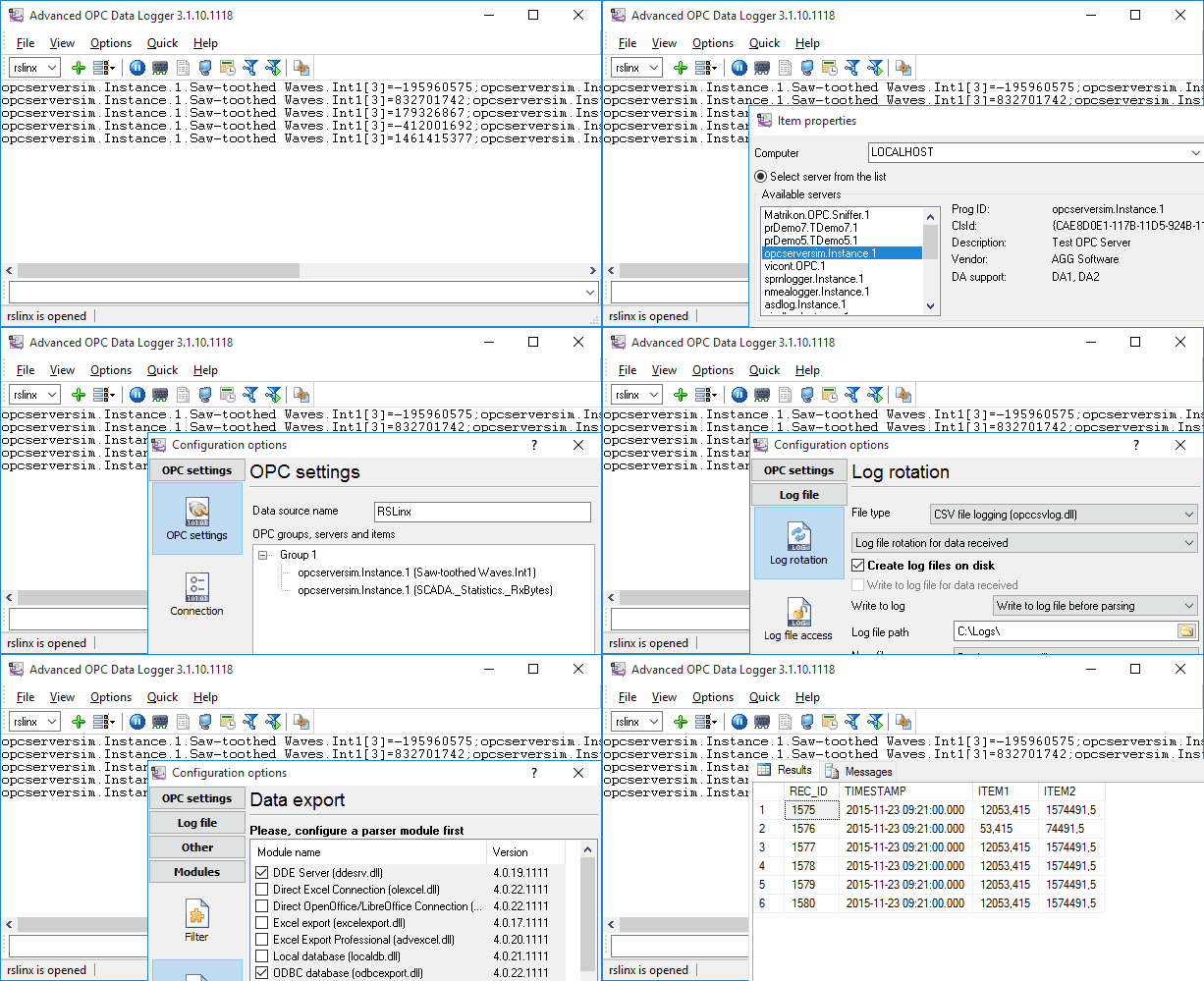
Advanced OPC Data Logger is an OPC client that connects to several OPC servers at once, OPC DA2, OPC UA, HDA, AE and XML-DA, subscribes to the tags you select, and writes the values to log files, Excel, or a database in real time. Filters keep only the changes you want (deadband, on change, on server event), timestamps come from the server or the logger, and recovery functions reconnect after a server or network failure. It runs as a Windows service and has no limit on the number of tags or servers.
Guides: adding OPC groups and tags (video), logging to a CSV file (video), OPC to a SQL database, many tags to SQL Server, tags to separate columns, OPC to MySQL, OPC to Access via ODBC, OPC to Excel, timestamps in CSV and binary logs, write only on change, filter by tag value, store on a server event, aggregate several servers into one, all OPC logger guides.
OPC bridges: OPC to SQL, MQTT and OPC UA
Datatag Link links tags between data sources and keeps them in sync in both directions: an OPC DA server to a SQL table and back, an OPC client to an MQTT broker, one OPC server to another, or tags from several OPC DA servers grouped into a single OPC UA server for remote access. It handles history data, runs as a service, and needs no code. Guides: OPC to a SQL database, OPC client to an MQTT broker, OPC DA server to OPC UA server, grouping tags from several DA servers into one UA server.

Datatag Link
Creates bidirectional bridges between OPC DA, OPC UA, SQL, MQTT and MODBUS in any combination, for example OPC to MQTT or OPC to SQL.
OPC dashboard: OPC Scada Viewer
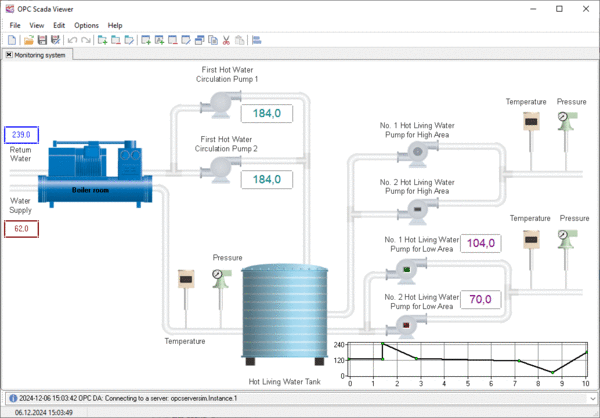
OPC Scada Viewer is an OPC client that shows tag values on pages of indicators: gauges, LEDs, numeric displays, bars, charts, with warning thresholds and scripts. It is the fast way to give an operator a screen for a process that has an OPC server but no HMI, and the serial data on a dashboard example shows it paired with one of our loggers acting as the OPC server.

OPC servers from files, devices and web pages
File OPC Server watches a binary or text file and publishes new values from it as OPC DA2 or OPC UA tags, which is a simple way to expose data from a program that can only write files. OPC HTTP Gateway translates HTTP and HTTPS requests into OPC DA calls so that web pages and scripts can read and write tags without OPC libraries. Our data loggers can also act as OPC servers: the OPC UA Server plugin publishes anything a logger receives, and examples show GPS data and a length meter exposed to OPC clients.


OPC HTTP Gateway
Secure OPC-HTTP Gateway for Web Server and OPC Server Connectivity
OPC Server Simulator
OPC Server Simulator is a small OPC DA2 and OPC UA server for testing clients. You add tags with names, data types and values, let built-in functions generate changing numbers, arrange tags in a tree, and allow reads and writes. It is portable and starts in seconds, so it can stand in for the real server while you develop or while the hardware is offline.

OPC and DCOM configuration guides
Classic OPC DA across two computers depends on DCOM, and most "cannot connect" problems are DCOM settings. Two guide series walk through it step by step, one for current systems and one for older ones.
Windows 10, 11, Server 2019 and 2022: installing the OPC Core Components · users and permissions · Windows Firewall for DCOM and OPC · Dcomcnfg settings · troubleshooting
Windows 7 and Server 2008: Core Components · users and permissions · firewall · Dcomcnfg · typical problems
OPC UA does not use DCOM. If you can choose, connect through the UA interface of your server and skip this chapter.
Frequently asked questions
Which OPC specifications does each tool support?
Advanced OPC Data Logger: DA2, UA, HDA, AE and XML-DA as a client. Datatag Link: DA and UA, client and server. OPC Scada Viewer: DA client. File OPC Server and OPC Server Simulator: DA2 and UA servers. OPC HTTP Gateway: DA1 and DA2 client.
Do I need to configure DCOM for OPC UA?
No. OPC UA runs over TCP with its own security; DCOM configuration is only needed for classic OPC DA when the client and the server are on different computers.
Can one logger read several OPC servers at the same time?
Yes, on the same or different computers, with separate groups and update rates per server, and it can write them all into one database or file. See aggregating several servers.
Can the tools run as a Windows service?
Advanced OPC Data Logger, Datatag Link, File OPC Server and OPC HTTP Gateway run as services and start before anyone logs in.
Which Windows versions are supported?
Windows 11 and 10, Windows Server, 32-bit and 64-bit. Older releases back to Windows 2000 still work.
Related categories
Data logger software · MODBUS software · TCP/IP and UDP software · COM port software