
COM Port Software: Monitor, Log, Test and Virtual COM Ports
A COM port is what Windows calls any serial port: a real RS232 or RS485 port, a USB-to-serial adapter, a Bluetooth serial link, or a virtual port created by software. This page lists the tools we make for working with COM ports, explains which one fits which job, and collects our guides for fixing COM port problems on Windows 11 and 10.
On this page: Which tool for which job · Monitor and terminal · Log data 24/7 · Virtual COM ports and port sharing · Free utilities · Troubleshooting guides · FAQ
Which COM port tool do you need?
| You want to | Tool |
|---|---|
| See what a program and a device send to each other, while they are talking, to debug or reverse-engineer a protocol | Advanced Serial Port Monitor, spy mode |
| Type commands to a device by hand and read the replies in ASCII or hex, with timestamps | Advanced Serial Port Monitor, terminal mode |
| Poll or simulate a MODBUS RTU device from the PC | Advanced Serial Port Monitor with the MODBUS plugin (included) |
| Record everything a device sends, around the clock, into files, Excel or a database | Advanced Serial Data Logger |
| Use a COM port that is on another computer, over the LAN or the Internet | TCP COM Bridge |
| Let two programs use one COM port at the same time | TCP COM Bridge, splitter mode |
| Connect two programs on the same PC through a virtual serial cable | Virtual Null Modem |
| Simulate a device and feed test data into a program you are developing | COM Port Data Emulator (free) |
| Check quickly whether a port, a USB adapter or a cable works, with nothing to install | Serial Port Tester (free, in the browser) |
| Check whether a port, cable or driver stays stable under load | COM Port Stress Test (free) |
| Find out which COM port a device got, or why a port does not open | Our troubleshooting guides (free) |
The paid tools have free trials; each product's order page shows the price for your country. RS485 and RS422 devices use the same tools through a converter, see the RS485 software page.
Monitor and terminal: Advanced Serial Port Monitor
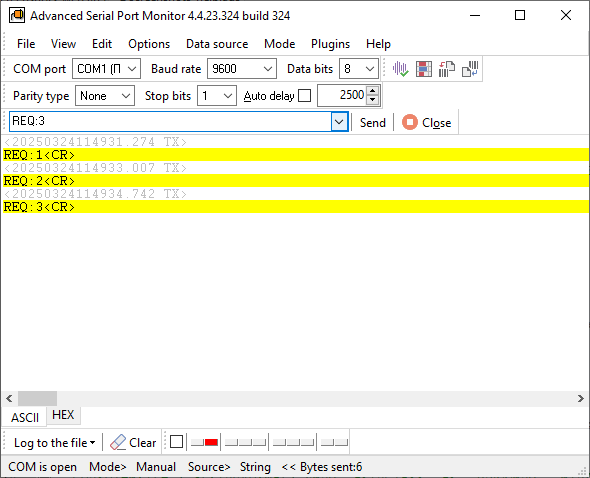
Advanced Serial Port Monitor is one program with three ways of working:
- Terminal (manual) mode. Open a port, send text, hex bytes or a file, watch the reply. Full duplex, any baud rate, hardware and software flow control, ASCII and hex views, date and time stamps on every packet.
- Spy (sniffer) mode. Watch a port that another application already has open, without interrupting it. This is the mode for debugging someone else's software or for capturing a protocol you need to reproduce.
- Automatic mode. Send a data source, such as a file, to a port in a loop and log what comes back.
Plugins add a MODBUS RTU/ASCII master and slave, a scripting engine, ASCII and binary device emulation, automated test sequences, a MODBUS device scanner, log replay and file transfer. The full list is on the plugins page.
Guides: how to sniff a serial port, spy mode in detail, using it as an RS232 terminal, COM port debugging, UART monitoring, COM port scanner. Comparisons: six serial port monitors compared, Docklight, HyperTerminal replacement, 232analyzer.
Advanced Serial Port Monitor
Serial Port Monitor is a terminal, sniffer and analyzer for COM, RS232, RS485 ports. Built for hands-on debugging and reverse engineering.
Log COM port data 24/7: Advanced Serial Data Logger
Where the monitor is for a person at the keyboard, the logger is for unattended collection. It opens one or more COM ports, optionally sends requests to the devices, parses the replies into named values and writes them to log files, Excel, SQL databases, OPC, MQTT or another program, in real time. It runs as a Windows service and needs no programming to configure.
Typical uses: a scale or meter into Excel, an instrument into a SQL database, a barcode scanner into a log or database, a barcode scanner into Excel, MODBUS RTU polling. Read when you need a logger rather than a monitor, and see the data logger software page for the whole family, including the TCP/IP, OPC and USB HID loggers.

Advanced Serial Data Logger
Serial Data Logger software - COM port data acquisition and logging software. Built for fully automatic COM port data logging.
Virtual COM ports, port sharing and serial over Ethernet
TCP COM Bridge creates virtual COM ports and connects them, or real ports, to TCP or UDP sockets. That gives you three things: a serial device server made from an ordinary PC (a program on another computer talks to the device as if the port were local), a way to share a COM port over the network, and a serial port splitter that lets several applications read one device. It handles up to 256 ports on one computer, runs as a service, and the virtual ports behave like real ones for the applications that use them.
Guides: build a COM port server, redirect network data to a COM port, COM ports on a terminal server, connect two COM ports on one PC, one receipt printer for two computers, faster redirection. Comparisons: six serial-over-Ethernet tools, tcp2com.
Virtual Null Modem creates pairs of virtual COM ports joined by a virtual null-modem cable on one computer, so that a program under test and an emulator, or two programs that only speak serial, can talk without hardware.

TCP COM Bridge
TCP COM Bridge - connects two physical or virtual COM ports to each other over network!

Virtual Null Modem
It creates two virtual serial ports connected to each other by a virtual null-modem cable. Unlimited pairs, fast transfer, no hardware.
Free COM port utilities

COM Port Data Emulator - Freeware
COM Port Data Emulator for RS232 and TCP/IP Device Traffic. Sends data from a file to a COM or TCP port on a schedule. Use it to set up a logger before the device arrives, or with Virtual Null Modem to test your own software.

COM Port Stress Test - Freeware
COM Port Stress Test Tool for Serial Port Performance & Stability. Generates high-volume traffic with random communication parameters to expose flaky cables, adapters and drivers.
Five browser tools need no installation at all: test a COM port with a loopback plug, read and write MODBUS registers, check a MODBUS CRC and decode frames, find MODBUS RTU device addresses and scan a device's register map.
COM port troubleshooting guides for Windows
- List all COM ports and find which one an application uses
- COM port not working in Windows: causes and fixes
- How to test a COM port
- How to add a COM port device
- Reset, delete or restore a COM port in Windows 11
- Five common COM port errors and what they mean
- Two reasons an application fails to open a serial port
- Five ways to send data to a COM port from the command line
Cables and wiring: RS232 pinout and signals, a monitoring cable for sniffing between two devices, all cable diagrams.
Frequently asked questions
Do the tools work with USB-to-serial adapters and Bluetooth?
Yes. Windows presents them as COM ports, and every tool on this page opens them like a built-in port. If the adapter's port number keeps changing, see the reset and restore guide.
Can I watch a port that another program already has open?
Yes, that is the spy mode of Advanced Serial Port Monitor. The other program keeps working and you see both directions of the traffic.
What is the difference between the monitor and the logger?
The monitor is interactive: you open a port, send, look, and save what you saw. The logger is unattended: it runs as a service, parses the data and exports it continuously. Many customers use both, the monitor to understand a device and the logger to collect from it.
Can a COM port be used from another computer?
Yes. TCP COM Bridge on the computer with the device publishes the port over TCP; TCP COM Bridge on the other computer creates a virtual COM port that connects to it. Applications on the second computer see an ordinary COM port.
Which Windows versions are supported?
Windows 11 and 10, Windows Server, 32-bit and 64-bit. Older releases back to Windows 2000 still work.
Related categories
RS232 software · RS485 software · USB software · TCP/IP and UDP software · Data logger software · MODBUS software · OPC software