
Replacing the Report Printer of a Flow Computer with PDF Files
 Based on a support request. Written by Arthur Grasin, Head of Support. Updated .
- Data
- Meter proving, batch and snapshot reports printed by a flow computer
- Industry
- Oil and gas, custody-transfer metering
- Interface
- RS-232 printer port, one COM port per flow computer
- Product
- Serial Printer Logger, PDF logging module
- Result
- In use at the contractor's sites: one PDF per report in a folder per day, file name with the device prefix and the time; the report number stays inside the PDF
The task
A contractor who services flow computers for oil and gas operators wanted to retire the serial dot-matrix printers at customer sites. A flow computer prints a meter proving report, a batch report, a snapshot report and system messages such as a power failure, and the paper is the record. The contractor tested Serial Printer Logger with three requirements: a folder for every day, a file name that identifies the report or the device, and no manual work after the setup.
The setup
The printer cable of the flow computer goes to a COM port of the logging PC instead of the printer. Serial Printer Logger listens on that port and writes what the flow computer "prints" with the PDF logging module. Three settings on the Log rotation page do the rest:
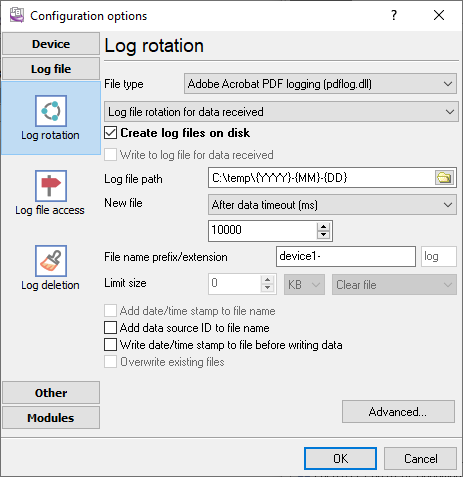
PDF logging, a folder per day from date macros, a new file after 10 s of silence, a prefix per device
- A folder per day. The log file path contains the date macros, for example
C:\Reports\{YYYY}-{MM}-{DD}. The program creates the folder for the current day by itself; nothing has to be scheduled. - One PDF per report. New file is set to After data timeout, 10000 ms. A flow computer prints a report as one burst and then stays silent, so ten seconds of silence closes the current PDF and the next report starts a new one.
- The device in the file name. Every COM port has its own configuration in the program, including the file name prefix, so the port of the first flow computer writes
device1-…and the second onedevice2-…. The time of the report is part of the file name as well.
Sample: a snapshot report as it arrived
An excerpt of one captured report, with the site header removed. The PDF keeps the fixed-width layout of the printer, so the report reads like the paper copy.
                   Snapshot Report
Date : 03/03/26   Time : 08:39:19          Computer ID :      FC1
Batch Number             1
Product ID           CRUDE
API TableSelected CrudeOil
Batch Start Date  14/12/24
Batch Start Time  16:17:15
K Factor P/m3         .000
...
Meter Factor        1.0000
The setup went into use with these three settings; the reports arrive as PDF files and the paper printers are gone.
Why the report number is not in the file name
The contractor also wanted the report number in the file name. Serial Printer Logger can extract an ID from a report only when every report has a fixed start signature and a fixed end signature, because the ID is read from the text between them. The reports of this flow computer share a header line that works as the start signature, but the proving, batch and snapshot reports end differently and the system messages have no footer at all. Without a reliable end signature the program cannot tell where one report stops, so the report number stays inside the PDF. The date folder, the device prefix and the time in the file name identify the file instead; the data timeout separates the reports.
Try it yourself
The trial version of Serial Printer Logger has every option described above. Configure it the same way and write to support if your device sends something different.
Related topics: Serial Printer Logger
hereSerial port interface RS232 pinout and signals Cables and signals Data monitor cables