
Serial Port Monitor or Sniffer Cable
A monitoring cable taps the line between two external devices so that a PC can listen to their data exchange. If you only need to see what a program sends and receives on the PC's own COM port, no cable is required: a software RS232 sniffer such as Advanced Serial Port Monitor captures the data inside Windows. The comparison of serial port monitor tools explains when a cable is needed and when software is enough. Connector pin numbers used in the diagrams are on the RS232 connector pinout page.
Half Duplex
The schematic below is used to make a half duplex RS232 monitoring cable.
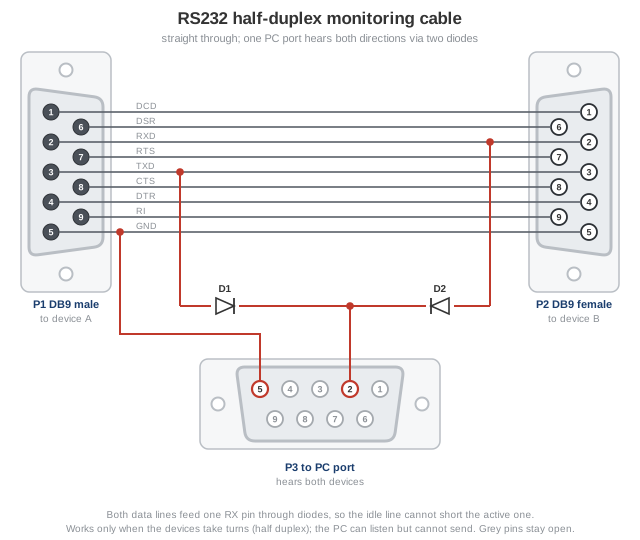
Fig. 1. Half-duplex monitoring cable: one PC port hears both devices
This cable is used for monitoring 2 devices that send data in half duplex. For example, one device sends data and another devices wait for incoming data. In the half duplex mode both devices cannot transmit at the same time. If it will be happened the data would be unreadable. This mode is used in all master-slave applications. In this mode the computer (P3) cannot send data and interfere in data exchange between external devices.
Advanced Serial Port Monitor can be used to
receive either ASCII or Hex half duplex data.
Full Duplex
The following cable is used for monitoring full duplex RS232 communication.
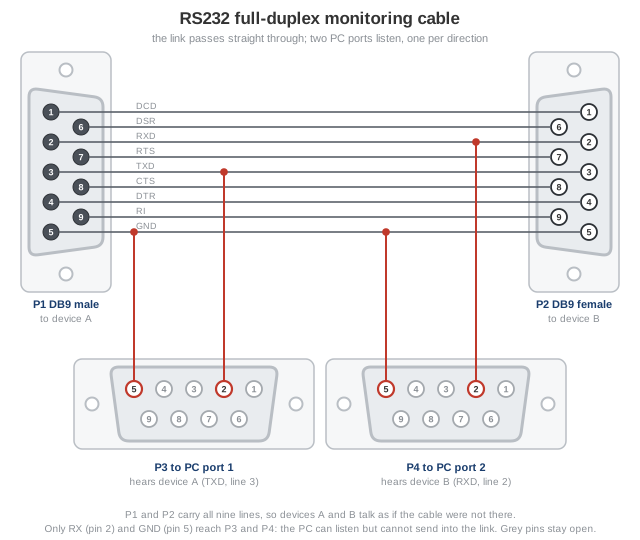
Fig. 2. Full-duplex monitoring cable: two PC ports, one per direction
This cable is used when you need to monitor data exchange between two external devices that may transmit async data (full duplex mode). You need 2 RS232 ports on your computer (an individual port for outgoing and incoming data; see how to list the COM ports in Windows). Advanced Serial Port Monitor can display
both sides of full duplex RS232 communication in the "Dual ports" mode. In this mode the computer (P3, P4) cannot send data and interfere in data exchange between external devices.