
A Timestamp on Every NMEA Sentence Logged over UDP
 Based on a support request. Written by Arthur Grasin, Head of Support. Updated .
- Data
- NMEA 0183 sentences from a GPS receiver, broadcast over UDP
- Interface
- UDP, Windows 11 Pro
- Product
- Advanced TCP/IP Data Logger, version 5.1
- Result
- Every received packet, or every parsed record, carries its own time stamp, depending on which of the two settings is used
The task
A user captures NMEA 0183 sentences that a GPS receiver broadcasts over UDP on a Windows 11 PC. Each sentence must carry the time it arrived. In the log file only some sentences had a stamp, and the first guess was that the program split the sentences wrongly.
What was really happening
The parser was fine. A UDP stream of NMEA sentences has no pauses: one datagram carries several sentences, and the next datagram follows at once. The logger decides where to put a time stamp by watching the data flow. It stamps a block of data when the flow was idle before it, when the direction changes, or when the stamp timeout runs out. In a stream without gaps, several sentences end up under one stamp.
Fix 1: set the stamp timeout to zero
Open Configuration options, then Date/time stamp. Keep Add for data packets (after parsing or splitted by characters) ticked and set Stamp timeout (ms) to 0.
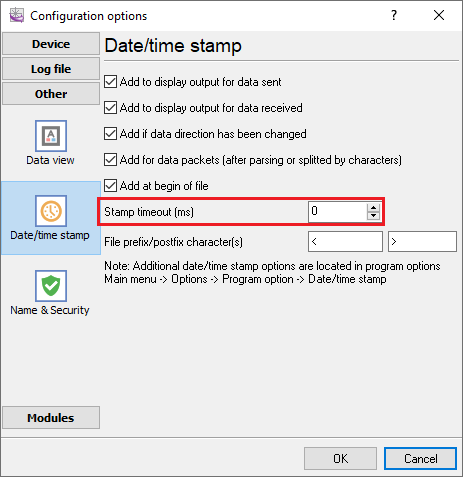
Stamp timeout 0: every received packet gets its own stamp
With the timeout at zero the logger stops treating back-to-back packets as one block, and every received packet gets its own stamp. The raw log keeps every byte, including sentences with a bad checksum, which is what you want when you later need to see what the receiver really sent.
Fix 2: stamp each parsed record instead
If the time must belong to the parsed record rather than to the received packet, change the log mode. Open Configuration options, Log file, Log rotation. Set Write to log to Write to log file after filtering and tick Write date/time stamp to file before writing data.
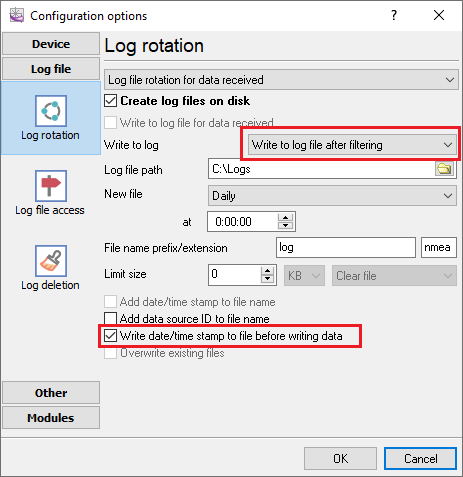
Write to log file after filtering: one stamp per parsed record
Now the logger writes a record only after the NMEA parser has accepted it, and the stamp is taken at that moment. The trade-off: damaged, unknown or unsupported sentences never reach the file, because the parser drops them before the write. Use this mode when the file feeds another program. Keep fix 1 when you need everything the receiver sent.
Where the settings are described
Both pages are documented in the online help of Advanced TCP/IP Data Logger, under Date/time stamp and Log rotation. If NMEA is the only data you log, Advanced NMEA Data Logger is the same engine with the NMEA parser built in.
Try it yourself
The trial version of Advanced TCP/IP Data Logger has every option described above. Configure it the same way and write to support if your device sends something different.
Related topics: Advanced TCP/IP Data Logger
hereSerial port interface RS232 pinout and signals Cables and signals Data monitor cables