
DB9 Pinout and Signals: RS232 Serial Port, Male and Female
The DB9 (DE-9) connector is the RS232 port found on most PCs and on many industrial devices. The table gives the DB9 pinout with the direction of each signal from the computer (DTE) to a modem or another DCE device. The complete 25-pin RS232 pinout carries the same signals plus the secondary channel and timing lines, and the RS232 pinout of DB9, DB15, DB25 and RJ45 connectors is compared on one page.
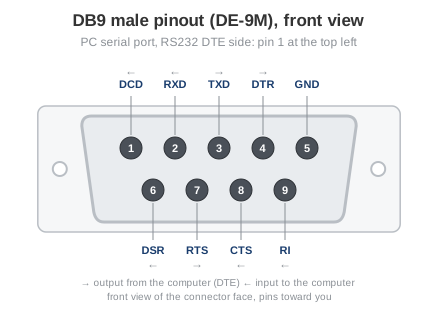
Fig. 1. DB9 male connector on the computer, front view: pin 1 at the top left
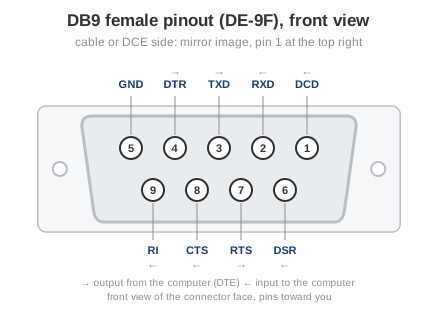
Fig. 2. DB9 female connector on the cable or the DCE device, front view
The PC port is male (pins), the cable end that goes into it is female (holes), and the two are mirror images when you look at their faces. Pin 1 is at the top left of the male connector and at the top right of the female one; the numbers are moulded into the insulator on most connectors, so check them when in doubt.
 | DB9 pin D-SUB male |
| Pin | Name | Direction | Description |
|---|---|---|---|
| 1 | CD | ← | Carrier Detect |
| 2 | RXD | ← | Receive Data |
| 3 | TXD | → | Transmit Data |
| 4 | DTR | → | Data Terminal Ready |
| 5 | GND | System Ground | |
| 6 | DSR | ← | Data Set Ready |
| 7 | RTS | → | Request to Send |
| 8 | CTS | ← | Clear to Send |
| 9 | RI | ← | Ring Indicator |
DB9 to DB25 pinout
The 9-pin port carries the same nine signals as the 25-pin RS232 port; only the pin numbers differ. This table is all that is needed to wire a DB9 to DB25 adapter or a straight cable between a 9-pin PC and 25-pin equipment. For a crossed cable between two DTE devices see the null modem cable (DB9-DB25).
| Signal | DB9 pin | DB25 pin | Direction |
|---|---|---|---|
| DCD Carrier Detect | 1 | 8 | ← |
| RXD Receive Data | 2 | 3 | ← |
| TXD Transmit Data | 3 | 2 | → |
| DTR Data Terminal Ready | 4 | 20 | → |
| GND Signal Ground | 5 | 7 | |
| DSR Data Set Ready | 6 | 6 | ← |
| RTS Request to Send | 7 | 4 | → |
| CTS Clear to Send | 8 | 5 | ← |
| RI Ring Indicator | 9 | 22 | ← |
USB to serial adapters
A USB to RS232 adapter ends in exactly this DB9 male connector and behaves like a built-in port: Windows creates a COM port for it, and the pinout, the voltages and the cables are the same. Two things differ. The COM number can change when the adapter moves to another USB socket (see how to list the COM ports), and cheap adapters sometimes leave the handshake lines unconnected, which a loopback plug and the free online serial port tester reveal in a minute.
RS232 pinout and signals
Serial port pinout and signals
Full DB25 serial (RS232) port pinout and signals
DB25 pinout and signals
RS232 connectors and their pinouts
Null modem cable pinout (DB9-DB9)
Loopback plug for port testing
Which COM ports are present and in use on your PC
COM port in use or access denied: how to fix it