
Find MODBUS RTU devices in your network online
How the MODBUS Scanning Procedure Works
The tool works with COM ports straight from the browser by using a special programming interface called Web Serial API.
When the utility opens a port, it iterates through all possible MODBUS device addresses (slave IDs) and displays them in the log. To stop the search, just close the port.
Key Advantages
The main advantage is the lack of necessity to install specialized software, drivers, or third-party libraries.
You can scan an RS-485 bus or a direct RS-232 connection directly from your browser and determine the slave ID. This makes the tool cross-platform: the same code works on Windows, macOS, and Linux (in Chromium-based browsers: Google Chrome, Opera, Microsoft Edge, Yandex Browser, etc.). It is useful in field conditions when only a laptop with a basic OS or even an Android tablet is available.
MODBUS COM Port Connection
Feature Not Supported
Your current browser does not support the Web Serial API required to access local COM ports. Please use a Chromium-based browser like Google Chrome, Microsoft Edge, or Opera.
Security Aspects
Working with serial ports via a browser and the Web Serial API imposes strict restrictions to protect the user.
Key security aspects include:
Only with User Consent: This page cannot access the list of ports on its own. The connection to a port is initiated only after the user clicks a button (e.g., "Connect") and selects a specific device in the system dialog box.
HTTPS and Isolation: The API can only be accessed when using a secure, encrypted connection (HTTPS), which prevents data spoofing or interception between the browser and the device.
No Background Operation: As soon as the tab is closed, access to the port is terminated. This prevents hidden monitoring or control of devices in the background.
Source: Detailed specifications and security requirements are published in the official W3C document: Web Serial API.
Is there a version of the utility that works offline?
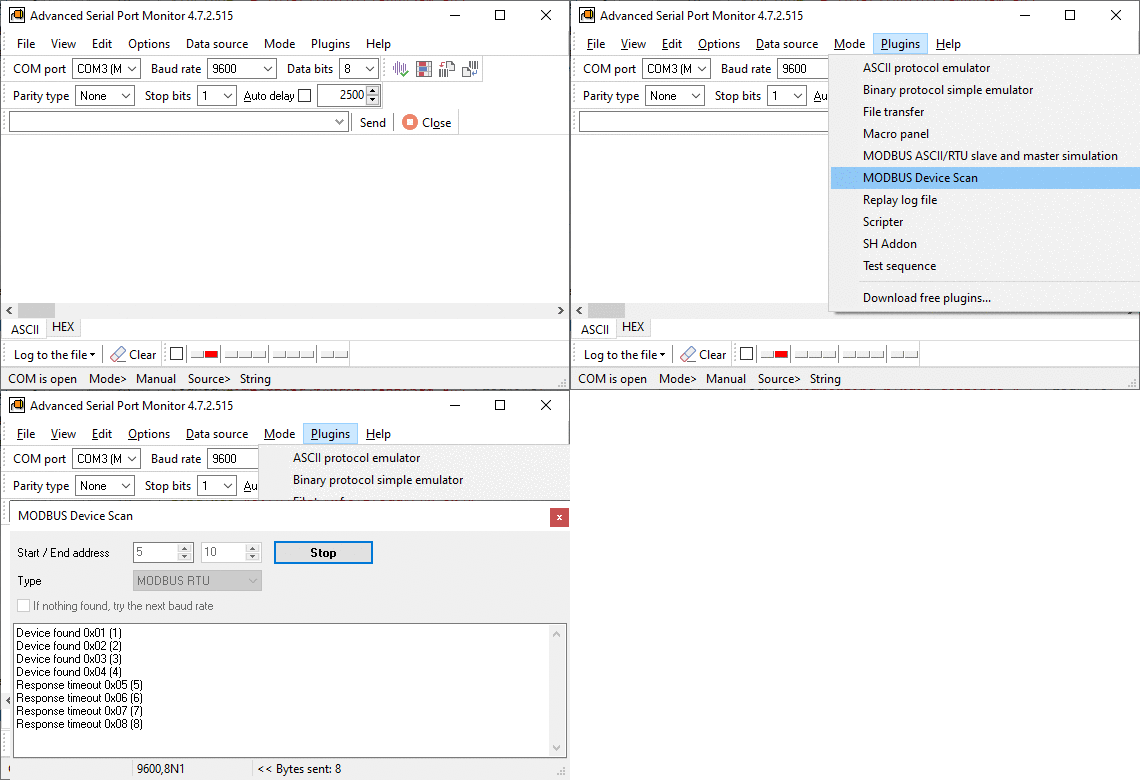
Our Advanced Serial Port Monitor software includes a module for device address scanning. An added benefit of this utility is the automatic baud rate detection and support for MODBUS ASCII and MODBUS Enron protocols, in addition to MODBUS RTU.
Which Serial Ports Can the Page Work With?
All ports successfully identified by the operating system are available for user selection. The utility only has access to the specific port authorized by the user.
How Long Does a Device Search Take?
The utility sends a request and waits 1 second for a response. If the first request fails, the utility makes a second attempt. To scan the entire range of addresses, the program needs up to 600 seconds.
You may need to perform the search several times with different communication parameters (baud rate, data bits, parity). If no address answers at any setting, check the port and the converter first: the Serial Port Tester shows whether the port opens, whether another program holds it, and whether any data arrives at all.
Can the Utility Read Values From a Device?
This utility is only designed to search for devices. To read and write the registers of a device you found, and to see every request and response byte by byte, use the online MODBUS tester.
Our other online utility can scan the register memory map and display the values.
We offer a range of classic software programs that can help collect and save Modbus data from various devices (regardless of the model, but you need a register map).
For certain electricity meters with a MODBUS interface, the program can read MODBUS data online.