
Serial Port Tester Online: Check a COM Port in the Browser
This free tester opens a COM port straight from your browser and tells you whether the port, the USB-to-serial adapter and the cable work. It runs in Chrome, Edge and Opera on Windows, macOS and Linux, installation is not necessary, and nothing the port sends or receives leaves your computer.
1. Choose the port
2. Port settings
3. Run a test
How to test a COM port
- Choose the port. Click Choose a COM port and pick it in the list your browser shows. The tester tells you what it is: the chip of a USB adapter (FTDI, Prolific, CH340, CP210x and others), a Bluetooth link or a built-in port. If you do not know which COM number is yours, list the COM ports in Windows first.
- Run the open test. It shows whether the system lets a program use the port at the settings you chose, and the state of the input lines. A refusal almost always means that another program already has the port open.
- Run the loopback test with a loopback plug, or a wire between TX and RX. The tester sends test data at every common baud rate and checks that each byte comes back unchanged. Then it switches RTS and DTR on and off and checks that CTS, DSR and DCD follow.
- Listen when a device is connected. The tester counts the bytes that arrive, shows the first ones in hex and text, and warns when framing errors or unreadable data point to a wrong baud rate.
- Copy the report for your records or for a support request.
Loopback plug wiring
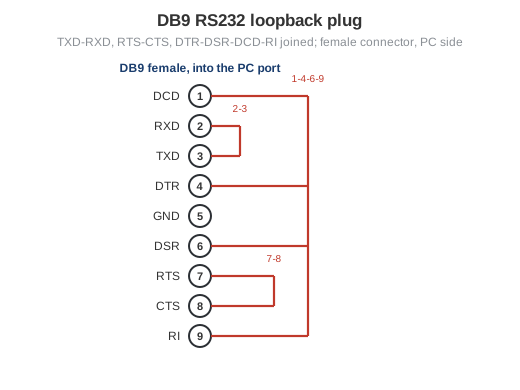
A loopback plug connects the outputs of the port to its own inputs: TXD (pin 3) to RXD (pin 2), RTS (pin 7) to CTS (pin 8), and DTR (pin 4) to DSR (pin 6), DCD (pin 1) and RI (pin 9). For a quick data test, a single wire or a paper clip between pins 2 and 3 is enough. The loopback plug page has the DB25 version and the wiring step by step.
Reading the results
| Result | What it means | What to do |
|---|---|---|
| The port opened | The driver works and no other program holds the port. | Go on with the loopback test. |
| The port cannot be opened | Another program has it open, or the adapter's driver is not working. | Close terminals, loggers and vendor tools, replug the adapter; see why a serial port fails to open. |
| Loopback passed | Port, adapter and cable up to the plug carry data correctly at that rate. | If a device still does not answer, check its wiring and settings. |
| Nothing came back | TX and RX are not connected, or this is a different port. | Check the plug, then test the other ports. |
| Bytes changed or missing | The adapter or cable fails at that speed. | Use a lower baud rate, a shorter cable or another adapter; see garbled serial data. |
| A line is always on or always off | That handshake pair is not wired in the plug, or the adapter does not have the line. | It matters only if your device uses hardware flow control. |
| Framing or parity errors while listening | Data arrives, but at another speed or format. | Set the device's baud rate, parity and stop bits. |
More causes and fixes: five common COM port errors and COM port not working in Windows.
What a browser cannot test
- Traffic between another program and a device. A web page can only open a port that nobody else uses. To see what an application and a device send to each other, use the spy mode of Advanced Serial Port Monitor; it also sends commands by hand and logs sessions with timestamps.
- Hours of load on many ports. To keep ports busy for hours and count errors, use the free COM Port Stress Test.
- Continuous recording. To collect a device's data into files, Excel or a database around the clock, use Advanced Serial Data Logger.
- A list of all ports. The browser only sees the port you pick. How to check COM ports in Windows shows Device Manager, PowerShell and the command line.
Frequently asked questions
Does the tester send my data anywhere?
No. The test runs in your browser, and nothing the port sends or receives leaves your computer. The page only records which test buttons are used, without any port data.
Which browsers and systems does it work in?
Chrome, Edge and Opera on a desktop computer with Windows, macOS, Linux or ChromeOS. Firefox, Safari and mobile browsers do not support the Web Serial API that the tester needs.
Why does the tester say the port cannot be opened?
Almost always because another program already has the port open: a terminal, a logger, a device configuration tool or a background utility. Only one program can use a COM port at a time. Close it and run the test again. If nothing else is running, unplug and replug the adapter and check its driver in Device Manager.
Do I need a loopback plug?
Only for the loopback test. The open test and the listen test work without one. For a quick data check, a wire or a paper clip between pins 2 and 3 of the DB9 connector is enough; the control line test also needs RTS joined to CTS and DTR joined to DSR and DCD.
Can it test RS485 or RS422 converters?
An RS422 converter can be loop-tested by joining TX+ to RX+ and TX- to RX-. A two-wire RS485 bus is half duplex, so a loopback does not tell much; test it with a device on the bus instead, for example with the online MODBUS scanner or the MODBUS tester if the devices speak MODBUS.
Why do the highest baud rates fail?
Built-in serial ports usually stop at 115200 baud, and many USB adapters, level shifters and long cables cannot carry 460800 or 921600 baud reliably. If the loopback test passes up to a certain rate, use that rate or a lower one.