
RS232 Null Modem Cable Pinout (DB9-DB9)
In modern software development, physical cables are often replaced by Virtual Null Modem (also known as a Virtual COM Port driver) to facilitate testing on a single local computer. A virtual null modem creates a pair of interlinked virtual COM ports (e.g., COM3 and COM4) in the operating system; any data sent to one port is instantly received by the other. This allows developers to test communication between two different applications. For example, you can connect a data logger and a terminal emulator on the same machine without physical serial hardware (usefult on modern laptops without ports).
Use this cable between two DTE (Data Terminal Equipment) devices (for instance two computers).
This is the cable for an RS232 to RS232 connection: two computers, or a computer and a device that is itself a DTE, such as a PLC, a scale or a measuring instrument. Both ends transmit on pin 3 and listen on pin 2, so the cable crosses the data lines, and it crosses the handshake lines the same way. A straight cable would join output to output and nothing would arrive.
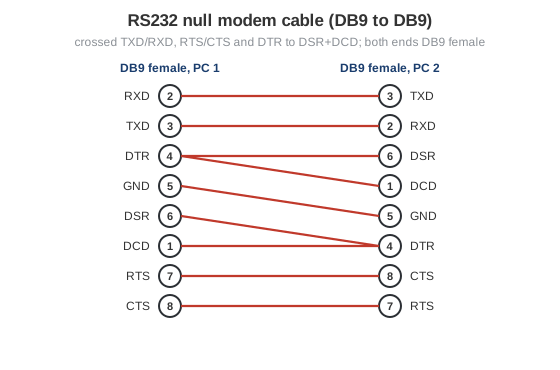
Fig. 1. Null modem cable wiring between two DB9 female connectors
 | DB9 pin D-SUB female to PC1 |
| DB9 pin D-SUB female to PC2 |
| DB9-1 | DB9-2 | ||
|---|---|---|---|
| Receive Data | 2 | 3 | Transmit Data |
| Transmit Data | 3 | 2 | Receive Data |
| Data Terminal Ready | 4 | 6+1 | Data Set Ready + Carrier Detect |
| System Ground | 5 | 5 | System Ground |
| Data Set Ready + Carrier Detect | 6+1 | 4 | Data Terminal Ready |
| Request to Send | 7 | 8 | Clear to Send |
| Clear to Send | 8 | 7 | Request to Send |
The pin numbers above follow the standard DB9 pinout of a PC serial port. If one side has a 25-pin connector, use the null modem cable (DB9-DB25) and check the RS232 female and male DB-25 pinout for the signal names. The pinouts of all common RS232 connectors, including DB15 and RJ45, are on the RS232 connector pinout page. A cable without handshaking, with only TxD, RxD and ground, is described under serial data transfer cable.
Null modem (crossed) cable DB9-25 pin
Null modem (crossed) cable DB25-25 pin
Modem (straight) cable (DB9-DB25)
Modem (straight) cable (DB25-DB25)
Modem (straight) cable (DB9-DB15)