
USB 3.0 Pinout: Type A, Type B and Micro-B, Wire Colors
A USB 3.0 Type A or Type B connector has nine contacts: the four USB 2.0 contacts in their usual places (VBUS +5 V, D-, D+ and GND) plus two SuperSpeed differential pairs, SSTX+ and SSTX- for transmitting and SSRX+ and SSRX- for receiving, and a drain contact, GND_DRAIN, for the shields of those pairs. The Micro-B plug has ten contacts in a wider housing. SuperSpeed runs at 5 Gbit/s (USB 3.0, later renamed USB 3.2 Gen 1), 10 Gbit/s (USB 3.1 Gen 2) and 20 Gbit/s (USB 3.2 Gen 2x2, Type-C connector only). It is full duplex on the SuperSpeed pairs, and a port supplies up to 900 mA. Connectors are usually blue. The tables below give the Type A, Type B and Micro-B pinouts, the 20-pin motherboard header, the wire colors, the electrical limits and the speed of each version.
USB 3.0 at a glance
| Item | Value |
|---|---|
| Contacts | 9 in Type A and Type B, 10 in Micro-B; 24 in Type-C |
| Signals | VBUS, D- and D+ (the USB 2.0 pair), SSTX+ and SSTX-, SSRX+ and SSRX- (SuperSpeed pairs), GND, GND_DRAIN |
| Data rates | 5 Gbit/s (USB 3.0, USB 3.2 Gen 1), 10 Gbit/s (USB 3.1 Gen 2, USB 3.2 Gen 2), 20 Gbit/s (USB 3.2 Gen 2x2, Type-C only) |
| Direction | Full duplex on the SuperSpeed pairs; the USB 2.0 pair stays half duplex |
| Power | 5 V, up to 900 mA per port; up to 1.5 A from a charging port |
| Cable length | Not fixed by the specification; about 3 m at 5 Gbit/s and about 1 m at 10 Gbit/s for passive cables |
| Color | Blue (Pantone 300C) recommended for Standard-A plugs and receptacles |
| Introduced | USB 3.0 November 2008, USB 3.1 July 2013, USB 3.2 September 2017, USB4 August 2019 |
USB 3.0 did not replace the USB 2.0 wiring; it added a second bus next to it. Every USB 3.0 cable still contains the D+ and D- pair, and a USB 3.0 device connects to both buses when it is plugged in. If the host and the cable support SuperSpeed, the device talks over the SSTX and SSRX pairs; otherwise it works as a USB 2.0 device over D+ and D-. That is why USB 3.0 ports accept USB 2.0 plugs and why the first four pins of every table below are the familiar USB 2.0 pins.
USB 3.0 Type A pinout
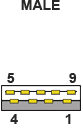 | 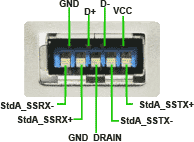 |
Pins 1 to 4 are the USB 2.0 contacts at the front of the plug; pins 5 to 9 sit deeper inside and touch only when a USB 3.0 plug is fully inserted.
| Pin | Name | Direction | Color | Description |
|---|---|---|---|---|
| 1 | VBUS | red | +5 V power | |
| 2 | D- | ←→ | white | USB 2.0 Data - |
| 3 | D+ | ←→ | green | USB 2.0 Data + |
| 4 | GND | black | Ground | |
| 5 | StdA_SSRX- | ← | blue | SuperSpeed receiver |
| 6 | StdA_SSRX+ | ← | yellow | SuperSpeed receiver |
| 7 | GND_DRAIN | ground | Drain wires of the SuperSpeed pair shields | |
| 8 | StdA_SSTX- | → | purple | SuperSpeed transmitter |
| 9 | StdA_SSTX+ | → | orange | SuperSpeed transmitter |
USB 3.0 Type B pinout
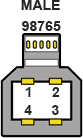 | 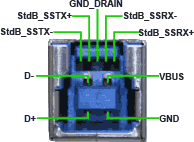 |
The Type B plug is taller than its USB 2.0 counterpart: the five SuperSpeed contacts sit in the extra part on top. A USB 2.0 Type B plug fits this receptacle; a USB 3.0 Type B plug does not fit a USB 2.0 receptacle.
| Pin | Name | Direction | Color | Description |
|---|---|---|---|---|
| 1 | VBUS | red | +5 V power | |
| 2 | D- | ←→ | white | USB 2.0 Data - |
| 3 | D+ | ←→ | green | USB 2.0 Data + |
| 4 | GND | black | Ground | |
| 5 | StdB_SSTX- | → | blue | SuperSpeed transmitter |
| 6 | StdB_SSTX+ | → | yellow | SuperSpeed transmitter |
| 7 | GND_DRAIN | ground | Drain wires of the SuperSpeed pair shields | |
| 8 | StdB_SSRX- | ← | purple | SuperSpeed receiver |
| 9 | StdB_SSRX+ | ← | orange | SuperSpeed receiver |
Note the crossed names: the blue and yellow wires are the receive pair at the A end and the transmit pair at the B end, because what the host sends the device receives. The wire colors are the same in the whole cable; only the signal names change with the end you look at.
USB 3.0 Micro-B pinout
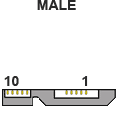 |
Two plugs side by side in one housing: the left part is a standard USB 2.0 Micro-B with five contacts, the right part adds the five SuperSpeed contacts. External hard drives use this connector.
| Pin | Name | Direction | Color | Description |
|---|---|---|---|---|
| 1 | VBUS | red | +5 V power | |
| 2 | D- | ←→ | white | USB 2.0 Data - |
| 3 | D+ | ←→ | green | USB 2.0 Data + |
| 4 | ID | any | OTG ID: grounded in a Micro-A plug, open in a Micro-B plug | |
| 5 | GND | black | Ground | |
| 6 | StdB_SSTX- | → | blue | SuperSpeed transmitter |
| 7 | StdB_SSTX+ | → | yellow | SuperSpeed transmitter |
| 8 | GND_DRAIN | ground | Drain wires of the SuperSpeed pair shields | |
| 9 | StdB_SSRX- | ← | purple | SuperSpeed receiver |
| 10 | StdB_SSRX+ | ← | orange | SuperSpeed receiver |
USB 3.0 internal header pinout (motherboard, 20-pin)
Front-panel USB 3.0 ports connect to a 2x10 header with 19 pins; position 20 is left empty as a key. The layout comes from the Intel design guide for the USB 3.0 front panel header and carries two ports: pins 2 to 9 belong to port 1 and pins 11 to 18 to port 2, with VBUS at both ends. The plug is a shrouded block that fits only one way, so the pin order matters only when you wire a header cable yourself.
| Pin | Signal | Pin | Signal |
|---|---|---|---|
| 1 | VBUS (+5 V) | 11 | Port 2 D+ |
| 2 | Port 1 SSRX- | 12 | Port 2 D- |
| 3 | Port 1 SSRX+ | 13 | GND |
| 4 | GND | 14 | Port 2 SSTX+ |
| 5 | Port 1 SSTX- | 15 | Port 2 SSTX- |
| 6 | Port 1 SSTX+ | 16 | GND |
| 7 | GND | 17 | Port 2 SSRX+ |
| 8 | Port 1 D- | 18 | Port 2 SSRX- |
| 9 | Port 1 D+ | 19 | VBUS (+5 V) |
| 10 | ID (not connected on most boards) | 20 | Key (no pin) |
USB 3.0 wire colors
A USB 3.0 cable has nine wires. The USB 2.0 part keeps its colors: red VBUS, black ground, white D- and green D+. The two SuperSpeed pairs are blue and yellow for one pair and purple and orange for the other, each pair twisted and wrapped in its own foil shield with a bare drain wire. The drain wires end on the GND_DRAIN contact, and an overall braid connects the two plug shells. Cheap cables may use other colors; the pin positions in the tables are the reliable reference.
Electrical parameters
| Parameter | USB 3.0 value |
|---|---|
| VBUS voltage | 5 V nominal; 4.45 to 5.25 V at the port (the USB 3.0 specification allows a lower minimum than USB 2.0 because of the higher current) |
| Current per port | One unit load is 150 mA. A SuperSpeed device may draw 150 mA before configuration and up to 6 unit loads, 900 mA, after it. A USB 2.0 device on the same port gets the USB 2.0 limit of 500 mA. Charging ports supply up to 1.5 A (USB Battery Charging 1.2); USB Power Delivery over Type-C negotiates more |
| SuperSpeed pairs | Two shielded differential pairs, SSTX and SSRX, one per direction; 90 Ω differential impedance; each pair has its own shield and drain wire |
| USB 2.0 pair | D+ and D-, 90 Ω twisted pair as in USB 2.0; used for enumeration of USB 2.0 devices and for devices that fall back from SuperSpeed |
| Signal levels | SuperSpeed: about 1 V differential peak to peak at the transmitter, low-voltage differential signalling; 8b/10b encoding at 5 Gbit/s, 128b/132b at 10 Gbit/s and above |
| Cable length | Not set by the specification; signal loss limits passive cables to about 3 m at 5 Gbit/s and about 1 m at 10 Gbit/s. Active cables with repeaters go further |
| Wires | Nine wires: power pair 20 to 28 AWG, USB 2.0 data pair 28 AWG, two thin shielded SuperSpeed pairs, drain wires, overall braid |
| Connector color | Blue recommended for Standard-A plugs and receptacles; not mandatory, so a black port can be USB 3.0 and a blue one is not a guarantee |
| Compatibility | A USB 3.0 Type A receptacle accepts USB 2.0 plugs; USB 3.0 Type B and Micro-B receptacles accept USB 2.0 Type B and Micro-B plugs; the larger USB 3.0 Type B and Micro-B plugs do not fit USB 2.0 receptacles |
USB 3.x speeds and names
| # | Specification | Marketing name | Speed | Connectors |
|---|---|---|---|---|
| 1 | USB 3.0 (2008), renamed USB 3.1 Gen 1 (2013) and USB 3.2 Gen 1 (2017) | SuperSpeed USB 5Gbps | 5 Gbit/s (625 MB/s) | Type A, Type B, Micro-B, Type-C |
| 2 | USB 3.1 Gen 2 (2013), renamed USB 3.2 Gen 2 | SuperSpeed USB 10Gbps | 10 Gbit/s (1,250 MB/s) | Type A, Type B, Micro-B, Type-C |
| 3 | USB 3.2 Gen 2x2 (2017), two lanes | SuperSpeed USB 20Gbps | 20 Gbit/s (2,500 MB/s) | Type-C only |
| 4 | USB4 (2019) | USB4 40Gbps | 40 Gbit/s (5,000 MB/s) | Type-C only |
The speeds are raw bit rates. The 8b/10b encoding of USB 3.0 leaves about 500 MB/s for data, and protocol overhead brings a fast SSD to about 400 MB/s over a 5 Gbit/s link. For the slower versions see the USB 1.x and 2.0 speeds.
Questions
Is USB 3.0 backward compatible with USB 2.0?
Yes, in both directions for Type A. A USB 2.0 device in a USB 3.0 port runs at USB 2.0 speed over the D+ and D- pair; a USB 3.0 device in a USB 2.0 port does the same. The device and the cable need the SuperSpeed contacts for 5 Gbit/s, so a USB 3.0 drive on a USB 2.0 cable works, but slowly. Type B and Micro-B are compatible only one way: the old plug fits the new receptacle.
Why is the USB 3.0 port blue?
The USB 3.0 specification recommends Pantone 300C blue for the plastic insert of Standard-A plugs and receptacles so that users can tell them from USB 2.0 ports. It is a recommendation, not a rule. Some manufacturers use teal for 10 Gbit/s ports, red or yellow for ports that stay powered when the computer sleeps, and black for everything on a dark case. The SuperSpeed logo next to the port is the official marking.
USB 3.0, 3.1 and 3.2: what is the difference?
Mostly names. USB 3.0 introduced SuperSpeed at 5 Gbit/s in 2008. USB 3.1 in 2013 added a 10 Gbit/s mode and renamed the old mode "Gen 1" and the new one "Gen 2". USB 3.2 in 2017 added a two-lane 20 Gbit/s mode for Type-C cables and renamed everything again: Gen 1 is 5 Gbit/s, Gen 2 is 10 Gbit/s, Gen 2x2 is 20 Gbit/s. The connector pinouts on this page did not change between the versions; only Gen 2x2 and USB4 need the Type-C connector.
How many amps does a USB 3.0 port supply?
Up to 900 mA at 5 V for a SuperSpeed device after it has been configured, which is 4.5 W. A USB 2.0 device in the same port still gets 500 mA. Charging ports that follow USB Battery Charging 1.2 supply 1.5 A. For more, a Type-C port with USB Power Delivery negotiates up to 100 W, or 240 W with the extended power range of Power Delivery 3.1.
How long can a USB 3.0 cable be?
The specification does not state a maximum; it sets limits on signal loss instead. Passive cables reach about 3 m at 5 Gbit/s and about 1 m at 10 Gbit/s before the SuperSpeed link drops to USB 2.0 or fails. Longer runs need an active cable with repeaters, a powered hub, or an extender over optical fibre or Ethernet cable.
What is the drain wire, GND_DRAIN?
Each SuperSpeed pair is wrapped in a foil shield, and a bare wire runs along the foil to give the shield a solid connection. Those drain wires end on pin 7 (pin 8 on Micro-B), GND_DRAIN, which is a signal ground for the high-speed pairs. It is separate from the power ground on pin 4, so that current returning on the power pair does not disturb the shields, although both are at ground potential.
Does a USB 2.0 Micro-B plug fit a USB 3.0 Micro-B port?
Yes. The USB 3.0 Micro-B receptacle is a standard Micro-B receptacle with a second compartment beside it. A USB 2.0 Micro-B plug goes into the left part and the device works at 480 Mbit/s. The wide USB 3.0 Micro-B plug does not fit a USB 2.0 port.
See also: USB 2.0 pinout for the Type A, Type B, Mini and Micro connectors and the USB Type-C pinout with its 24 contacts. When a device misbehaves and the cable is fine, the USB protocol analyzer shows the requests and data packets on the bus, and the USB software page lists the tools for logging data from USB devices.