
Samsung iDCS 500 SMDR setup and CDR format
This page shows how to get call records out of the Samsung iDCS 500 into Advanced PBX Data Logger: the connection settings, the parser to select and the 13 fields the logger extracts for reports or a database. The settings apply to our logger; other call accounting software may expect a different configuration.
Quick facts
| Item | Samsung iDCS 500 |
|---|---|
| Interface | LAN. The PBX accepts a connection on TCP port 5100; the logger connects to the PBX IP address. |
| Port | 5100 |
| Parser to select | Samsung iDCS 500 |
| Fields extracted | 13 |
| Other Samsung systems | Samsung DCS, iDCS, SKP and NX SMDR formats |
Samsung OfficeServ/iDCS programming codes
MMC830
IP Address - e.g. 192.168.01.20
Subnet Mask - usually 255.255.255.0 (same network)
LAN Gateway - e.g. 192.168.1.3
Card Reset - YES
MMC 829
[01]. SMDR - Destination set to PC (Port 5100)
[02]. UCD Report - Destination set to PC (Port 5101)
[06]. Periodic UCD - Destination set to PC (Port 5105)
then Update LAN - YES
MMC 725. Turn on all options except Page header
MMC 210
PERI UCD Report - On
PERI UCD SIO - Off
MMC 501. PERI UCD Report. Set to 03 sec
MMC 722. Assign ACD Group Supervisor key to keyset(s) and set up auto clearing of data at 23:59pm each night, and auto-printing every hour. (If you do not do this, then the Reports in ACD Supervisor will not work).
Pinout and wiring
| PBX (25 pin male) | PC (9 pin female) | PC (25 pin female) |
|---|---|---|
| 2 | 3 | 2 |
| 3 | 2 | 3 |
| 5 | 5 | 7 |
| 4 | 4 | 20 |
Installation Tool. Programming example. MMC 829

Settings from the manufacturer's documentation
Taken from smdr pinout, Tracer-SMDR-Compatibility-Guide, SMDR - some formats. Values are those stated in the documentation; confirm them against your firmware release.
| Setting | Documented value |
|---|---|
| cable or pinout | Samsung DCS Compact II / iDCS 500 pinout: PBX pin2->PC 9-pin pin3->PC 25-pin pin2; PBX pin3->PC9 pin2->PC25 pin3; PBX pin5->PC9 pin5->PC25 pin7; PBX pin4->PC9 pin4->PC25 pin20. |
Record format notes
- Tracer's Samsung iDCS 500 record format has Extension at columns 6-9, Trunk ID at 16-19, Date at 21-25, Start Time at 27-31, Account Code at 67-80 and Name at 99-114, and supports multiple records per call; Extension, Trunk ID, Date and Start Time are all required.
- A generic Samsung DCS/iDCS/SKP family report layout is T EXT AUTH TRK MM/DD STT.TIME DURATION FG DIALED_DIGIT ACCOUNT_CODE CID/ANI_NUMBER CID/ANI_NAME, matching the tenant/extension/trunk/date/time/duration/flag/dialed-number shape of this page's own sample.
Configuring PBX Data Logger as a TCP client
Our software should work in the TCP client mode. It means that our software will initiate connection with the PBX and the PBX will work as a server. Add one or several PBX IP addresses here (the IP address of the Samsung iDCS). The port number should match the port that you have defined within the PBX (5100 in the example below).
1. Add a new configuration with the TCP data source (if you didn't it before).
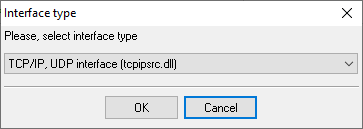
2. Configure the TCP settings as shown below.
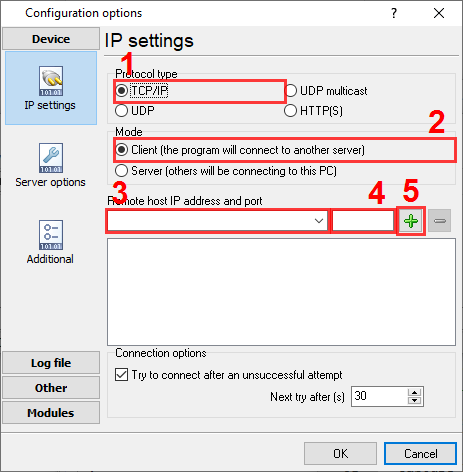
192.168.1.220
5100
192.168.1.220:5100
Selecting the correct parser for Samsung iDCS 500

Samsung iDCS 500
Samsung iDCS 500
Data items
| Description | Data type | Column name |
|---|---|---|
| External | string | EXT |
| Authorization code | string | AUTH |
| Trunk | string | TRUNK |
| Call time | datetime | CALL_TIME |
| Call duration | datetime | CALL_DURATION |
| Call duration (s) | integer | CALL_DURATION_S |
| Call type | string | CALL_TYPE |
| Direction | string | DIRECTION |
| Phone | string | DIALED_PHONE |
| Account code | string | ACC |
| Cost | float | COST |
| Caller phone | string | CALLER_PHONE |
| Caller name | string | FLAG1 |
Sample record
As delivered by the system; phone numbers, names and public addresses are masked.
   1 263  7777 719  04/02 09:29:31 00:00:09 O  456225                 0.00
   1 298       717  04/02 09:28:52 00:00:52 O  277127                 0.00
   1 263  7777 720  04/02 09:29:58 00:00:12 O  456225                 0.00
Reports and a database
Once records arrive, the logger writes them to a text file or to any ODBC database in real time, or hands them to the PBX Reports utility for manual, scheduled and e-mailed reports with a built-in web server. See exporting call log data to a database for the database setup.
Related Samsung systems
Samsung iDCS 100Samsung iDCS 100 M2
Selta 1000
Selta SAM Office 8
Samsung DCS, iDCS, SKP and NX SMDR formats
All supported PBX systems
Note: Products and companies mentioned here are used only for definition and identification purposes and can be trademarks and/or registered trademarks of the respective companies.
Related topics: Advanced PBX Data Logger
hereCall logging Call accounting SMDR to SQL SMDR Listener Cables and signals