
6 Best Serial Port Monitor Tools (2026 Guide & Comparison)
Testing, debugging, and analyzing COM port connections can be a challenging task for hardware developers and IT administrators. To see exactly what data is flowing through your RS232, RS422, or RS485 interfaces, you need a robust serial port monitor tool.
These applications act as sniffers, allowing you to intercept, log, and analyze data exchanged between a computer and connected serial devices. In this article, we'll review and compare the best serial port monitor tools available today, helping you choose the right solution for your diagnostic needs.
Quick Comparison: Top Serial Port Monitors
| Tool | Best For | Standout Feature | Pricing | Highlight |
|---|---|---|---|---|
| Advanced Serial Port Monitor | All-around testing & debugging | Background Spy Mode | Paid / Free Trial | Ultimate flexibility with intuitive data logging. |
| HHD Serial Monitor | High-load industrial setups | RegEx custom parsing | Paid | Handles massive data streams without freezing. |
| VSDP | Software testing without hardware | Virtual null-modem pairs | Paid | All-in-one virtual port creation and sniffing. |
| Electronic Team Monitor | Multi-port tracking | Session playback | Paid | Monitors multiple COM ports simultaneously. |
| Portmon | Legacy system debugging | Extreme lightweight footprint | Free | Bare-bones API hooking for older OS versions. |
| RealTerm | Deep technical data streams | I2C/SPI hardware support | Free (Open-source) | Small executable size. |
1. Advanced Serial Port Monitor (Top Recommendation)
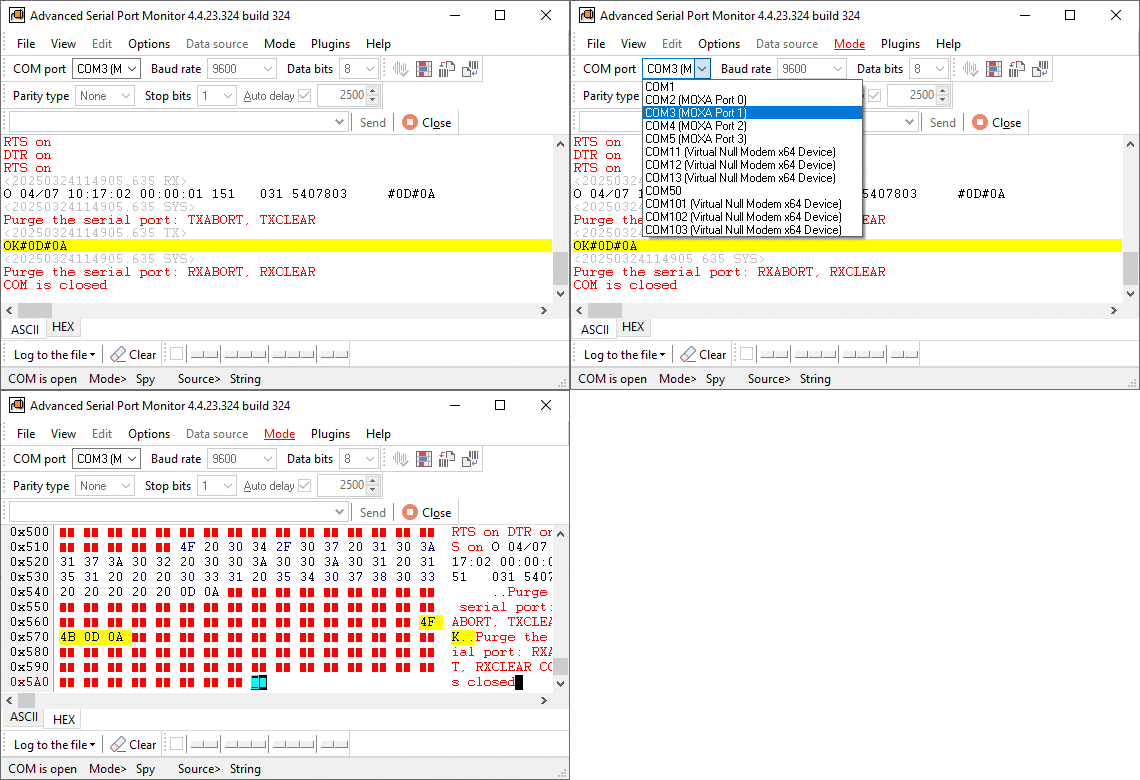
When it comes to sniffing and analyzing COM port traffic, Advanced Serial Port Monitor stands out as the ultimate, most comprehensive tool on the market. Engineered for both beginners and advanced users, it allows you to connect to any COM port (hardware or virtual) and seamlessly log data without interfering with the device's standard operations.
What makes Advanced Serial Port Monitor our top choice is its unmatched flexibility. Whether you are debugging industrial automation equipment, POS terminals, or custom robotics, this software provides a highly readable display of hex, ASCII, and binary data. It can operate in a "spy" mode, silently monitoring traffic between third-party applications and serial devices.
Key Features:
- Spy Mode (Sniffer): Monitor data exchange between a serial device and any Windows application.
- Dual-port mode: watch the traffic between two external devices through an RS232 monitoring cable, with no PC in the loop.
- Built-in Terminal: Send custom commands to test device responses.
- Advanced Logging: Write incoming and outgoing data directly to a file for later analysis.
- Flexible Data Viewing: View data in Hex, ASCII, Decimal, or Binary formats.
Pros:
- Incredibly intuitive user interface that reduces troubleshooting time.
- Supports full automation via scripting and plugins.
- Allows for custom baud rates and non-standard connection parameters.
- Automatic visual data packets splitting with precise timestamps.
- Excellent data filtering capabilities to isolate specific command strings.
- Consumes very few system resources.
- Outstanding customer support and detailed documentation.
Cons:
- Advanced scripting features require a slight learning curve.
- Might be overkill if you only need a quick, one-off connection test. For that, our free online serial port tester checks a port, adapter or cable in the browser.
- Native application is Windows-only.
2. HHD Serial Monitor (Device Monitoring Studio)
HHD Software's Serial Monitor (often bundled as part of their Device Monitoring Studio) is a highly capable alternative for tracking COM port data. It is primarily built to handle high-data-transfer rates without freezing your system, making it great for high-load industrial environments.
Pros:
- Capable of handling massive volumes of serial data efficiently without crashing.
- Customizable interface with dockable windows for multi-monitor setups.
- Allows advanced custom data parsing using regular expressions.
- Supports decoding of multiple protocols beyond standard RS232 (e.g., Modbus).
- Includes robust data export options to various file formats.
Cons:
- The user interface can feel cluttered and overwhelming for beginners (the opossite side of "Studio").
- Premium, professional-grade features are locked behind a relatively expensive license tier.
- Steeper learning curve compared to more streamlined tools.
- It can be resource-heavy when running complex, multi-port monitoring sessions.
3. VSDP (Virtual Serial Port Driver / Monitor)
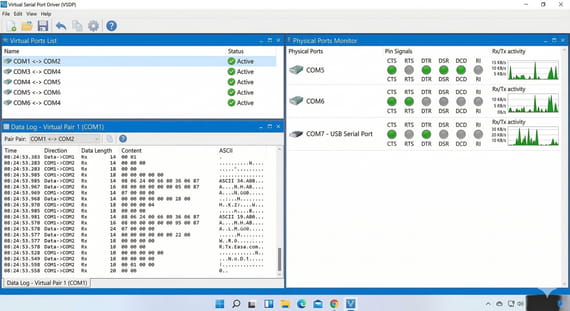
VSDP acts as both a virtual port creator and a monitoring utility. While primarily known for creating virtual COM port pairs connected via a virtual null-modem cable, the PRO version includes powerful port sniffing and monitoring capabilities.
Pros:
- Excellent all-in-one solution for both creating virtual ports and monitoring them.
- Perfect for testing serial applications when you don't have physical hardware present.
- Clean, easy-to-read visual representation of port states and control lines (DTR, RTS, CTS, etc.).
- Highly reliable driver architecture that rarely conflicts with the OS.
- Supports strict baud rate emulation for accurate virtual testing.
Cons:
- Sniffing and monitoring is a secondary feature, lacking some deep analytical tools.
- You pay a premium for the driver capabilities even if you only need a monitor.
- The interface looks a bit dated compared to modern development tools.
- Lacks advanced, on-the-fly data manipulation features.
4. Electronic Team Serial Port Monitor
Electronic Team offers a dedicated Serial Port Monitor that is widely used by developers. It can connect to an already opened COM port and start sniffing data instantly. It supports advanced filtering and allows you to emulate sending data to a specific port on behalf of the monitored application.
Pros:
- Real-time monitoring of multiple COM ports simultaneously in one window.
- Four distinct, highly useful data views (Table, Line, Dump, Terminal).
- Playback feature allows you to record a session and seamlessly resend that data to the port.
- User-friendly interface that is easy to pick up quickly.
- Solid built-in support for decoding Modbus RTU and ASCII frames.
Cons:
- Occasional latency spikes when tracking multiple high-speed ports simultaneously.
- Expensive licensing model for enterprise teams.
- Native application is Windows-only (no macOS or Linux support).
- Scripting and automation options are limited compared to Advanced Serial Port Monitor.
5. Portmon by Microsoft Sysinternals
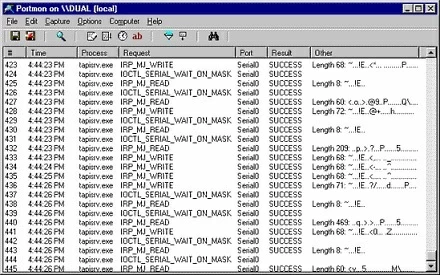
Portmon is a legacy freeware utility created by Mark Russinovich (Microsoft Sysinternals). It is a pure, bare-bones utility for monitoring and displaying all serial and parallel port activity on a system.
Pros:
- 100% free to use.
- Incredibly lightweight executable - requires absolutely no installation.
- Great for debugging legacy systems or tracking basic API-level port calls.
- Trusted pedigree as a Microsoft Sysinternals tool.
Cons:
- Severely outdated (last updated during the Windows XP/7 era).
- Fails to run natively on modern 64-bit Windows 10/11 systems without complex workarounds.
- No longer supported, meaning zero bug fixes or updates.
- Completely lacks modern protocol decoding (like Modbus) and built-in data sending tools.
6. RealTerm
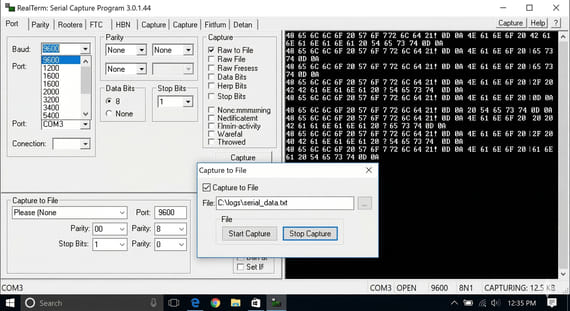
RealTerm is an open-source terminal program specially designed for capturing, controlling, and debugging complex data streams. While functioning mostly as a terminal, it has excellent raw-data monitoring capabilities built right in.
Pros:
- Completely free and open-source.
- Unbeatable for viewing raw binary, hex, and deeply technical data streams.
- Supports physical I2C, SPI, and 1-Wire chips via specialized hardware adapters.
- Highly scriptable and controllable via ActiveX/COM.
- Extremely low latency, ensuring no dropped bytes during capture.
Cons:
- The UI is notoriously archaic, dense, and difficult to navigate.
- Lacks a dedicated "spy" mode for silently sniffing background traffic.
- Extremely difficult to configure for beginners or non-engineers.
- Active development and updates have slowed down significantly lately.
Summary
If you need a reliable, feature-rich tool to analyze COM port traffic, there are several solid options available. While tools like Portmon and RealTerm are fine for free, basic tasks, professional environments require dedicated software.
For the vast majority of developers and IT professionals, Advanced Serial Port Monitor is the undeniable winner. Its perfect balance of user-friendly design, background spy mode, and advanced data-logging capabilities makes debugging serial connections faster and more efficient than ever.
See also
Garbled Serial Data on a COM Port: 7 Checks in Order
5 Ways To Send Data To COM Port From Command Line in Windows
How To Add COM Port Device On Windows Computer
6 Best Serial Port Monitor Tools (Guide & Comparison)
2 common reasons why applications failed to open serial port
How to Reset, Delete, or Restore a COM Port in Windows 11
Advanced Serial Port Monitor vs. 232analyzer
Related topics: Advanced Serial Port Monitor
hereRS232 monitor RS232 analyzer COM Port Debug RS232 terminal Serial port sniffer Serial port spy UART monitor RS232 pinout and signals Data monitor cables.