
Avaya (Customized Output Format Call Center) SMDR/CDR format
This page shows how to get call records out of the Avaya (Customized Output Format Call Center) into Advanced PBX Data Logger: the connection settings, the parser to select and the 20 fields the logger extracts for reports or a database. The settings apply to our logger; other call accounting software may expect a different configuration.
Quick facts
| Item | Avaya (Customized Output Format Call Center) |
|---|---|
| Interface | Serial printer port or LAN, whichever the system uses for SMDR output. The record layout identifies the format. |
| Parser to select | Avaya (Customized Output Format Call Center) |
| Fields extracted | 20 |
| Other Avaya systems | Avaya Communication Manager, Definity and G3 CDR formats, Avaya Merlin 1030, 3070 and Magix SMDR formats |
Avaya Communication Manager 4.X
1. Change node-name ip and add a new entry that hosts our PBX Data Logger application.
2. Change ip-services add a new entry of CDR1, and fill out the rest of the values. If you go to page three, you may need to set the "Secure" or "Reliable" option to N.
3. Change system cdr and setup the link how you want it outputted.
4. Disable the switch for "Legacy" output.
5. Our software expects date in MMDDYY format if nothing else is specified explicitly.
Our software does not support Reliable Session Protocol. You need to select another protocol type in your PBX
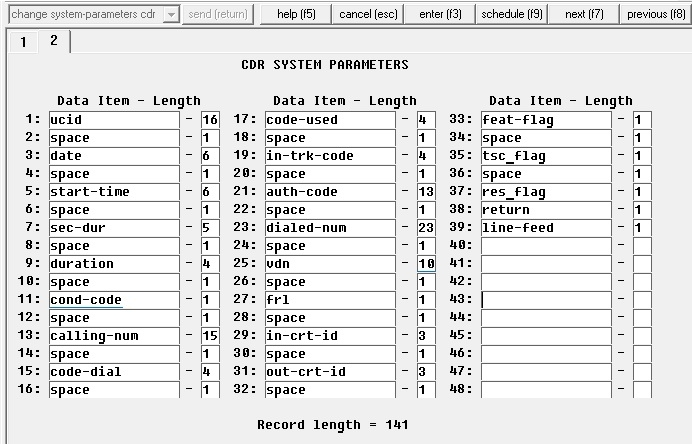
Launch the Avaya Site Administration software and go to the "CDR Parameter Settings;" tab to configure the CDR format. Please have a look at a record length when you finish setup.
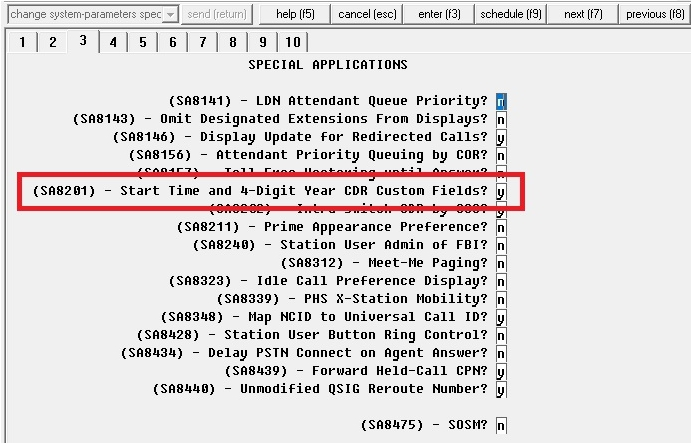
Execute the "change system-parameters special-applications" command to configure custom options. With this option enabled, the PBX will output a call duration with seconds and the full 4-difit year.
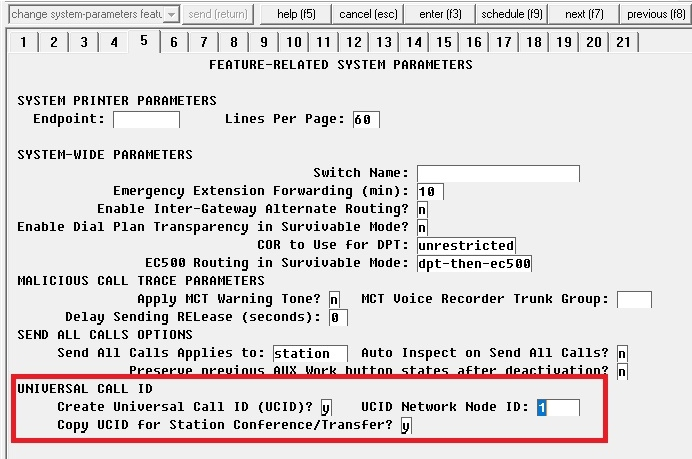
The following option allows you to create a unique ID for each call (UCID).
- Create Universal Call ID (UCID) - set to Y
- UCID Network Node ID - specify any unique value (for example, if you have five PBXs, you may use numbers 1..5).
- Copy UCID - set to Y (use the same UCID for transit calls and conferences)
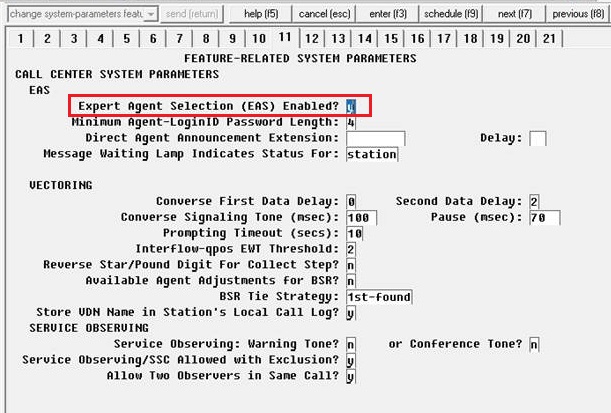
On the page 11, set the "Expert Agent Selection" parameter to Y.
On the page 13, set the "Send UCID to ASAI" parameter to Y.
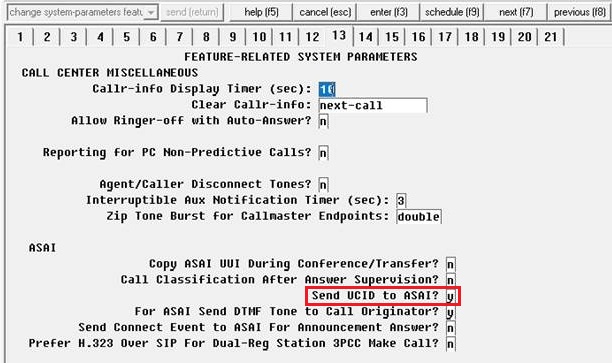
Finally, execute the "save trans all" command.
Settings from the manufacturer's documentation
Taken from Avaya ACM4 - All CDR formats, Avaya ACM6 - Condition codes, SMDR - some formats. Values are those stated in the documentation; confirm them against your firmware release.
| Setting | Documented value |
|---|---|
| Use Legacy CDR Formats default | y (legacy) by default |
Switching SMDR output on, as documented
- Type change system-parameters cdr and set Primary Output Format to customized before defining the field list.
- Expert Agent Selection (EAS) lets CDR record the agent's logical login extension as the called number instead of the hunt-group/member extension.
Record format notes
- VDN (Vector Directory Number) is available only on customized CDR records; if VDN Return Destination is active, the field holds the first VDN the caller accessed, which is relevant to call-center customized formats like this one.
Selecting the correct parser for Avaya (Customized Output Format Call Center)

Avaya (Customized Output Format Call Center)
Avaya (Customized Output Format Call Center)
Data items
| Description | Data type | Column name |
|---|---|---|
| Call time | datetime | CALL_TIME |
| Call duration (s) | integer | CALL_DURATION_S |
| Condition code | string | CALL_TYPE |
| Direction | string | DIRECTION |
| Call ID | string | FLAG3 |
| Dialed phone | string | DIALED_PHONE |
| Caller phone | string | CALLER_PHONE |
| Extension | string | EXT |
| Access code dialed | string | FLAG1 |
| Access code used | string | FLAG2 |
| Trunk code | string | TRUNK |
| Auth code | string | AUTH |
| VDN extension number | string | ACC |
| FRL | string | FLAG6 |
| Incoming circuit ID | string | FLAG4 |
| Outgoing circuit ID | string | FLAG5 |
| Flags (feature, Tsc, Res) | string | FLAG7 |
| Feature flag | string | FEAT_FLAG |
| Tsc flag | string | TSC_FLAG |
| Res flag | string | RES_FLAG |
Sample record
As delivered by the system; phone numbers, names and public addresses are masked.
110xxxxxxxxxxxxx 110423 103905 00050 0008 7            6118    9 6601                                849xxxxxxxx            1     121 4 0 0
110xxxxxxxxxxxxx 110423 103948 00221 0023 0            1387                                                 1352            1
110xxxxxxxxxxxxx 110423 103406 00949 0098 9            3777    9 6601 6691                           896xxxxxxxx            1 249 122 4 0 0
Reports and a database
Once records arrive, the logger writes them to a text file or to any ODBC database in real time, or hands them to the PBX Reports utility for manual, scheduled and e-mailed reports with a built-in web server. See exporting call log data to a database for the database setup.
Related Avaya systems
Avaya (Customized Output Format ACM 6.0)Avaya (Customized Output Format ACM 4.0)
Avaya (Enhanced Unformatted Output Format ACM 4.0)
Avaya (Expanded Output Format ACM 4.0)
Avaya Communication Manager, Definity and G3 CDR formats
Avaya Merlin 1030, 3070 and Magix SMDR formats
All supported PBX systems
Note: Products and companies mentioned here are used only for definition and identification purposes and can be trademarks and/or registered trademarks of the respective companies.
Related topics: Advanced PBX Data Logger
hereCall logging Call accounting SMDR to SQL SMDR Listener Cables and signals