
Ericsson BP 250 SMDR setup and CDR format
This page shows how to get call records out of the Ericsson BP 250 into Advanced PBX Data Logger: the connection settings, the parser to select and the 12 fields the logger extracts for reports or a database. The settings apply to our logger; other call accounting software may expect a different configuration.
Quick facts
| Item | Ericsson BP 250 |
|---|---|
| Interface | Serial. The SMDR or printer port of the PBX is connected to a COM port; speed, data bits, parity and flow control must match the PBX. |
| Parser to select | Ericsson BP 250 |
| Fields extracted | 12 |
| Other Ericsson systems | Ericsson BusinessPhone, BP128i and MD110 formats |
| serial parameters (documented) | Command 6009 baud-rate codes run from 1=50 Baud through 15=14400 Baud (e.g. 8=1200, 10=2400, 14=9600); the page only shows the two specific default codes (8 and 10) actually used for IOU/SMU. |
6006 - Device type: 7 (unspecified terminal/printer)
6007 - Character set: 0 (no conversion)
6009 - IOU (except CPU-D4) Baud rate: 10 (2400 Baud)
6009 - IOU (CPU-D4) Baud rate: 10 (2400 Baud)
6009 - SMU (except CPU-D4) Baud rate: 8 (1200 Baud)
6009 - SMU (CPU-D4) Baud rate: 10 (2400 Baud)
6011 - Autoselect allowed: Yes (optional)
6017 - Mode selection for serial interface - should be RS-232
6101 - Set year month day to : YYMMDD
6102 - Set day of week: 1 - Sunday, 7 - Saturday
6103 - Set hour minute second: HHMMSS
6104 - 12h mode, display - Set it to N for 24 mode
6201 - Log internal calls? - Yes
6202 - Log incoming calls? - Yes
6203 - Block log output? - Yes
6204 - Digits to log - Set it to NO
6205 - Bar outgoing calls for guest - Yes if you want to stop guest making calls while the pbx memory is full. Useful for hotels. (optional)
6301 - Log outgoing calls? - Yes
6302 - Log duration time - Set it to 0 because you can configure it in the application.
6303 - Log minimum meter pulses - Should set it to 0
6304 - Bar outgoing calls? - Yes if you want to stop the outgoing calls while the calls storage if out of order and the pbx memory is full. (optional)
6305 - Dialed number: suppress - Set it to 0 unless you want to strip the last n digits from the dialed number for security reasons.
6306 - Log dialed numbers beginning with 0 - Yes.
6307 - Log dialed numbers beginning with 1 - Yes.
6308 - Log dialed numbers beginning with 2 - Yes.
6309 - Log dialed numbers beginning with 3 - Yes.
6310 - Log dialed numbers beginning with 4 - Yes.
6311 - Log dialed numbers beginning with 5 - Yes.
6312 - Log dialed numbers beginning with 6 - Yes.
6313 - Log dialed numbers beginning with 7 - Yes.
6314 - Log dialed numbers beginning with 8 - Yes.
6315 - Log dialed numbers beginning with 9 - Yes.
6332 - Log minimum cost - Set it 0
6403 - Format table - Format 00-29, Set it to 01 and select Ericsson MD110 in app.
6404 - Lines per page - Set it to 0
6402 - Automatic I/O activation - Set it to 1 minute. (0 means disabled)
6701 - I/O Port - Value ppiii where pp is board position and iii is individual number of a V24 (IO unit) port.
6702 - Lines/page - Set it to 0
Settings from the manufacturer's documentation
Taken from Ericsson Business Phone 50-250 SMDR, smdr pinout. Values are those stated in the documentation; confirm them against your firmware release.
| Setting | Documented value |
|---|---|
| cable or pinout | General pinout guide maps Ericsson BP250 PBX connector pins A02/A04/A06/A08/C02/C04/C08 to PC serial pin 2/5/3/4/8/6/7 on a 9-pin PC connector (and equivalent 25-pin mapping). |
| serial parameters | Command 6009 baud-rate codes run from 1=50 Baud through 15=14400 Baud (e.g. 8=1200, 10=2400, 14=9600); the page only shows the two specific default codes (8 and 10) actually used for IOU/SMU. |
Switching SMDR output on, as documented
- When using the V.24 bi-directional interface for CIL/HOTEL, set command 6006 (Device type) to value 13, not the plain 'unspecified printer/terminal' value 7 the page lists as the default.
Record format notes
- Caller's number is a 4-digit field (0-9999); account code is a caller-entered digit combination of 1-15 digits; call duration is presented as hours, minutes, seconds (hhmmss).
- A single 'Cost state' character marks whether the call's cost was calculated internally by the PABX or received from the network.
- Command 6403's format table names many CIL layouts, e.g. 01=MD110/standard, 07=CILHOTEL, 08=CIL2HOTEL, 09=CIL3HOTEL, plus bidirectional variants 64-69; value 00 shuts the output channel down entirely.
Configuring a COM port
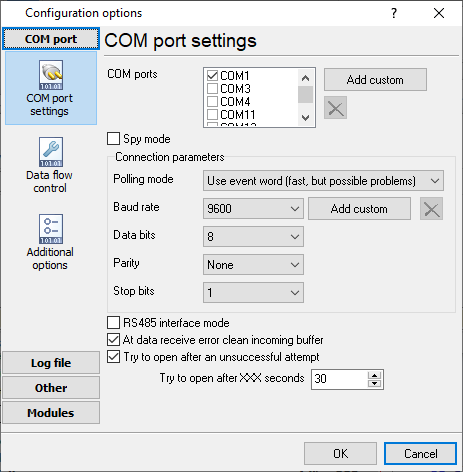
The COM port number should match the number in your system. You can check the correct port number in Devices Manager → Ports.
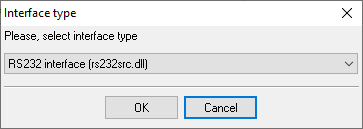
1. Add a new configuration with the RS232 data source (if you didn't it before).
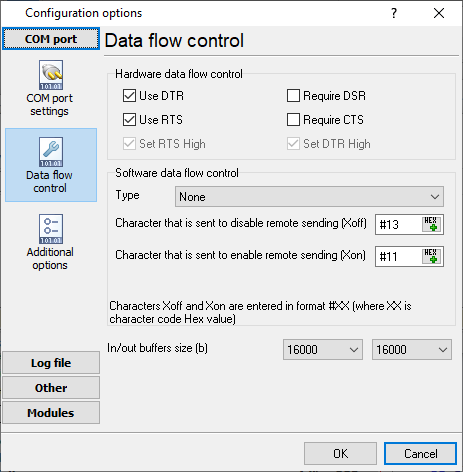
2. Select the COM port and configure the communication settings for your PBX corresponding to your PBX settings.
Selecting the correct parser for Ericsson BP 250

Ericsson BP 250
Ericsson BP 250
Data items
| Description | Data type | Column name |
|---|---|---|
| Call time | datetime | CALL_TIME |
| Caller phone | string | CALLER_PHONE |
| Call duration | datetime | CALL_DURATION |
| Call duration (s) | integer | CALL_DURATION_S |
| Phone | string | DIALED_PHONE |
| Flag 2 | string | FLAG2 |
| Account number | string | ACC |
| Authorization code | string | FLAG3 |
| Call type | string | CALL_TYPE |
| Price | float | COST |
| Trunk number | string | TRUNK |
| Sent number | string | FLAG4 |
Sample record
As delivered by the system; phone numbers, names and public addresses are masked.
00 958 050706 1308 233        0000      230                      Q                      0001 Q        0.00 I
00 959 050706 1308 203  00012 0000      252                      Q                      0003 Q        0.00 I
00 960 050706 1309 233        0000      250                      Q                      0032 Q        0.00 I
Reports and a database
Once records arrive, the logger writes them to a text file or to any ODBC database in real time, or hands them to the PBX Reports utility for manual, scheduled and e-mailed reports with a built-in web server. See exporting call log data to a database for the database setup.
Related Ericsson systems
Ericsson BP 250 (BiDi)Eclipse Executone IDS
Ericsson BP128i (Call-Hotel)
Ericsson BP128i
Ericsson BusinessPhone, BP128i and MD110 formats
All supported PBX systems
Note: Products and companies mentioned here are used only for definition and identification purposes and can be trademarks and/or registered trademarks of the respective companies.
Related topics: Advanced PBX Data Logger
hereCall logging Call accounting SMDR to SQL SMDR Listener Cables and signals