
Grandstream UCM6100, UCM6200 and UCM6510 CDR setup
This page covers the Grandstream Grandstream UCM6200, Grandstream UCM6100 and Grandstream UCM6200 (Real Time) variants in Advanced PBX Data Logger. Each section gives the connection settings, the parser to select and the fields the logger extracts for reports or a database; where the setup steps are the same for every variant they are given once. The settings apply to our logger; other call accounting software may expect a different configuration.
Quick facts
| Item | Grandstream UCM6100, UCM6200 and UCM6510 CDR setup |
|---|---|
| Variants on this page | Grandstream UCM6200, Grandstream UCM6100, Grandstream UCM6200 (Real Time) |
| Interface | Differs by variant; see each section. |
| Port | 7777 |
| Parsers | Grandstream UCM6200, Grandstream UCM6100, Grandstream UCM6200 (Real Time) |
| Fields extracted | 19 to 20 |
Variants on this page
- Grandstream UCM6200 · Records collected over HTTP from the system's web interface or API, 20 fields
- Grandstream UCM6100 · Records collected over HTTP from the system's web interface or API, 20 fields
- Grandstream UCM6200 (Real Time) · LAN, port 7777, 19 fields
Grandstream UCM6200
Parser: Grandstream UCM6200
Connection: Records collected over HTTP from the system's web interface or API.
Fields extracted: 20
PBX Settings
You can easily change the setting using the web interface.
1. Open your favorite browser.
2. Navigate to the http://192.168.0.10/ (replace the IP address with the address of your PBX)
3. Login as Administrator.
4. Select CDR → API Configuration from the left side menu.
5. Change the settings as showed below.
6. (Optional) For better securty you may specify the permitted IP address of the computer where our software is be installed (e.g. 192.168.0.10).
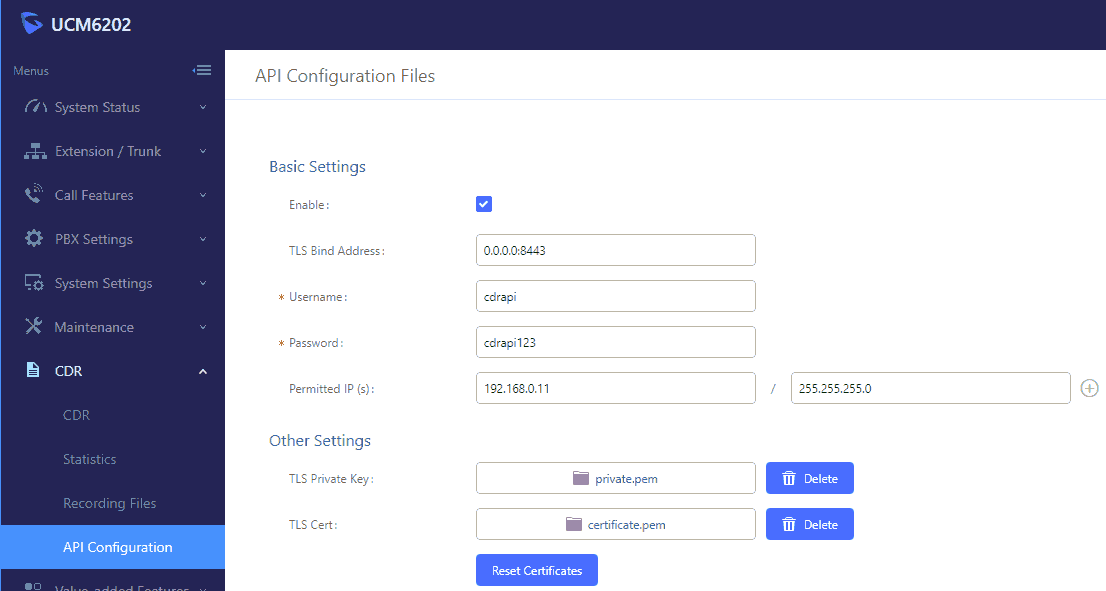
Configuring PBX Data Logger
Settings from the manufacturer's documentation
Taken from grandstream ucm61xx cdr rec api guide. Values are those stated in the documentation; confirm them against your firmware release.
| Setting | Documented value |
|---|---|
| CDR API default port | 8443 |
Data items: Grandstream UCM6200
| Description | Data type | Column name |
|---|---|---|
| Record ID | string | FLAG1 |
| Account code | string | ACC |
| Dialed phone | string | DIALED_PHONE |
| Caller phone | string | CALLER_PHONE |
| Call type | string | CALL_TYPE |
| Source channel | string | SRC_CH |
| Destination channel | string | DEST_CH |
| Direction | string | DIRECTION |
| Caller name | string | FLAG2 |
| Charged user ID | string | EXT |
| Trunk | string | TRUNK |
| Call time | datetime | CALL_TIME |
| Call duration (s) | integer | CALL_DURATION_S |
| Call duration | datetime | CALL_DURATION |
| Ring | datetime | RING |
| Disposition | string | FLAG3 |
| Unique ID | string | FLAG4 |
| User field | string | FLAG5 |
| Service | string | FLAG6 |
| Action type | string | FLAG7 |
Grandstream UCM6100
Parser: Grandstream UCM6100
Connection: Records collected over HTTP from the system's web interface or API.
Fields extracted: 20
PBX Settings
You can easily change the setting using the web interface.
1. Open your favorite browser.
2. Navigate to the http://192.168.5.220/ (replace the IP address with the address of your PBX)
3. Login as Administrator.
4. Select CDR → API Configuration from the left side menu.
5. Change the settings as showed below.
6. For better securty you may specify the permitted IP address of the computer where our software will be installed.
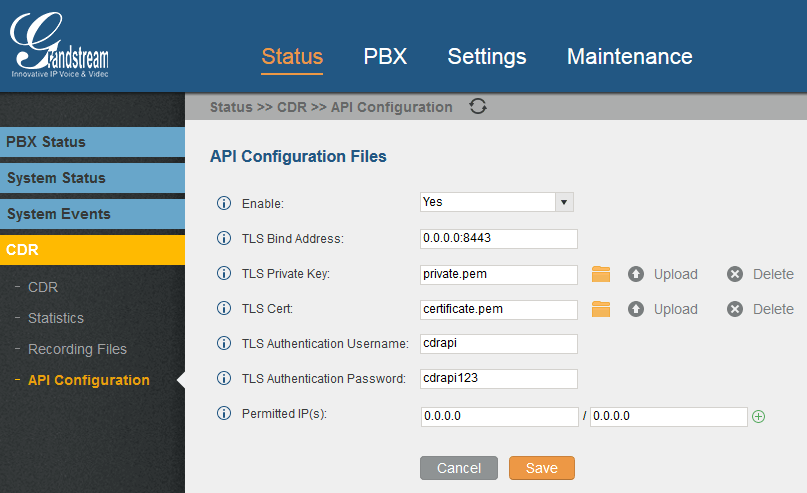
Configuring PBX Data Logger
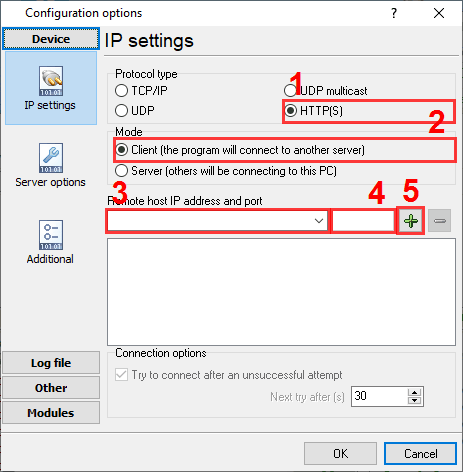
1. Advanced PBX Data Logger must be configured to the HTTP(S) client mode and specify the target URL address of your PBX (see example below): "". The port number should match the value from the CDR settings above. The URL may also include the port number, login and password.
2. The corresponding data query and parser plugin must be selected on the "Modules" page.
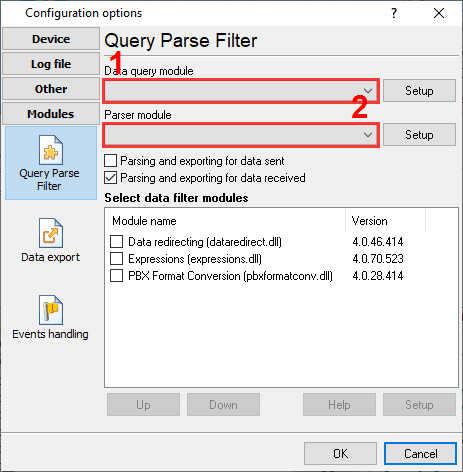
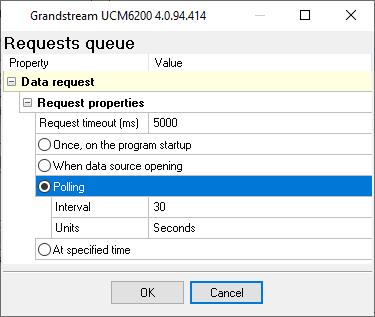
3. Click on the "Setup" button near the data query plugin and configure the polling interval (30 seconds by default).
Settings from the manufacturer's documentation
Taken from grandstream ucm61xx cdr rec api guide. Values are those stated in the documentation; confirm them against your firmware release.
| Setting | Documented value |
|---|---|
| CDR/REC API enabled state | disabled by default |
| TLS Bind Address / API port | 0.0.0.0:8443 (port 8443) |
| Permitted IP(s) default | blank, which denies all IP addresses |
| CDR API output format default | csv |
| CDR API numRecords default/max per request | 1000 |
Switching SMDR output on, as documented
- Enable the API and configure the TLS Bind Address, TLS certificate/key and Permitted IP(s) before the CDR API can be queried by a third-party application.
- Add the querying computer's IP address to Permitted IP(s); by default this list is blank and denies every address, so the CDR API will refuse all requests until an address is added.
Record format notes
- CDR API requests use the URL form https://[UCM IP]:[Port]/cdrapi?[option]=[value]&... with query parameters including format, numRecords, offset, caller, callee, startTime, endTime, minDur and maxDur.
- CSV output header row: AcctId,accountcode,src,dst,dcontext,clid,channel,dstchannel,lastapp,lastdata,start,answer,end,duration,billsec,disposition,amaflags,uniqueid,userfield,channel_ext,dstchannel_ext,service.
- XML output wraps every record in <cdr>...</cdr> elements inside one <root> element, reusing the CSV column names as element tags.
- JSON output is a top-level object with a "cdr" array of per-call objects, again reusing the same field names as keys.
Data items: Grandstream UCM6100
| Description | Data type | Column name |
|---|---|---|
| Record ID | string | FLAG1 |
| Account code | string | ACC |
| Dialed phone | string | DIALED_PHONE |
| Caller phone | string | CALLER_PHONE |
| Call type | string | CALL_TYPE |
| Source channel | string | SRC_CH |
| Destination channel | string | DEST_CH |
| Direction | string | DIRECTION |
| Caller name | string | FLAG2 |
| Charged user ID | string | EXT |
| Trunk | string | TRUNK |
| Call time | datetime | CALL_TIME |
| Call duration (s) | integer | CALL_DURATION_S |
| Call duration | datetime | CALL_DURATION |
| Ring | datetime | RING |
| Disposition | string | FLAG3 |
| Unique ID | string | FLAG4 |
| User field | string | FLAG5 |
| Service | string | FLAG6 |
| Action type | string | FLAG7 |
Sample record
As delivered by the system; phone numbers, names and public addresses are masked.
<sub_cdr>
<AcctId>184</AcctId>
<accountcode/>
<src>3259</src>
<dst>6474</dst>
<dcontext>ext-local</dcontext>
<clid>"Name Surname " <3259></clid>
<channel>PJSIP/3259-000xxxxf</channel>
<dstchannel>PJSIP/6474-000000a0</dstchannel>
<lastapp>Dial</lastapp>
<lastdata>PJSIP/6474/sip:6474@10.224.21.193:5060,30,zb(callee-handler^s^1)</lastdata>
<start>2018-03-01 07:38:11</start>
<answer>2018-03-01 07:38:15</answer>
<end>2018-03-01 07:38:58</end>
<duration>46</duration>
<billsec>42</billsec>
<disposition>ANSWERED</disposition>
<amaflags>DOCUMENTATION</amaflags>
<uniqueid>1519911491.511</uniqueid>
<userfield>Internal</userfield>
<channel_ext>3259</channel_ext>
<dstchannel_ext>6474</dstchannel_ext>
<service>s</service>
<caller_name>Name Surname </caller_name>
<recordfiles/>
<dstanswer>6474</dstanswer>
<chanext/>
<dstchanext/>
<session>151xxxxxxxxxxxxx-3259</session>
<action_owner>3259</action_owner>
<action_type>DIAL</action_type>
<src_trunk_name/>
<dst_trunk_name/>
</sub_cdr>
Grandstream UCM6200 (Real Time)
Parser: Grandstream UCM6200 (Real Time)
Connection: LAN. The PBX sends records to the logger PC; the logger listens on TCP port 7777. Port 7777.
Fields extracted: 19
PBX Settings
Note: CDR Real-Time Output feature added starting from firmware 1.0.17.16 on UCM62xx/UCM6510 and starting from firmware 1.0.5.4 on UCM630xA.
You can change the PBX setting using the web interface.
1. Open your favorite browser.
2. Navigate to the http://192.168.0.10/ (replace the IP address with the address of your PBX)
3. Login as Administrator.
4. From the left side menu:
4.1 Select "CDR → API Configuration".
4.2 Or in newer versions "Value-added features → API Configuration".
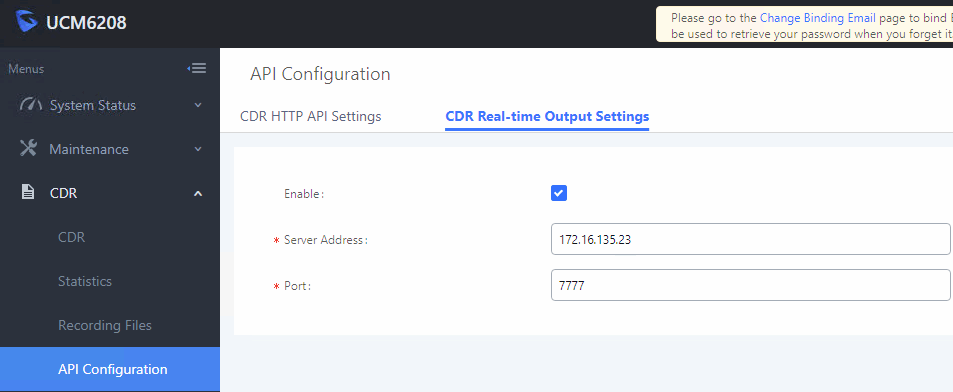
5. Switch to the "Real Time /CDR Real-time output settings" tab.
6. Specify the IP address/port of the computer with Advanced PBX Data Logger (for example: 172.16.135.23 and 7777). You need the static IP address on this computer.
Data items: Grandstream UCM6200 (Real Time)
| Description | Data type | Column name |
|---|---|---|
| Record ID | string | FLAG1 |
| Account code | string | ACC |
| Dialed phone | string | DIALED_PHONE |
| Caller phone | string | CALLER_PHONE |
| Call type | string | CALL_TYPE |
| Source channel | string | SRC_CH |
| Destination channel | string | DEST_CH |
| Direction | string | DIRECTION |
| Caller name | string | FLAG2 |
| Charged user ID | string | EXT |
| Call time | datetime | CALL_TIME |
| Call duration (s) | integer | CALL_DURATION_S |
| Call duration | datetime | CALL_DURATION |
| Ring | datetime | RING |
| Disposition | string | FLAG3 |
| Unique ID | string | FLAG4 |
| User field | string | FLAG5 |
| Service | string | FLAG6 |
| Action type | string | FLAG7 |
Sample record
As delivered by the system; phone numbers, names and public addresses are masked.
'73436','','050xxxxxxx','171','from-internal','"" <050xxxxxxx>','DAHDI/o7-1','PJSIP/171-000021c0','Dial','PJSIP/170/sip:170@172.16.132.55:5060&PJSIP/173/sip:173@172.16.132.107:5060&PJSI','2018-07-30 16:11:41','2018-07-30 16:11:56','2018-07-30 16:11:56','14','0','NO ANSWER','DOCUMENTATION','1532952700.27036','Inbound','o7','171','p','','','','','','153xxxxxxxxxxxxx-050xxxxxxx','050xxxxxxx','RINGGROUP[6400]','Etisalat_024xxxxxx','',
'73437','','050xxxxxxx','111','from-internal','"" <050xxxxxxx>','DAHDI/o7-1','PJSIP/111-000021c1','Dial','PJSIP/170/sip:170@172.16.132.55:5060&PJSIP/173/sip:173@172.16.132.107:5060&PJSI','2018-07-30 16:11:41','2018-07-30 16:11:56','2018-07-30 16:12:10','28','13','ANSWERED','DOCUMENTATION','1532952700.27036','Inbound','o7','111','p','','','111','','','153xxxxxxxxxxxxx-050xxxxxxx','050xxxxxxx','RINGGROUP[6400]','Etisalat_024xxxxxx','',
'73438','','050xxxxxxx','6400','ext-group','"" <050xxxxxxx>','DAHDI/o4-1','','ForkCDR','are','2018-07-30 16:12:19','2018-07-30 16:12:20','2018-07-30 16:12:20','0','0','ANSWERED','DOCUMENTATION','1532952739.27079','Inbound','o4','6400','p','','','6400','','','153xxxxxxxxxxxxx-050xxxxxxx','050xxxxxxx','RINGGROUP[6400]','Etisalat_024xxxxxx','',
Connecting the logger
Add a data source in PBX Data Logger that matches the interface named in the section for your variant (RS232, TCP client, TCP server or FTP), then open Modules → Query Parse Filter → Data query, click Setup and select the parser named there.
Reports and a database
Once records arrive, the logger writes them to a text file or to any ODBC database in real time, or hands them to the PBX Reports utility for manual, scheduled and e-mailed reports with a built-in web server. See exporting call log data to a database for the database setup.
Related Grandstream systems
Grandstream UCM6500 (Real Time)Greenlite
GoldStar GPS-6A
Genbend M6
All supported PBX systems
Note: Products and companies mentioned here are used only for definition and identification purposes and can be trademarks and/or registered trademarks of the respective companies.
Related topics: Advanced PBX Data Logger
hereCall logging Call accounting SMDR to SQL SMDR Listener Cables and signals