
Panasonic KX-HTS824 SMDR setup and CDR format
This page shows how to get call records out of the Panasonic KX-HTS824 into Advanced PBX Data Logger: the connection settings, the parser to select and the 17 fields the logger extracts for reports or a database. The settings apply to our logger; other call accounting software may expect a different configuration.
Quick facts
| Item | Panasonic KX-HTS824 |
|---|---|
| Interface | Records collected over HTTP from the system's web interface or API. |
| Parser to select | Panasonic KX-HTS824 |
| Fields extracted | 17 |
| Other Panasonic systems | Panasonic KX-TDA30, TDA100, TDA200, TDA600 SMDR setup, Panasonic KX-T, KX-TD500, DBS and 576/816 SMDR formats |
Panasonic KX-HTS32 and Panasonic KX-HTS824
The PBX records the information of outgoing and incoming call numbers, etc., for all calls to a CSV file.
Configuring call logging
CDR Recording can be set through the Web Maintenance Console screen in the HTS system (default login/password: INSTALLER/1234)
Go to the PBX Configuration → System → CDR
Configure the following options:
[CDR Record Enable/Disable] - Enable.
[CDR Recording Mode] - Web Maintenance Console or External Application (preferable).
Apply & Save the settings.
CDR Recording Mode: For Web Maintenance Console
A CDR data file (Master.csv) can be downloaded from the Web Maintenance Console. A maximum of 5 CDR data files, including the most recent file, can be retained in the PBX.
You should manually download the CSV file, unpack, and place it in a folder on your computer in this mode. The logger will import data from that folder automatically.
Create the "File" data source in the PBX logger and add the folder with the "Master.csv" file.
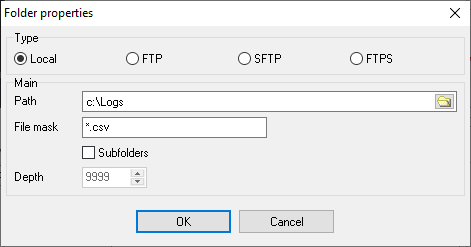
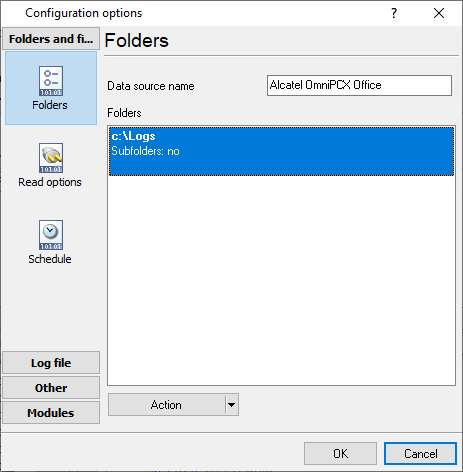
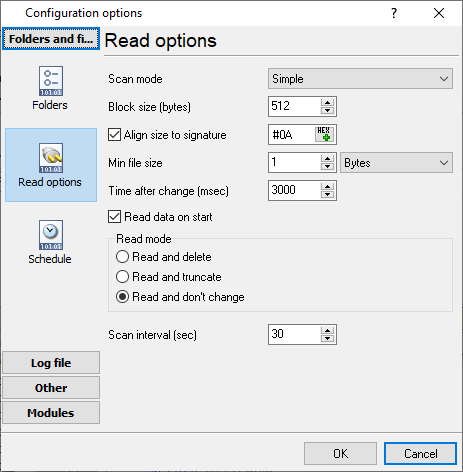
You do not need to select a data query plugin for this PBX when you use the "For Web Maintenance Console" mode.
CDR Recording Mode: For External Application
The PBX stores only a few last records and clears the Master.csv file after each external application request.
The logger automatically polls the PBX every 30 seconds for new data and processes data in this mode.
Note: Please, change "your_password" in the URL below with your installer's password.
Configuring PBX Data Logger
Settings from the manufacturer's documentation
Taken from Panasonic-KX-HTS32-KX-HTS824-v1.6. Values are those stated in the documentation; confirm them against your firmware release.
| Setting | Documented value |
|---|---|
| External Application download URL format | GET xxx.xxx.xxx.xxx/INSTALLER/yyyyy/Master.csv (xxx.xxx.xxx.xxx = PBX IP address, INSTALLER = fixed account name, yyyyy = the Installer level account password) |
| Max CDR data file size | 2.5 MB, around 10000 call records |
| Retained CDR files, Web Maintenance Console mode | Up to 5 files including the most recent; oldest deleted first once 5 are exceeded |
Switching SMDR output on, as documented
- Enable CDR recording via PBX Configuration -- [1-7] System -- CDR in Web Maintenance Console.
- Choose CDR Recording Mode: For Web Maintenance Console or For External Application.
Record format notes
- The CDR CSV file has 15 columns: Account Code, Caller, Callee, Source Channel, Destination Channel, Feature, Option 1, Option 2, Start Time, Answer Time, End Time, Total Duration, Talking Duration, Status, Unique ID; no header row is written.
Selecting the correct parser for Panasonic KX-HTS824

Panasonic KX-HTS824
Panasonic KX-HTS824
Data items
| Description | Data type | Column name |
|---|---|---|
| Account | string | ACC |
| Direction | string | DIRECTION |
| Extension | string | EXT |
| Caller phone | string | CALLER_PHONE |
| Trunk | string | TRUNK |
| Device | string | FLAG1 |
| Dialed phone | string | DIALED_PHONE |
| Feature | string | FLAG4 |
| Option 1 | string | FLAG2 |
| Option 2 | string | FLAG3 |
| Call time | datetime | CALL_TIME |
| Total duration (sec) | integer | TOTAL_DURATION_S |
| Call duration (sec) | integer | CALL_DURATION_S |
| Call duration | datetime | CALL_DURATION |
| Ring | datetime | RING |
| Call type | string | CALL_TYPE |
| Call ID | string | FLAG5 |
Panasonic programming software
Panasonic KX-NS and KX-HTS systems are programmed in the Web Maintenance Console, opened in a browser at the IP address of the PBX. It is part of the system, not a download from AGG Software. The SMDR settings described on this page are made there; PBX Data Logger receives the records the console switches on.
Reports and a database
Once records arrive, the logger writes them to a text file or to any ODBC database in real time, or hands them to the PBX Reports utility for manual, scheduled and e-mailed reports with a built-in web server. See exporting call log data to a database for the database setup.
Related Panasonic systems
Panasonic KX-HTS32Panasonic DBS-90
Panasonic KX-NCP1000
Panasonic KX-NCP500
Panasonic KX-TDA30, TDA100, TDA200, TDA600 SMDR setup
Panasonic KX-T, KX-TD500, DBS and 576/816 SMDR formats
All supported PBX systems
Note: Products and companies mentioned here are used only for definition and identification purposes and can be trademarks and/or registered trademarks of the respective companies.
Related topics: Advanced PBX Data Logger
hereCall logging Call accounting SMDR to SQL SMDR Listener Cables and signals