
Yeastar (S100,S200,S300) SMDR setup and CDR format
This page shows how to get call records out of the Yeastar (S100,S200,S300) into Advanced PBX Data Logger: the connection settings, the parser to select and the 15 fields the logger extracts for reports or a database. The settings apply to our logger; other call accounting software may expect a different configuration.
Quick facts
| Item | Yeastar (S100,S200,S300) |
|---|---|
| Interface | LAN. The PBX accepts a connection on TCP port 5038; the logger connects to the PBX IP address. |
| Port | 5038 |
| Parser to select | Yeastar (S100,S200,S300) |
| Fields extracted | 15 |
Introduction
Yeastar S-Series outputs real-time records after each call (Station Message Detail Recording (SMDR)). These records include info about outgoing calls, incoming calls and internal calls.
For example, this page shows the settings for S100
AMI Settings
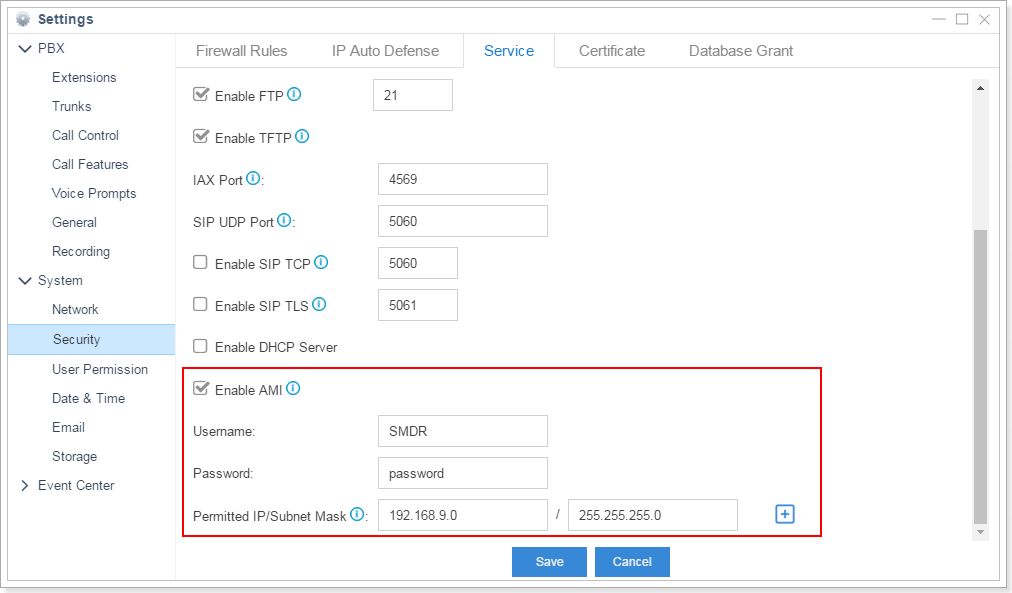
Step 1. Enable AMI on your PBX and setup the permitted host/IP to access AMI.
PATH: Settings → System → Security → Service
PBX Data Logger Settings
1. The logger should work in TCP client mode. The PBX being in permanent listening on port 5038, therefore you need to specify x.x.x.x:5038, where x.x.x.x should be the IP address of your PBX (e.g. 192.168.9.150).
2. Select the corresponding data query and parser plugin (Modules → Query Parse Filter → Parser).
3. Click the "Setup" button near the "Data query" box.
4. Specify your login and password.
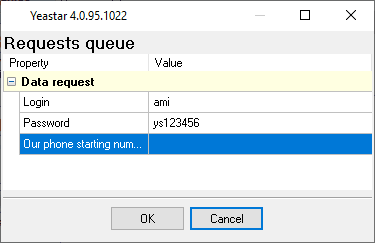
5. Clock "OK" and save all changes.
Configuring PBX Data Logger as a TCP client
Our software should work in the TCP client mode. It means that our software will initiate connection with the PBX and the PBX will work as a server. Add one or several PBX IP addresses here (the IP address of the Asterisk [AMI interface]). The port number should match the port that you have defined within the PBX (5038 in the example below).
1. Add a new configuration with the TCP data source (if you didn't it before).
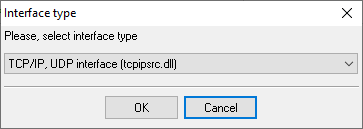
2. Configure the TCP settings as shown below.
![TCP Client Mode - Asterisk [AMI interface]](/pbx/shared/tcp-client-mode.png)
192.168.1.220
5038
192.168.1.220:5038
Selecting the correct parser for Yeastar (S100,S200,S300)

Yeastar (S100,S200,S300)
Yeastar (S100,S200,S300)
Data items
| Description | Data type | Column name |
|---|---|---|
| Account code | string | ACC |
| Destination number | string | DIALED_PHONE |
| Caller ID Name | string | FLAG1 |
| Caller number | string | CALLER_PHONE |
| Call type | string | CALL_TYPE |
| Direction | string | DIRECTION |
| Trunk | string | TRUNK |
| Ext | string | EXT |
| Call time | datetime | CALL_TIME |
| Call duration (sec) | integer | CALL_DURATION_S |
| Call duration | datetime | CALL_DURATION |
| Total duration (sec) | integer | TOTAL_DURATION_S |
| Ring duration (s) | integer | RING_S |
| Ring duration | datetime | RING |
| Call ID | string | FLAG2 |
Reports and a database
Once records arrive, the logger writes them to a text file or to any ODBC database in real time, or hands them to the PBX Reports utility for manual, scheduled and e-mailed reports with a built-in web server. See exporting call log data to a database for the database setup.
Related Yeastar systems
WypointWelltech ePBX 100
Yeastar MyPBX Enterprise
eOn Millennium v1.2
All supported PBX systems
Note: Products and companies mentioned here are used only for definition and identification purposes and can be trademarks and/or registered trademarks of the respective companies.
Related topics: Advanced PBX Data Logger
hereCall logging Call accounting SMDR to SQL SMDR Listener Cables and signals