
RS232 RJ45 Pinout: EIA-561 and Cisco Console (Yost) Wiring
RJ45 is only the shape of the jack. When it carries a serial port, one of two pin assignments is used: EIA/TIA-561, the standard for modems and terminals, and the Yost layout that Cisco adopted for its console ports and that most other network equipment copied. The two are not compatible, so check the manual of the device before wiring a cable. An RJ45 serial port is still RS232 (±12 V signals), not Ethernet, even though the same jack is used for both; plugging a console cable into a network port does no harm, but nothing will work.
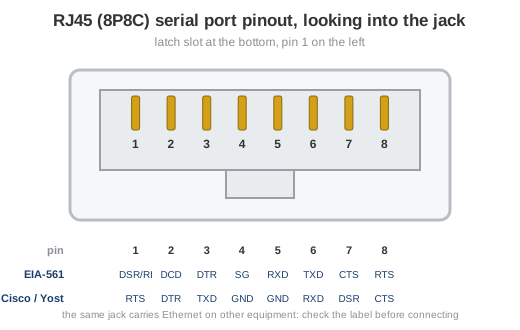
Fig. 1. RJ45 (8P8C) jack, front view, latch slot at the bottom: pin 1 is on the left
EIA/TIA-561 RS232 pinout on RJ45
EIA-561 defines RS232 on an 8-position modular jack for asynchronous use only: there are no clock lines. Pin 1 doubles as DSR or RI depending on the equipment. Directions are given for the DTE (computer) side.
| Pin | Signal | Name | DTE | DB9 pin |
|---|---|---|---|---|
| 1 | DSR / RI | Data Set Ready or Ring Indicator | ← | 6 / 9 |
| 2 | DCD | Data Carrier Detect | ← | 1 |
| 3 | DTR | Data Terminal Ready | → | 4 |
| 4 | SG | Signal Ground | 5 | |
| 5 | RXD | Receive Data | ← | 2 |
| 6 | TXD | Transmit Data | → | 3 |
| 7 | CTS | Clear To Send | ← | 8 |
| 8 | RTS | Request To Send | → | 7 |
The last column gives the matching pin of the DB9 pinout for a straight RJ45 to DB9 adapter that connects an EIA-561 port to a PC.
Cisco console port pinout (Yost RJ45 layout)
Routers, switches, firewalls and many serial-console servers use the layout that Dave Yost proposed for RS232 over RJ45. Its trick is symmetry: outputs are on pins 1 to 3, inputs on pins 6 to 8, so a rolled (rollover) cable that reverses pin 1 to 8 connects any two devices, and the same cable plus an adapter reaches a PC. Directions below are from the console port's point of view.
| Console pin | Signal | Direction | Rolled cable | Adapter pin | DB9 signal (PC) |
|---|---|---|---|---|---|
| 1 | RTS | out | 1 → 8 | 8 | CTS (pin 8) |
| 2 | DTR | out | 2 → 7 | 7 | DSR (pin 6) |
| 3 | TXD | out | 3 → 6 | 6 | RXD (pin 2) |
| 4 | GND | 4 → 5 | 5 | GND (pin 5) | |
| 5 | GND | 5 → 4 | 4 | GND (pin 5) | |
| 6 | RXD | in | 6 → 3 | 3 | TXD (pin 3) |
| 7 | DSR | in | 7 → 2 | 2 | DTR (pin 4) |
| 8 | CTS | in | 8 → 1 | 1 | RTS (pin 7) |
RJ45 to DB9 adapter for a console cable
The light-blue Cisco console kit is a rolled RJ45 cable plus an RJ45 to DB9 female adapter (the "terminal" adapter, often marked DTE). Wired as in the table, the adapter maps RJ45 pin 1 to DB9 pin 8, 2 to 6, 3 to 2, 4 and 5 to 5, 6 to 3, 7 to 4 and 8 to 7. Only three wires matter for a console session: TXD, RXD and ground, which is why cheap adapters with the handshake pins left open still work. Current equipment often adds a USB console port next to the RJ45 one; both give the same command line.
Talking to the port
A console or an EIA-561 port is an ordinary COM port on the PC side once the adapter is in place. Open it with an RS232 terminal at the speed the device expects (9600 8N1 for most console ports), flow control off. If nothing arrives, swap the pin assignment first, then check the COM port number Windows gave to the adapter.
RJ45 serial related links
- RS232 connector pinouts: DB9, DB15, DB25 and RJ45 compared on one page.
- Full 25-pin RS232 pinout (DB-25) with every signal name.
- DB9 pinout of the PC serial port.
- Null modem cable for two DTE devices with D-sub connectors.
- RS232 signals and hardware flow control.