
Serial over Ethernet: how it works, software or hardware
Serial over Ethernet carries the bytes of an RS232, RS422 or RS485 line through a TCP/IP network instead of a serial cable. One end reads a COM port and sends the bytes into a network connection. The other end receives them and writes them to a COM port: a real one, or a virtual one that a program opens as if the device were plugged in locally. TCP COM Bridge does both jobs on Windows.
How the link is built
- The serial end. On the computer where the device is connected, the program opens the physical COM port with the baud rate, parity and flow control the device needs.
- The network link. One side listens as a TCP server on a port number you choose; the other side connects as a TCP client. Either computer can take either role. The client can address the server by IP address, by domain name or by computer name, which helps when addresses are assigned dynamically.
- The virtual COM port. On the computer where your application runs, the program creates a virtual COM port. The application opens it like any other COM port, and everything it writes goes to the network link. You need this only when the application cannot open a TCP connection itself.
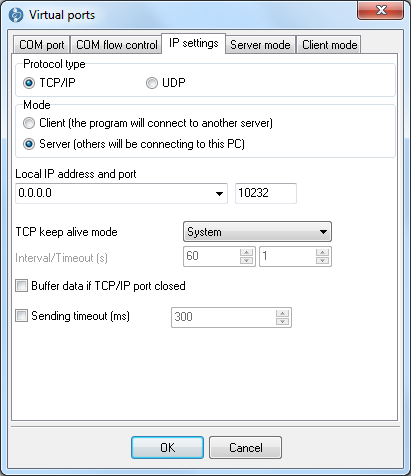
The network side of one connection: protocol, client or server mode, address and port
Which layout fits your case
| You have | Layout | Guide |
|---|---|---|
| A device on computer A, a COM-only program on computer B | Server with the real COM port on A, client with a virtual COM port on B | COM port redirector |
| A device behind a hardware device server or a Wi-Fi gateway that offers an IP address and a port | One client connection with a virtual COM port on your computer; nothing to install at the device | COM port redirector |
| Many serial devices on one computer that other computers must reach | One server connection for each COM port | Serial device server |
| One device that several computers use | One server, a client on every other computer | Share a COM port over the network |
| One device that several programs on the same computer read | A local server on the real port, a local client with a virtual port for each program | Serial port splitter |
| A program on a terminal server, the device on the operator's computer | A dedicated TCP link instead of the remote desktop COM port channel | COM ports and a terminal server |
| Two existing COM ports on one computer | A server and a client on 127.0.0.1 | Connect two COM ports locally |
Raw TCP or RFC 2217
There are two ways to put serial data on a network.
- Raw TCP. Only the data bytes travel. Each end sets its own serial parameters. Any program or device that can open a TCP socket can take part.
- RFC 2217 (Telnet COM Port Control). The client can also change the baud rate and the control lines of the remote port with special commands. Both ends must implement the protocol.
TCP COM Bridge uses the raw data stream and does not implement RFC 2217. When the remote end is a hardware device server, switch it to its raw TCP mode and set the baud rate in the device server itself. Between two copies of TCP COM Bridge, the Professional edition can pass the communication parameters of a virtual COM port and the RTS and DTR lines to the remote hardware COM port. The options on the "Advanced" tab (transmit RTS and DTR state, transmit communication parameters, encryption, additional keep-alive packets, optimization for small data packets) work only when TCP COM Bridge runs on both ends, and the settings must be identical on both sides. Leave them off when the other end is a device server or another program.
TCP or UDP
- TCP keeps a connection and checks delivery. The program can watch the link with keep-alive packets, reconnect after a failure, and keep the data that arrives from the COM port in a buffer while the link is down. Use TCP unless you have a reason not to.
- UDP sends packets without a connection and without a delivery guarantee; the application must cope with a lost packet. It fits small packets that go to many receivers at once, including multicast. UDP requires the Professional edition.
Software on a PC or a hardware device server
A hardware device server is a small box with serial ports and an Ethernet socket. Software does the same work on a Windows computer. They also combine well.
- Choose a hardware box when there is no computer near the device, or when the place is unsuitable for a PC.
- Choose software when the device is already connected to a Windows computer, or when that computer can get the ports it needs from an add-in card or USB adapters. The computer stays available for other work, and one computer can serve up to 255 COM ports.
- Use both when a box sits at the device and a COM-only program runs on your computer. TCP COM Bridge then provides the virtual COM port and connects as a TCP client to the raw TCP port of the box.
What changes over the Internet
- The server side needs a static local IP address and a port forwarding rule on its router. With a dynamic public address, use a dynamic DNS name. The firewall must allow the chosen port. The online help has a step-by-step chapter.
- Restrict who may connect. In server mode you can list the allowed IP addresses; connections from other addresses are rejected.
- The Professional edition can encrypt the traffic between two copies of TCP COM Bridge with a proprietary algorithm. For sensitive data, run the link through a VPN as well.
- Every request and reply now crosses the network. Measure the round trip with ping. For devices that acknowledge every small packet, such as receipt printers, we recommend a round trip under 50 ms and the "Optimize for small data packets" option.
What serial over Ethernet does not do
- It does not convert protocols. A Modbus RTU frame stays a Modbus RTU frame inside the tunnel. To talk to Modbus RTU devices from a Modbus TCP master, use MODBUS Gateway.
- It does not create a pair of linked virtual ports on one computer. That is the job of Virtual Null Modem.
- It does not show you the traffic. Use Advanced Serial Port Monitor on the real or the virtual COM port.
- It does not remove delay. Protocols with strict timing between bytes can be sensitive to the delay a network adds. Test with your device before you rely on the link.
- TCP COM Bridge runs on Windows only. The other end of a raw TCP link can be any system.
Check that the link works
- Both connections show a green indicator in the main window, and the server shows one connected client.
- Reset the statistics, send a known test string from one end and compare the byte counters on both ends. They should grow by exactly the length of the string.
- If the counters grow on one end only, check the firewall, the port number and the serial parameters of the real COM port.
Editions and trial
The Standard edition allows two connections over TCP. The Professional edition has no connection limit and adds the Windows service mode, UDP, additional keep-alive packets, traffic encryption and the command line. The trial version works for 21 days and allows three connections; each work session is limited to 128 KB of transferred data or 2 hours. Compare editions.
See also
Install TCP COM Bridge: setup, driver, first connection
Serial port splitter: one COM port for two or more programs
Serial device server: many COM ports on one Windows PC
Share a COM port over the network
COM port redirector: a virtual COM port to a TCP/IP address
Redirect COM ports to a terminal Windows server
Serial over Ethernet: how it works
Connect two COM ports on the same computer
Printing on one receipt, POS or fiscal printer from two computers
Fix slow receipt printing from remote accounting software
Serial to TCP/IP converter software
Best serial over Ethernet tools by situation
TCP COM Bridge vs tcp2com: when the free tool is enough
TCP COM Bridge troubleshooting
Related topics: TCP COM Bridge
hereSerial over Ethernet | Serial to TCP/IP converter | COM port redirector | Serial port splitter | COM port sharing | Serial device server | Serial port monitor | RS232 pinout and signals | Virtual Null Modem | COM Port Emulation