
Aastra 470 (PC5 format) SMDR setup and CDR format
This page shows how to get call records out of the Aastra 470 (PC5 format) into Advanced PBX Data Logger: the connection settings, the parser to select and the 16 fields the logger extracts for reports or a database. The settings apply to our logger; other call accounting software may expect a different configuration.
Quick facts
| Item | Aastra 470 (PC5 format) |
|---|---|
| Interface | LAN. The PBX accepts a connection on TCP port 1080; the logger connects to the PBX IP address. |
| Port | 1080 |
| Parser to select | Aastra 470 (PC5 format) |
| Fields extracted | 16 |
| Other Aastra systems | Aastra Intelligate and MX-ONE MDFP15 formats |
PBX settings (R3.2+)
Please,
1. Login to your PBX management console using your favorite browser.
2. Go to the "Tariffication → General" page.
3. Change the settings:
3.1 Enabled: checked.
3.2 OCL + ICL tariffication: checked.
3.3 IP address: 192.168.1.27 (the IP address of the computer where Advanced PBX Data Logger was installed).
3.4 TCP port: 1080.
3.5 OCL format: PC5.
3.6 ICL format: PC5.
3.7 OCL header: empty.
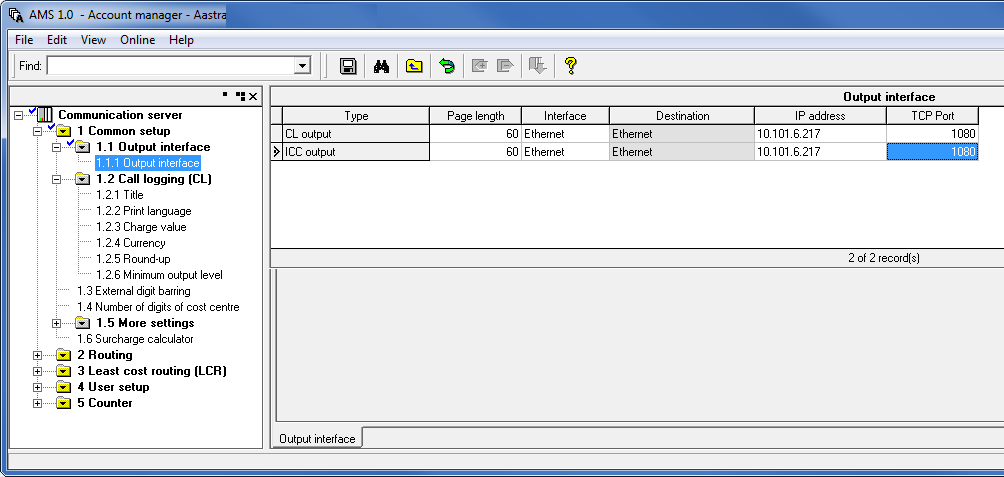
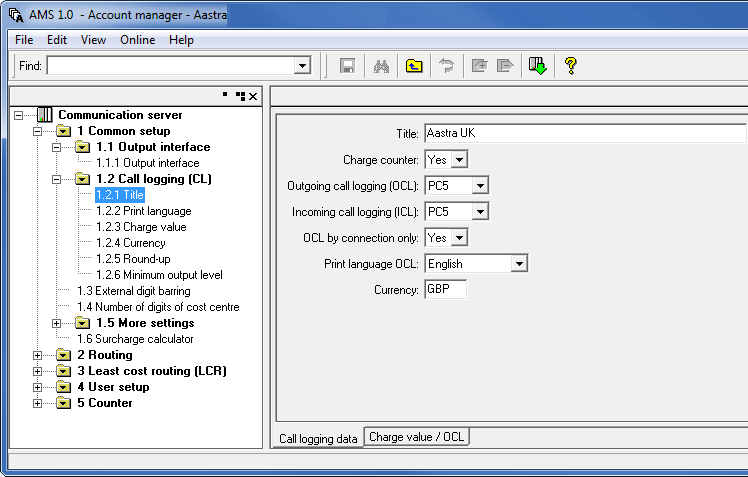
Configuring PBX Data Logger as a TCP client
Our software should work in the TCP client mode. It means that our software will initiate connection with the PBX and the PBX will work as a server. Add one or several PBX IP addresses here (the IP address of the Aastra 470). The port number should match the port that you have defined within the PBX (1080 in the example below).
1. Add a new configuration with the TCP data source (if you didn't it before).
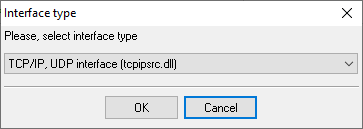
2. Configure the TCP settings as shown below.
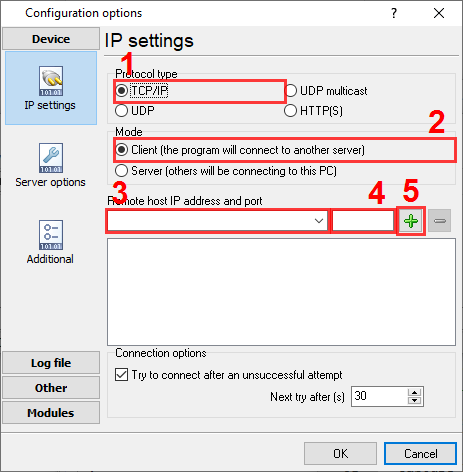
192.168.1.220
1080
192.168.1.220:1080
Selecting the correct parser for Aastra 470 (PC5 format)

Aastra 470 (PC5 format)
Aastra 470 (PC5 format)
Data items
| Description | Data type | Column name |
|---|---|---|
| Call time | datetime | CALL_TIME |
| Call duration | datetime | CALL_DURATION |
| Call duration (s) | integer | CALL_DURATION_S |
| Ext | string | EXT |
| Call type | string | CALL_TYPE |
| Direction | string | DIRECTION |
| Cost | float | COST |
| Call metering pulses | integer | FLAG1 |
| Trunk | string | TRUNK |
| Caller phone | string | CALLER_PHONE |
| Dialed phone | string | DIALED_PHONE |
| Dialed phone 2 | string | FLAG2 |
| Ring duration (s) | integer | RING_S |
| Ring duration | datetime | RING |
| Sequence No | string | FLAG5 |
| Record No | string | FLAG6 |
Sample record
As delivered by the system; phone numbers, names and public addresses are masked.
	6144                   110 160204 16:47 00H00M02       0.00 00000 02101 6144                 6144                 3023                                     3023                                             1929
	6144                   110 160204 16:48 00H00M01       0.00 00000 02101 6144                 6144                 3023                                     3023                                             1930
	6134                   010 160204 16:48 00H00M05       0.00 00000 00201 6134                 495xxxxxxx           892xxxxxxxx                              892xxxxxxxx                                      1931
Reports and a database
Once records arrive, the logger writes them to a text file or to any ODBC database in real time, or hands them to the PBX Reports utility for manual, scheduled and e-mailed reports with a built-in web server. See exporting call log data to a database for the database setup.
Related Aastra systems
AYC IPcts3CX
Aastra Intelligate (tab)
Aastra Intelligate IP SMDR
Aastra Intelligate and MX-ONE MDFP15 formats
All supported PBX systems
Note: Products and companies mentioned here are used only for definition and identification purposes and can be trademarks and/or registered trademarks of the respective companies.
Related topics: Advanced PBX Data Logger
hereCall logging Call accounting SMDR to SQL SMDR Listener Cables and signals