
Alcatel OmniPCX Office SMDR setup and CDR format
This page shows how to get call records out of the Alcatel OmniPCX Office into Advanced PBX Data Logger: the connection settings, the parser to select and the 15 fields the logger extracts for reports or a database. The settings apply to our logger; other call accounting software may expect a different configuration.
Quick facts
| Item | Alcatel OmniPCX Office |
|---|---|
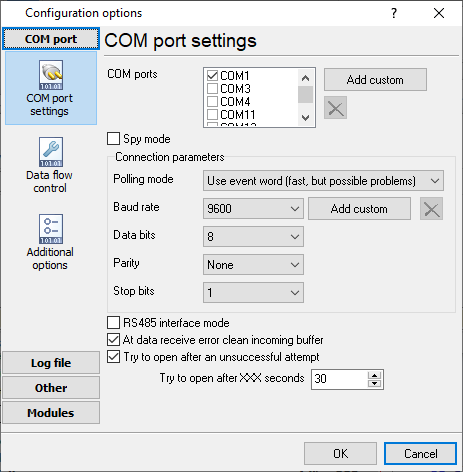
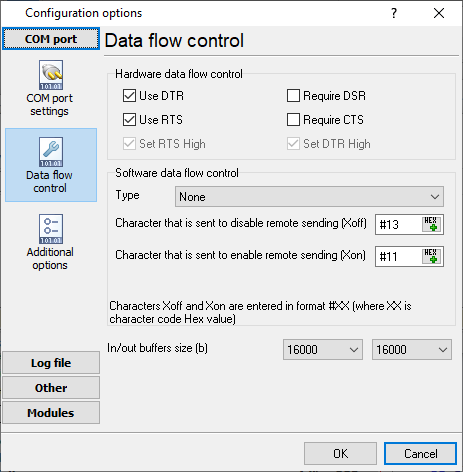
| Interface | Serial. The SMDR or printer port of the PBX is connected to a COM port; speed, data bits, parity and flow control must match the PBX. |
| Parser to select | Alcatel OmniPCX Office |
| Fields extracted | 15 |
| Other Alcatel systems | Other PBX SMDR formats, Alcatel to London |
In Alcatel Lucent OmniPCX Office Management Console (6.x.x.x) - (called PCXTools OMC 600)
Counting > Counting >
select "Accounting Printout"" tab:
check and select Ext. Accounting Activation IP
check "Print un-answered IC Calls"
uncheck "Masking of 4 last digits"
Type of printout "Ticket"
Language "English"
Select Accounting Options for Active Currency Display on sets: "Duration+Units"
Network Management Control > Centralized Management
Active call accounting for: Incoming&Outgoing calls
Alcatel OmniPcx Office Release 1.x-4.x (OXO)
The default address of the pbx system is 192.168.0.254 and the port for ftp is 30021. You need to add the "FTP" data source in our logger and setup in the remote server address:port the following string: 192.168.0.254:30021. Also you must use user ftp_nmc and password tuxalize.
Alcatel OmniPcx Office Release 5.x-6.x (OXO)
Yes, the newest Alcatel OXO models can't be used for call accounting without ordering something from Alcatel.
The method used with previous models does not work anymore. You must choose one of the following alternatives:
Buy/use the V24 serial interface - (cost ~150-250 EUR)
Buy/use the SWL CALL ACCOUNTING OVER IP (Metering License) - Product code: 3EH03177AA - would cost under 100 EUR. This license is required in order to be able to use Alcatel OHL Driver that is required by our software in order to work with 5.x or newer OXO units.
Now it seams to be impossible to record call accounting data via IP without ordering a Metering License for CAPInterface and using OHL Driver.
Configuring a COM port
The COM port number should match the number in your system. You can check the correct port number in Devices Manager → Ports.
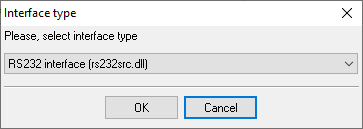
1. Add a new configuration with the RS232 data source (if you didn't it before).
2. Select the COM port and configure the communication settings for your PBX corresponding to your PBX settings.
Selecting the correct parser for Alcatel OmniPCX Office

Alcatel OmniPCX Office
Alcatel OmniPCX Office
Data items
| Description | Data type | Column name |
|---|---|---|
| Initial user | string | FLAG2 |
| Charged user | string | FLAG3 |
| Direction | string | DIRECTION |
| Line | string | EXT |
| Call time | datetime | CALL_TIME |
| Call duration (s) | integer | CALL_DURATION_S |
| Tax | string | FLAG4 |
| Service | string | FLAG5 |
| Facility | string | FLAG6 |
| Phone | string | DIALED_PHONE |
| Mode | string | CALL_TYPE |
| Ring | datetime | RING |
| Cost | float | COST |
| Caller phone | string | CALLER_PHONE |
| Subscriber | string | ACC |
Sample record
As delivered by the system; phone numbers, names and public addresses are masked.
       A1100 --> L43 11/06/08 15:50 00:02:06      ST X      912xxxxxxxxx..............                                     ................
       A1100 --> V01 11/06/08 15:52 00:00:02      ST        217.......................                                     ................
       A1059 --> L17 11/06/08 15:54 00:00:00      ST        521xxxx...................                                     Name Surname
Alcatel-Lucent programming software
OmniPCX Office and OXO Connect are programmed with OMC, the OmniPCX Office Management Console; PCXTools is the older name of the same package. OMC comes from Alcatel-Lucent Enterprise or your dealer, not from AGG Software, and you need it to switch the call accounting output on. PBX Data Logger does not replace OMC: it receives the call records that OMC lets you enable.
Reports and a database
Once records arrive, the logger writes them to a text file or to any ODBC database in real time, or hands them to the PBX Reports utility for manual, scheduled and e-mailed reports with a built-in web server. See exporting call log data to a database for the database setup.
Related Alcatel systems
Alcatel OmniPCX Office (OHL Driver XML)Alcatel OmniPCX Enterprise (OXE)
Allworx
Altigen
Other PBX SMDR formats, Alcatel to London
All supported PBX systems
Note: Products and companies mentioned here are used only for definition and identification purposes and can be trademarks and/or registered trademarks of the respective companies.