
AudioCodes SBC SMDR setup and CDR format
This page shows how to get call records out of the AudioCodes SBC into Advanced PBX Data Logger: the connection settings, the parser to select and the 30 fields the logger extracts for reports or a database. The settings apply to our logger; other call accounting software may expect a different configuration.
Quick facts
| Item | AudioCodes SBC |
|---|---|
| Interface | LAN. The PBX sends records to the logger PC; the logger listens on TCP port 514. |
| Port | 514 |
| Parser to select | AudioCodes SBC |
| Fields extracted | 30 |
| Other AudioCodes systems | VoIP PBX, softswitch and gateway CDR formats |
Configuring CDR
Note: For CDR reporting, you must also enable the Syslog feature.
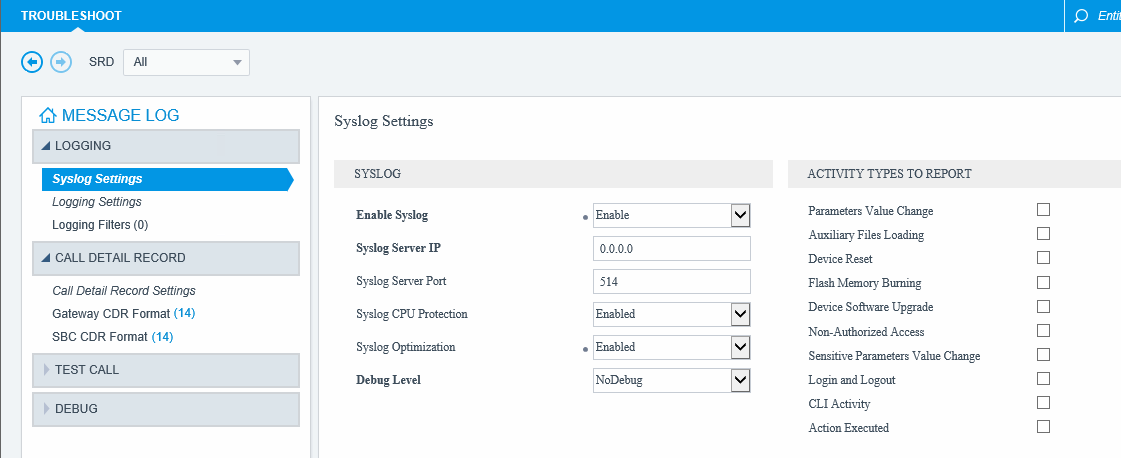
1. Open the Syslog Settings page (Troubleshoot menu > Troubleshoot tab > Logging folder > Syslog Settings).
2. From the Enable Syslog drop-down list, select Enable.
3. Specify the Syslog Server IP address 0.0.0.0.
5. Specify the Syslog Server Port number (default: 514).
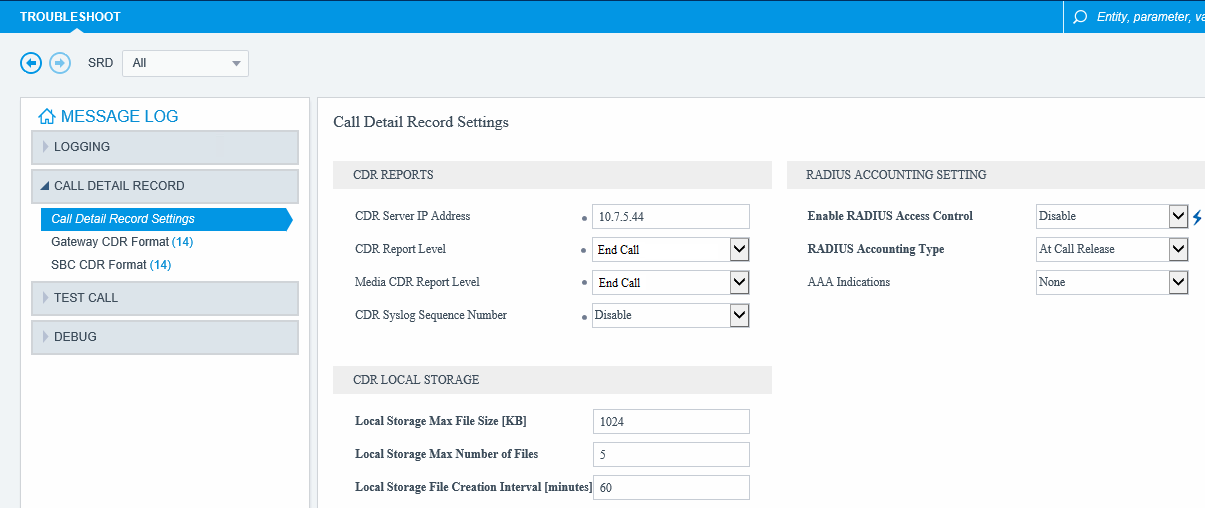
6. Open the Call Detail Record Settings page.
7. Under the CDR Reports group:
7.1. Specify the IP address of your computer or server with Advanced PBX Data Logger in the CDR Server IP Address field.
7.2. Select End Call in CDR Report Level and Medial CDR Report Level drop-down lists.
7.3. Select Disable in CDR Syslog Sequence Number.
SBC CDR Format
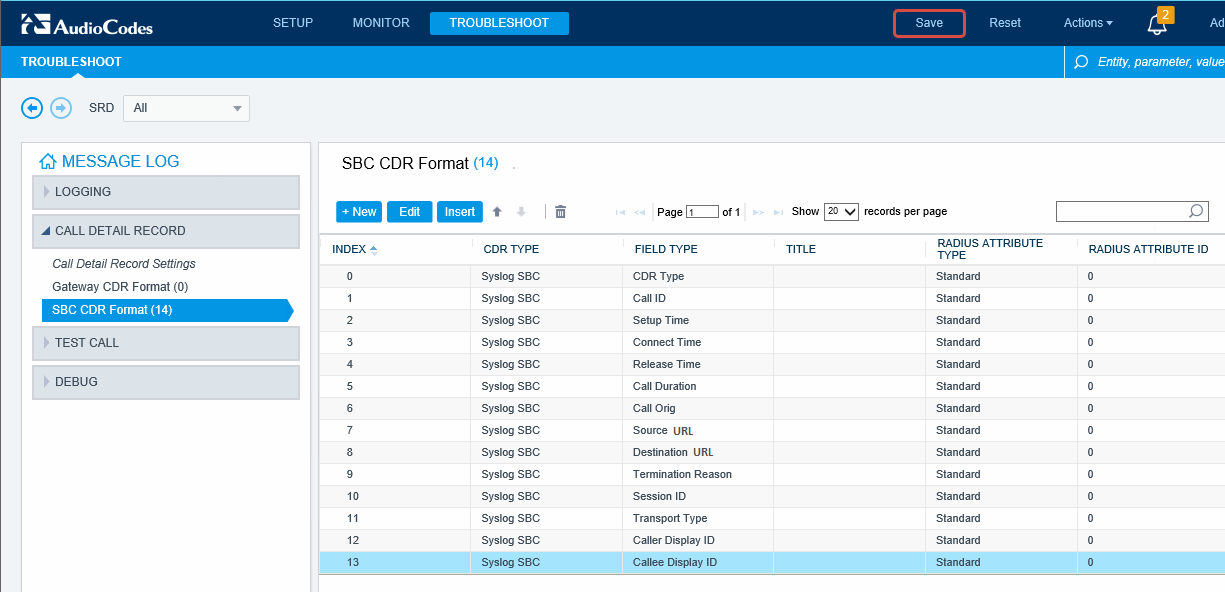
8. Open the SBC CDR Format page.
9. Define fields as showed on fig. 3 (the column order is important).
Settings from the manufacturer's documentation
Taken from AudioCodes CDR Field Description. Values are those stated in the documentation; confirm them against your firmware release.
Record format notes
- SBC produces two CDR streams: a signaling CDR per SBC leg (CALL_START/CALL_CONNECT/CALL_END) and a separate media CDR per active media stream (MEDIA_START/MEDIA_UPDATE/MEDIA_END), each media CDR sharing the SIPCallId of its signaling CDR.
- CDRs can be output as syslog CDRs, CDRs stored locally on the device, or RADIUS CDRs, and fields can be added via CDR customization.
- The syslog display is tabular and pipe-delimited: a header line names each field, followed by a value line, e.g. for a normally terminated SBC call.
- Each field has a fixed 'default field title' used in the raw syslog output, e.g. LatchedRtpIp, which can differ from the descriptive name shown in configuration screens.
Configuring Advanced PBX Data Logger as a TCP server
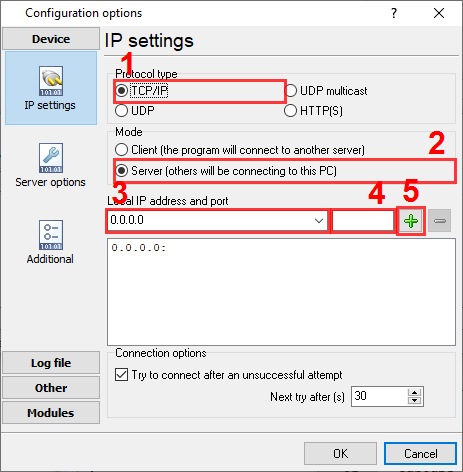
Advanced PBX Data Logger should be configured to the TCP server mode and listen on 0.0.0.0:514 (see below). The IP address 0.0.0.0 allows receiving data from all network connections on your computer. The port number should match the value from the SMDR settings in your AudioCodes SBC.
1. Add a new configuration with the TCP data source (if you didn't it before).
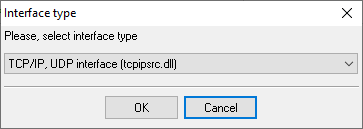
2. Configure the TCP settings as shown below.
514
514
Selecting the correct parser for AudioCodes SBC

AudioCodes SBC
AudioCodes SBC
Data items
| Description | Data type | Column name |
|---|---|---|
| Call type | string | CALL_TYPE |
| Call time | datetime | CALL_TIME |
| Connect time | datetime | CONNECT_TIME |
| Release time | datetime | RELEASE_TIME |
| Ring | datetime | RING |
| Call Identifier | string | FLAG6 |
| Call Originator | string | FLAG5 |
| Direction | string | DIRECTION |
| Trunk | string | TRUNK |
| Ext | string | EXT |
| Dialed IP | string | DIALED_PHONE |
| Caller phone | string | CALLER_PHONE |
| Source URL | string | FLAG1 |
| Destination URL | string | FLAG2 |
| Call duration (sec) | integer | CALL_DURATION_S |
| Call duration | datetime | CALL_DURATION |
| Termination Reason | string | FLAG7 |
| Caller Display ID | string | FLAG3 |
| Callee Display ID | string | FLAG4 |
| Termination Reason | string | TERM_REASON |
| Termination Reason Categoty | string | TERM_REASON_CAT |
| IP Group Name | string | IP_GROUP |
| SRD ID and Name | string | SRD_ID |
| SIP interface ID | string | SIP_ID |
| Proxy Interface ID | string | PROXY_ID |
| IP Profile ID | string | IP_PROFILE |
| Medial Realm ID | string | MEDIA_REALM |
| Direct Media ID | string | DIRECT_MEDIA |
| SIP Termination Reason | string | SIP_TERM_REASON |
| SIP Termination Description | string | SIP_TERM_DESC |
Reports and a database
Once records arrive, the logger writes them to a text file or to any ODBC database in real time, or hands them to the PBX Reports utility for manual, scheduled and e-mailed reports with a built-in web server. See exporting call log data to a database for the database setup.
Related AudioCodes systems
AudioCodes Mediant 1000AudioCodes Gateway (Extended)
AudioCodes VoIP Gateway
Australia Mobile (CSV)
VoIP PBX, softswitch and gateway CDR formats
All supported PBX systems
Note: Products and companies mentioned here are used only for definition and identification purposes and can be trademarks and/or registered trademarks of the respective companies.
Related topics: Advanced PBX Data Logger
hereCall logging Call accounting SMDR to SQL SMDR Listener Cables and signals