
AudioCodes VoIP Gateway SMDR setup and CDR format
This page shows how to get call records out of the AudioCodes VoIP Gateway into Advanced PBX Data Logger: the connection settings, the parser to select and the 45 fields the logger extracts for reports or a database. The settings apply to our logger; other call accounting software may expect a different configuration.
Quick facts
| Item | AudioCodes VoIP Gateway |
|---|---|
| Interface | LAN. The PBX sends records to the logger PC; the logger listens on TCP port 4000. |
| Port | 4000 |
| Parser to select | AudioCodes VoIP Gateway |
| Fields extracted | 45 |
| Other AudioCodes systems | VoIP PBX, softswitch and gateway CDR formats |
Configuring CDR
Note: For CDR reporting, you must also enable the Syslog feature.
1. Open the "Advanced Parameters" page (Configuration tab > VoIP menu > SIP Definitions submenu > Advanced Parameters).
2. Under the CDR and Debug group, perform the following:
a. In the "CDR Server IP Address" field, enter the IP address of the CDR server to where the device sends the CDR logs.
b. From the "CDR Report Level" drop-down list, select when the CDR"s are generated and sent to the CDR server:
[0] None = CDRs are not used (default).
[1] End Call = CDR is sent to the Syslog server at the end of each call.
[2] Start & End Call = CDR report is sent to Syslog server at the start and end of each call.
[3] Connect & End Call = CDR report is sent to the Syslog server at connection and at the end of each call.
[4] Start & End & Connect Call = CDR report is sent to the Syslog server at the start, at connection, and at the end of each call.
Note: If no IP address is defined, the CDR logs are sent to the Syslog server.

Settings from the manufacturer's documentation
Taken from AudioCodes VoIP Gateway, AudioCodes VoIP Gateway, AudioCodes VoIP Gateway2, AudioCodes CDR Field Description. Values are those stated in the documentation; confirm them against your firmware release.
| Setting | Documented value |
|---|---|
| CDR Report Level default | [0] None = CDRs are not used (default) |
Switching SMDR output on, as documented
- Open the Advanced Parameters page (Configuration tab > VoIP menu > SIP Definitions submenu > Advanced Parameters).
- Enter the IP address of the CDR server in the CDR Server IP Address field under the CDR and Debug group.
- Choose when CDRs are generated and sent from the CDR Report Level drop-down list (None, End Call, Start & End Call, Connect & End Call, or Start & End & Connect Call).
- Leave the CDR Server IP Address blank to have CDR logs fall back to the configured Syslog server instead of a dedicated CDR server.
Record format notes
- This manual states the CDR syslog message complies with 'RFC 3161' (the Mediant 1000B manual in this batch instead says RFC 3164, the actual Syslog RFC - likely a typo in one of the two AudioCodes documents), identified by Facility 17 (local1), Severity 6 (Informational).
- The Gateway/IP2IP CDR has a documented ordered field list (ReportType, Cid, SessionId, Trunk, BChan, ConId, TG, EPTyp, Orig, SourceIp, DestIp, TON, NPI, SrcPhoneNum ... through RemoteMosCQ, SourcePort, DestPort).
- TrmReason (termination reason) is filled from a large fixed vocabulary of release-cause strings, e.g. GWAPP_NORMAL_CALL_CLEAR, matching the value seen in the page's own sample record.
Configuring Advanced PBX Data Logger as a TCP server
Advanced PBX Data Logger should be configured to the TCP server mode and listen on 0.0.0.0:4000 (see below). The IP address 0.0.0.0 allows receiving data from all network connections on your computer. The port number should match the value from the SMDR settings in your AudioCodes VoIP Gateway.
1. Add a new configuration with the TCP data source (if you didn't it before).
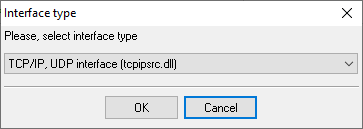
2. Configure the TCP settings as shown below.
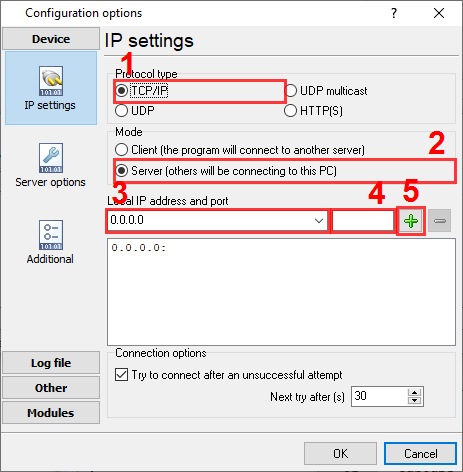
4000
4000
Selecting the correct parser for AudioCodes VoIP Gateway

AudioCodes VoIP Gateway
AudioCodes VoIP Gateway
Data items
| Description | Data type | Column name |
|---|---|---|
| Call type | string | CALL_TYPE |
| Call time | datetime | CALL_TIME |
| Connect time | datetime | CONNECT_TIME |
| Release time | datetime | RELEASE_TIME |
| Ring | datetime | RING |
| Cid Port Number | string | EXT |
| Call Identifier | string | FLAG6 |
| Trunk | string | TRUNK |
| Selected B-Channel | string | FLAG5 |
| Conference ID | string | FLAG4 |
| Trunk group | string | FLAG3 |
| Endpoint Type | string | ENDPOINT_TYPE |
| Call Originator | string | ACC |
| Direction | string | DIRECTION |
| Source IP Address | string | FLAG1 |
| Destination IP Address | string | FLAG2 |
| Source Phone Number Type | string | SRC_TON |
| Source Phone Number Plan | string | SRC_NPI |
| Source Phone Number | string | CALLER_PHONE |
| Destination Phone Number Type | string | DEST_TON |
| Destination Phone Number Plan | string | DEST_NPI |
| Destination Phone Number | string | DIALED_PHONE |
| Call duration (sec) | integer | CALL_DURATION_S |
| Call duration | datetime | CALL_DURATION |
| Coder | string | CODER |
| Packet Interval | string | INTRV |
| RTP IP Address | string | RTP_IP |
| RTP Port | string | RTP_PORT |
| Initiator of Call Release | string | TERM_SIDE |
| Termination Reason | string | TERM_REASON |
| Fax Transaction during the Call | string | FAX |
| Number of Incoming Packets | string | PACKETS_IN |
| Number of Outgoing Packets | string | PACKETS_OUT |
| Local Packet Loss | string | PACKETS_LOSS |
| Number of Outgoing Lost Packets | string | PACKETS_LOSS_REMOTE |
| Unique RTP ID | string | RTP_ID |
| RTP Delay | string | RTP_DELAY |
| RTP Jitter | string | RTP_JITTER |
| Local RTP SSRC | string | RTP_SSRC |
| Remote RTP SSRC | string | RTP_SSRC_REMOTE |
| Redirect Reason | string | REDIR_REASON |
| Redirection Phone Number Type | string | REDIR_TON |
| Number of Generated Metering Pulses | string | PULSES |
| Redirection Phone Number Plan | string | REDIR_NPI |
| Redirection Phone Number | string | REDIR_NUMBER |
Sample record
As delivered by the system; phone numbers, names and public addresses are masked.
<142> |CALL_END       |33   |114xxxxxxx     |0    |4    |252  |1    |ISDN      |LCL  |10.159.152.30       |10.200.128.31       |1    |1    |148xxxxxxxx         |148xxxxxxxx         |4    |1    |5544                |5544                |171  |g711Ulaw64k    |20   |10.200.72.56        |50352|RMT  |GWAPP_NORMAL_CALL_CLEAR                 |0    |989       |8488      |0         |0             |231xxxxxxxxxxxxxxxxxx@10.159.152.30               |12:52:48.951  UTC Wed Mar 02 2016  |12:52:51.345  UTC Wed Mar 02 2016  |12:55:42.997  UTC Wed Mar 02 2016  |0        |0        |352xxxxxx     |-1            |-1             |4    |1    |                    |0                   |10.159.152.30       |10.159.152.30       |10.200.128.31       |10.200.128.31       |1   (Mitel Controllers)             |10.159.152.30       |35220          |         |     |NORMAL_CALL_CLEAR|                    |0     (DefaultSRD)           |0              |1              |0           ()                    |0            (DefaultRealm)                            |UDP             |46             |40             |127         |127          |127       |127        |5060         |5060       |AUDIO     |   |   |BYE         |                          |0    <142>          |                    |0              |                    |0
<142> |CALL_END       |30   |114xxxxxxx     |0    |1    |255  |1    |ISDN      |LCL  |10.159.152.30       |10.200.128.31       |2    |1    |604xxxxxxx          |604xxxxxxx          |4    |1    |7601                |7601                |16   |g711Ulaw64k    |20   |10.200.144.54       |50230|RMT  |GWAPP_NORMAL_CALL_CLEAR                 |0    |807       |807       |0         |0             |194xxxxxxxxxxxxxxxxxxx@10.159.152.30              |12:55:39.878  UTC Wed Mar 02 2016  |12:55:43.953  UTC Wed Mar 02 2016  |12:56:00.944  UTC Wed Mar 02 2016  |0        |0        |203xxxxxxx    |-1            |-1             |4    |1    |                    |0                   |10.159.152.30       |10.159.152.30       |10.200.128.31       |10.200.128.31       |1   (Mitel Controllers)             |10.159.152.30       |34820          |         |     |NORMAL_CALL_CLEAR|                    |0     (DefaultSRD)           |0              |1              |0           ()                    |0            (DefaultRealm)                            |UDP             |46             |40             |127         |127          |127       |127        |5060         |5060       |AUDIO     |   |   |BYE         |
...
Reports and a database
Once records arrive, the logger writes them to a text file or to any ODBC database in real time, or hands them to the PBX Reports utility for manual, scheduled and e-mailed reports with a built-in web server. See exporting call log data to a database for the database setup.
Related AudioCodes systems
AudioCodes SBCAudioCodes Mediant 1000
Australia Mobile (CSV)
Avaya (59 Chars Output Format ACM 4.0)
VoIP PBX, softswitch and gateway CDR formats
All supported PBX systems
Note: Products and companies mentioned here are used only for definition and identification purposes and can be trademarks and/or registered trademarks of the respective companies.
Related topics: Advanced PBX Data Logger
hereCall logging Call accounting SMDR to SQL SMDR Listener Cables and signals