
Avaya IP Office 406 (CSV) SMDR setup and CDR format
This page shows how to get call records out of the Avaya IP Office 406 (CSV) into Advanced PBX Data Logger: the connection settings, the parser to select and the 22 fields the logger extracts for reports or a database. The settings apply to our logger; other call accounting software may expect a different configuration.
Quick facts
| Item | Avaya IP Office 406 (CSV) |
|---|---|
| Interface | LAN. The PBX accepts a connection on TCP port 180; the logger connects to the PBX IP address. |
| Port | 180 |
| Parser to select | Avaya IP Office 406 (CSV) |
| Fields extracted | 22 |
| Other Avaya systems | Avaya Communication Manager, Definity and G3 CDR formats, Avaya Merlin 1030, 3070 and Magix SMDR formats |
Configuring Avaya IP Office
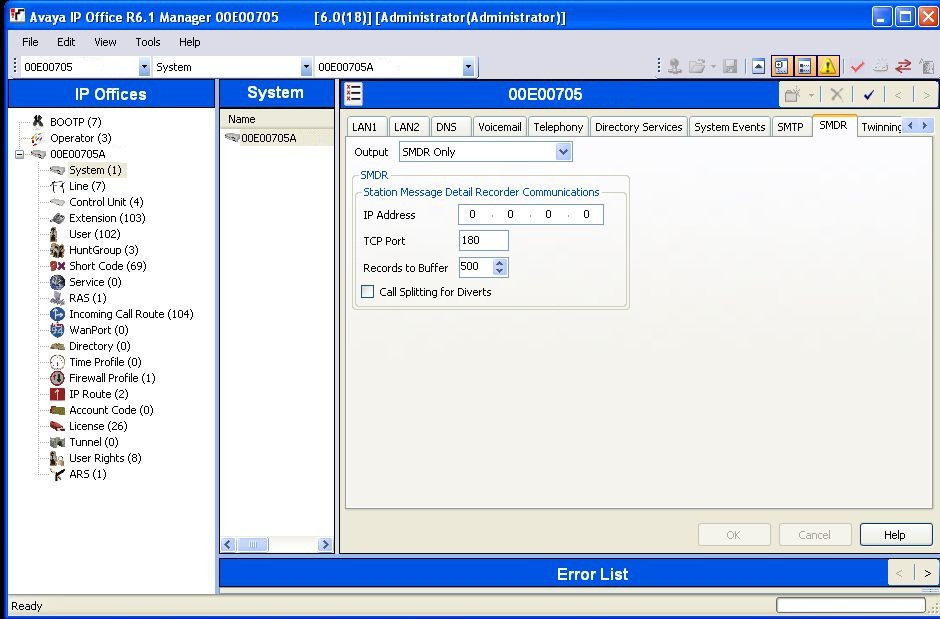
Replacing Avaya Delta Server
Recently Avaya have stripped off Delta Sever application which used to serve as SMDR. Our PBX Data Logger allows to replace this application and is very user friendly.
Settings from the manufacturer's documentation
Taken from Avaya Delta Server SMDR Fields, avaya Delta Server user manual, avaya ip office smdr enu, avaya rddt. Values are those stated in the documentation; confirm them against your firmware release.
| Setting | Documented value |
|---|---|
| Call Start date/time format | YYYY/MM/DD HH:MM:SS |
| total call duration formula | Connected Time + Ring Time + Hold Time + Park Time |
| Call ID numbering | starts at 1,000,000, increments by 1 per unique call, and resets to 1,000,000 when the IP Office restarts |
Record format notes
- Direction is I for inbound or O for outbound; internal calls are also represented as O, so use it together with the Is Internal field to tell internal calls from external outbound calls.
- A call can generate several SMDR records sharing one Call ID; the Continuation field is 1 if another record for that call id follows, 0 on the last record.
- Party device codes: E<extension> for an internal extension, V<9500+channel> for voicemail, T<9000+line> for a trunk line, V<8000+device> for other/unknown devices or tones.
Configuring PBX Data Logger as a TCP client
Our software should work in the TCP client mode. It means that our software will initiate connection with the PBX and the PBX will work as a server. Add one or several PBX IP addresses here (the IP address of the Avaya IP Office). The port number should match the port that you have defined within the PBX (180 in the example below).
1. Add a new configuration with the TCP data source (if you didn't it before).
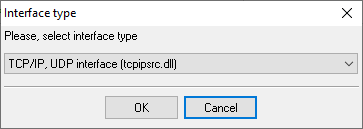
2. Configure the TCP settings as shown below.
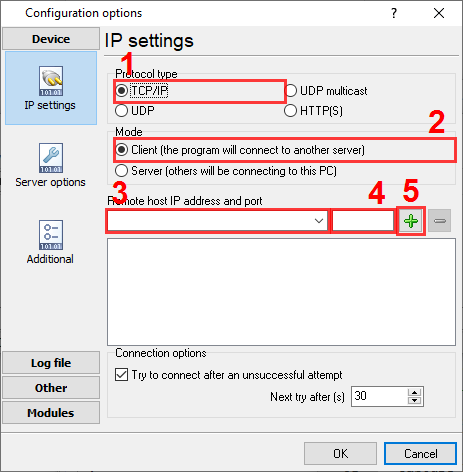
192.168.1.220
180
192.168.1.220:180
Selecting the correct parser for Avaya IP Office 406 (CSV)

Avaya IP Office 406 (CSV)
Avaya IP Office 406 (CSV)
Data items
| Description | Data type | Column name |
|---|---|---|
| Call time | datetime | CALL_TIME |
| Call duration | datetime | CALL_DURATION |
| Call duration (s) | integer | CALL_DURATION_S |
| Ring duration (s) | integer | RING_S |
| Ring duration | datetime | RING |
| Call type | string | CALL_TYPE |
| Direction | string | DIRECTION |
| Is internal | string | FLAG1 |
| Caller phone | string | CALLER_PHONE |
| Extension | string | DNIS |
| Extension | string | EXT |
| Called phone | string | CALLED_PHONE |
| Dialed phone | string | DIALED_PHONE |
| Account | string | ACC |
| Call ID | integer | CALL_ID |
| Continuation | string | FLAG2 |
| Party1Device | string | PARTY1_DEVICE |
| Party1Name | string | PARTY1_NAME |
| Party1Device | string | PARTY2_DEVICE |
| Party1Name | string | PARTY2_NAME |
| Hold time | integer | HOLD_TIME |
| Park time | integer | PARK_TIME |
Sample record
As delivered by the system; phone numbers, names and public addresses are masked.
<201xxxxxxxxxxx.798>2010/08/12 10:43:20,00:00:00,29,140,O,983xxxxxxxxx,983xxxxxxxxx,,0,105xxxx,0,E140,Сизов КВ,T9001,Line 1.9,0,0,,, ,0000.00,,0000.00,0,0,618,1.00,U,Сизов КВ,
<201xxxxxxxxxxx.939>2010/08/12 10:44:13,00:00:09,2,201,O,334,334,,1,105xxxx,0,E201,Володина СГ,E334,Петров МП,0,0,,,,,,,,,,,,,
<201xxxxxxxxxxx.658>2010/08/12 10:43:48,00:00:55,2,838xxxxxxxx,I,516,346480,,0,105xxxx,0,E401,СОФТОФАКС,T9001,Line 1.11,0,0,,,,,,,,,,,,,
<201xxxxxxxxxxx.283>2010/08/12 10:41:19,00:03:13,4,129,O,989xxxxxxxxx,989xxxxxxxxx,,0,105xxxx,0,E129,Ермохин КВ,T9001,Line 1.3,0,0,,, ,0000.00,,0000.00,0,0,618,1.00,U,Ермохин КВ,
<201xxxxxxxxxxx.611>2010/08/12 10:44:32,00:00:21,2,838xxxxxxxx,I,516,346480,,0,105xxxx,0,E408,СОФТОФАКС2,T9001,Line 1.12,0,0,,,,,,,,,,,,,
<201xxxxxxxxxxx.767>2010/08/12 10:39:53,00:04:55,1,838xxxxxxxx,I,507,346483,,0,105xxxx,1,E123,Высевко ОГ,T9001,Line 1.27,4,0,,,,,,,,,,,,,
2010/08/12 10:44:59,00:00:00,3,123,O,125,125,,1,105xxxx,1,E123,Высевко ОГ,E125,Савостьян РВ,0,0,,,,,,,,,,,,,
2010/08/12 10:44:59,00:00:00,1,123,O,125,125,,1,105xxxx,0,E123,Высевко ОГ,E125,Савостьян РВ,0,0,,,,,,,,,,,,,
<201xxxxxxxxxxx.080>2010/08/12 10:43:36,00:01:04,27,838xxxxxxxx,I,507,346483,,0,105xxxx,0,E120,Мартынов АГ,T9001,Line 1.10,0,0,,,,,,,,,,,,,
<201xxxxxxxxxxx.252>2010/08/12 10:45:06,00:00:00,30,838xxxxxxxx,I,106,346495,,0,105xxxx,0,E106,Капштык СВ,T9001,Line 1.13,0,0,,,,,,,,,,,,,
<201xxxxxxxxxxx.799>2010/08/12 10:45:50,00:00:10,2,838xxxxxxxx,I,507,346483,,0,105xxxx,0,E120,Мартынов АГ,T9001,Line 1.14,0,0,,,,,,,,,,,,,
<201xxxxxxxxxxx.111>2010/08/12 10:46:15,00:00:00,0,110,O,98,98,,0,105xxxx,0,E110,Жегло ВВ,V8000,U1 0.0,0,0,,, ,0000.00,,0000.00,0,0,618,1.00,U,Жегло ВВ,
<201xxxxxxxxxxx.768>2010/08/12 10:43:40,00:02:52,13,138,O,141,141,,1,105xxxx,0,E138,Мубаракова НГ,E141,Баранова НЕ,0,0,,,,,,,,,,,,,
<201xxxxxxxxxxx.190>2010/08/12 10:46:31,00:00:00,18,102,O,118,118,,1,105xxxx,0,E102,Безгодова ВВ,E118,Абзалов ИА,0,0,,,,,,,,,,,,,
2010/08/12 10:45:55,00:00:41,8,129,O,989xxxxxxxxx,989xxxxxxxxx,,0,105xxxx,0,E129,Ермохин КВ,T9001,Line 1.15,0,0,,, ,0000.00,,0000.00,0,0,618,1.00,U,Ермохин КВ,
<201xxxxxxxxxxx.627>2010/08/12 10:45:51,00:01:08,1,402,O,939xxxx,939xxxx,,0,105xxxx,0,E402,ФАКС ОМТО мат,T9001,Line 1.17,6,0,,,  ,0000.00,,0000.00,0,0,618,1.00,U,ФАКС ОМТО мат,
<201xxxxxxxxxxx.253>2010/08/12 10:45:38,00:01:41,3,207,O,130,130,,1,105xxxx,0,E207,Шушпанникова ЕС,E130,Гаврилов АН,0,0,,,,,,,,,,,,,
<201xxxxxxxxxxx.784>2010/08/12 10:46:19,00:00:52,11,110,O,989xxxxxxxxx,989xxxxxxxxx,
...
Avaya programming software
Avaya IP Office is programmed with IP Office Manager, which comes from Avaya or your dealer, not from AGG Software. SMDR output is switched on there; PBX Data Logger receives the records.
Reports and a database
Once records arrive, the logger writes them to a text file or to any ODBC database in real time, or hands them to the PBX Reports utility for manual, scheduled and e-mailed reports with a built-in web server. See exporting call log data to a database for the database setup.
Related Avaya systems
Avaya G3 V9Avaya G3 V12
Avaya IP Office 500 (CSV)
Avaya IP Office Phone (CSV)
Avaya Communication Manager, Definity and G3 CDR formats
Avaya Merlin 1030, 3070 and Magix SMDR formats
All supported PBX systems
Note: Products and companies mentioned here are used only for definition and identification purposes and can be trademarks and/or registered trademarks of the respective companies.
Related topics: Advanced PBX Data Logger
hereCall logging Call accounting SMDR to SQL SMDR Listener Cables and signals