
Digium Switchvox (Event Notifications) SMDR/CDR format
This page shows how to get call records out of the Digium Switchvox (Event Notifications) into Advanced PBX Data Logger: the connection settings, the parser to select and the 12 fields the logger extracts for reports or a database. The settings apply to our logger; other call accounting software may expect a different configuration.
Quick facts
| Item | Digium Switchvox (Event Notifications) |
|---|---|
| Interface | LAN. The PBX sends records to the logger PC; the logger listens on TCP port 80. |
| Port | 80 |
| Parser to select | Digium Switchvox (Event Notifications) |
| Fields extracted | 12 |
Overview
The Event Notifications are set up in the Switchvox Admin Tool Suite: https://your_switchvox/admin
Log into the Admin Suite and use the URL Manager page (System Setup > URL Manager).
For more information about using the Admin Suite and the URL Manager, see the Switchvox Administrator Manual.
You can set up Switchvox to notify your Web-based applications when a particular event occurs in Switchvox. Switchvox can submit information about the event, and then accept return XML that includes instructions to set a Caller ID for that call, transfer the call to an extension, and/or set a display URL for use in the Switchboard.
URLs
For each event that you want a notification, you can set up a URL to your application. Those URLs can include variables that will resolve to event-specific data. When the event happens, Switchvox builds the URL with the event's data, then posts a request to the newly formed URL.
Also, you can set up a Default URL so that you do not have to enter a full URL for every event. Then for each event, you can choose to use that Default URL, or a different URL.
For detailed description visit Digium's Wiki
URL format
Our parser is designed for the following default URL:
http://192.168.0.100/route.cgi?date=%VM_DATE%&event=%EVENT_TYPE%&ext=%EXTENSION%&cid_number=%CALLER_ID_NUMBER%&cid_name=%CALLER_ID_NAME%&did=%INCOMING_DID%&duration=%VM_DUR%&data=%FEATURE_DATA%&vm_msgnum=%VM_MSGNUM%&dialed=%DIALED_NUMBER%&endofdata
You need to verify your PBX settings before using our software as a data collection server. 192.168.0.100 - should be replaced with the IP address of a computer where our software is installed.
Configuring Advanced PBX Data Logger as a TCP server
Advanced PBX Data Logger should be configured to the TCP server mode and listen on 0.0.0.0:80 (see below). The IP address 0.0.0.0 allows receiving data from all network connections on your computer. The port number should match the value from the SMDR settings in your Switchvox.
1. Add a new configuration with the TCP data source (if you didn't it before).
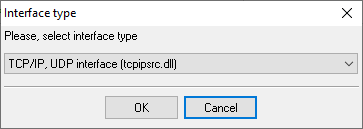
2. Configure the TCP settings as shown below.
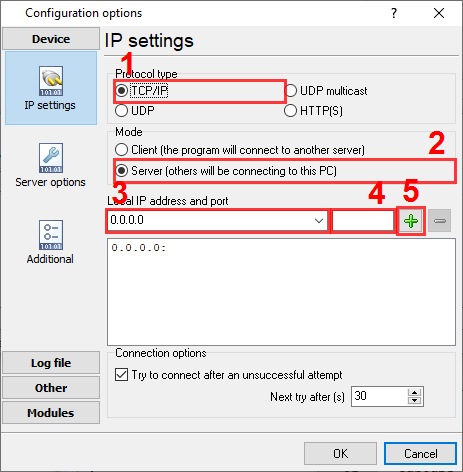
80
80
Selecting the correct parser for Digium Switchvox (Event Notifications)

Digium Switchvox (Event Notifications)
Digium Switchvox (Event Notifications)
Data items
| Description | Data type | Column name |
|---|---|---|
| Call time | datetime | CALL_TIME |
| Call type | string | CALL_TYPE |
| Extension | string | EXT |
| Caller number | string | CALLER_PHONE |
| Caller name | string | FLAG1 |
| DNIS | string | FLAG2 |
| Call duration (s) | integer | CALL_DURATION_S |
| Call duration | datetime | CALL_DURATION |
| Call data | string | FLAG3 |
| Voice message number | string | FLAG4 |
| Dialed number | string | DIALED_PHONE |
| Direction | string | DIRECTION |
Sample record
As delivered by the system; phone numbers, names and public addresses are masked.
<201xxxxxxxxxxx.332>GET /route.cgi?date=&event=incoming&ext=1555&cid_number=791xxxxxxxx&cid_name=791xxxxxxxx&did=307xxxxxxx&duration=&data=&vm_msgnum=&dialed=&endofdata HTTP/1.0
Host: 198.51.100.108:7777
User-Agent: libwww-perl/5.805
<201xxxxxxxxxxx.599>GET /route.cgi?date=&event=route_to_exten&ext=1555&cid_number=791xxxxxxxx&cid_name=791xxxxxxxx&did=307xxxxxxx&duration=&data=&vm_msgnum=&dialed=&endofdata HTTP/1.0
Host: 198.51.100.108:7777
User-Agent: libwww-perl/5.805
<201xxxxxxxxxxx.948>GET /route.cgi?date=&event=hangup&ext=1555&cid_number=791xxxxxxxx&cid_name=791xxxxxxxx&did=307xxxxxxx&duration=&data=&vm_msgnum=&dialed=&endofdata HTTP/1.0
Host: 198.51.100.108:7777
User-Agent: libwww-perl/5.805
Reports and a database
Once records arrive, the logger writes them to a text file or to any ODBC database in real time, or hands them to the PBX Reports utility for manual, scheduled and e-mailed reports with a built-in web server. See exporting call log data to a database for the database setup.
Related Digium systems
DVC (Digital Voice Corp)Comdial
ECI Telecom Coral III
ESI (csv)
All supported PBX systems
Note: Products and companies mentioned here are used only for definition and identification purposes and can be trademarks and/or registered trademarks of the respective companies.
Related topics: Advanced PBX Data Logger
hereCall logging Call accounting SMDR to SQL SMDR Listener Cables and signals