
NEC NEAX2000 IPS SMDR setup and CDR format
This page shows how to get call records out of the NEC NEAX2000 IPS into Advanced PBX Data Logger: the connection settings, the parser to select and the 12 fields the logger extracts for reports or a database. The settings apply to our logger; other call accounting software may expect a different configuration.
Quick facts
| Item | NEC NEAX2000 IPS |
|---|---|
| Interface | Serial. The SMDR or printer port of the PBX is connected to a COM port; speed, data bits, parity and flow control must match the PBX. |
| Parser to select | NEC NEAX2000 IPS |
| Fields extracted | 12 |
| Other NEC systems | NEC Electra Elite, Aspire, DS2000, XN120 SMDR formats |
SMDR over TCP/IP
CM0401>05:0 - SMDR terminal via LAN port (0 - LAN, 7 - RS232)
CM0401>08:15 - Former 2400 IMS Format
or
CM0401>08:00 - Extended message format
For all units you need to define IP address, Subnet mask and Gareway (IP addresses should be different) :
CM0B00>00= IP ADDRESS OF PBX CPU
CM0B00>01= SUBNET
CM0B00>02= GATEWAY
For example:
CM0B101>00: 172.16.1.1 - ip address unit 1
CM0B101>01: 255.255.0.0 - subnet mask
CM0B101>02: 172.16.1.1 - gateway
CM0B102>00: 172.16.2.1 - ip address unit 2
CM0B102>01: 255.255.0.0 - subnet mask
CM0B102>02: 172.16.1.1 - gateway
CM0B103>00: 172.16.3.1 - ip address unit 3
CM0B103>01: 255.255.0.0 - subnet mask
CM0B103>02: 172.16.1.1 - gateway
save and reset
CM08>827:0 - None parity
CM08>828:1 - Parity type (0 - Odd, 1 - Even)
CM0B001>92:0 - Maintenance Port
CM0B101>92:1 - VoIP port
CM15213>15:0 - Allow SMDR service for station-to-station calls (0 - Allow, 1 - Restricted)
Additional parameters:
CM13>06>1 - Allow SMDR service for outgoing calls to the required stations
CM35>14>1 - Provide the SMDR service for outgoing calls to the required trunk routes
CM08>426:0 - ANI/Caller ID (0 - to send, 1 - not sent)
Settings from the manufacturer's documentation
Taken from nec univerge neax2000 ips smdr-mci-pms interface specifications 008866-001-30, NEC R14 SMDR Interface, Veramark - Connectivity Guide. Values are those stated in the documentation; confirm them against your firmware release.
| Setting | Documented value |
|---|---|
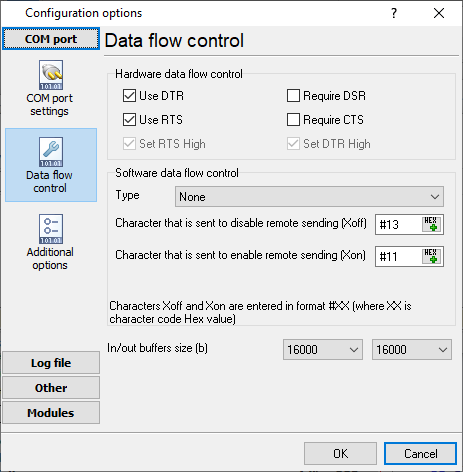
| RS232 SMDR port defaults (integration-guide source) | 9600 baud, 8 data bits, no parity, 2 stop bits, DTR/RTS flow control |
| Selectable transmission speeds (NEC's own interface spec) | 1200/2400/4800/9600 bps (SMDR with AP00); 1200/2400/4800/9600/19200 bps (MP built-in SMDR on RS-232C) |
| Selectable stop bits | 1/1.5/2 bits (AP00) or 1/2 bits (MP built-in) |
| Fixed TCP port for MP built-in SMDR over LAN/IP | 60010 (fixed) |
| Incoming-call SMDR enablement defaults | Disabled by default for both stations (CM13+05) and trunk routes (CM35+49); ANI/Caller ID excluded by default |
Switching SMDR output on, as documented
- Enable outgoing SMDR for stations via CM13+06
- Enable outgoing SMDR for trunk routes via CM35+14
- For MP built-in SMDR-on-IP, set the IP address to match the one assigned by office data (CM0B Y=00>00 or CM0B Y=02>03)
- Extended NEAX 2400 IMS format requires SC-3168 MRCA program issue 2 or later
Record format notes
- Record prefix decoded: STX + SA('0') + UA('!') + Entry Index('K', SMDR record follows) + Type-of-Record letter, explaining the page's '0!KE'/'0!KA' samples
- Type-of-Record letter for Former format: A=outgoing trunk, E=incoming trunk, B=station-to-station; so '0!KA'=outgoing, '0!KE'=incoming
- Condition Code is a 3-character code: char1=call origin (0=ordinary,1=transferred), char2=account code presence, char3=setup method (attendant-assisted etc.)
- The source manual's own scope covers SMDR, MCI (voicemail message-center interface) and PMS (hotel property-management system) together, not just plain call logging
Configuring a COM port
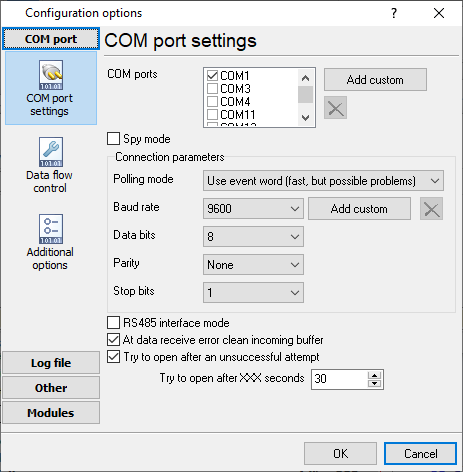
The COM port number should match the number in your system. You can check the correct port number in Devices Manager → Ports.
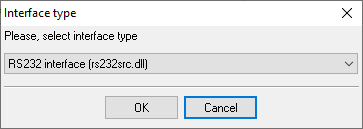
1. Add a new configuration with the RS232 data source (if you didn't it before).
2. Select the COM port and configure the communication settings for your PBX corresponding to your PBX settings.
Selecting the correct parser for NEC NEAX2000 IPS

NEC NEAX2000 IPS
NEC NEAX2000 IPS
Data items
| Description | Data type | Column name |
|---|---|---|
| Call type | string | CALL_TYPE |
| Route + Trunk | string | TRUNK |
| Calling party | string | FLAG2 |
| Tenant number | string | FLAG3 |
| Calling party | string | EXT |
| Call time | datetime | CALL_TIME |
| Call duration | datetime | CALL_DURATION |
| Call duration (s) | integer | CALL_DURATION_S |
| Account | string | ACC |
| Condition code | string | FLAG4 |
| Phone | string | DIALED_PHONE |
| Caller phone | string | CALLER_PHONE |
Sample record
As delivered by the system; phone numbers, names and public addresses are masked.
0!KE008xxxxxxxxx   011xxxxxxxxxxxxxxxxx             000xxxxxx                                0000                  07070
0!KE008xxxxxxxxx   011xxxxxxxxxxxxxxxxx             100xxxxxx                                0000                  07070
0!KE000xxxxxxxxx   011xxxxxxxxxxxxxxxxx             000xxxxxx                                000xxxxxxxxxxxx       07070
Reports and a database
Once records arrive, the logger writes them to a text file or to any ODBC database in real time, or hands them to the PBX Reports utility for manual, scheduled and e-mailed reports with a built-in web server. See exporting call log data to a database for the database setup.
Related NEC systems
NEC Elite Series 8000NEC ElectraElite IPK
NEC NEAX7400 ICS m100
NEC Neac 1400
NEC Electra Elite, Aspire, DS2000, XN120 SMDR formats
All supported PBX systems
Note: Products and companies mentioned here are used only for definition and identification purposes and can be trademarks and/or registered trademarks of the respective companies.
Related topics: Advanced PBX Data Logger
hereCall logging Call accounting SMDR to SQL SMDR Listener Cables and signals