
NEC Electra Elite, Aspire, DS2000, XN120 SMDR formats
Advanced PBX Data Logger includes 13 parsers for NEC systems. This page gathers them in one place. For each system you will find how the call records reach the logger, the parser to select, and the 193 fields in total that these parsers extract for PBX Reports or a database. Of these, 3 over RS-232, 1 over TCP client; the rest are identified by their record layout and can arrive over a serial port or a LAN connection. The settings apply to our logger; other call accounting software may expect a different configuration.
Systems on this page
- NEC 2000 IVS Series · RS-232, 13 fields
- NEC Aspire 300IP · RS-232, 10 fields
- NEC DS2000 · RS-232, 11 fields
- NEC Electra Elite IPK II · TCP client, 9 fields
- NEC ElectraElite IPK (CSV) · Serial or TCP, 11 fields
- NEC ElectraElite IPK · Serial or TCP, 9 fields
- NEC Elite Series 8000 · Serial or TCP, 10 fields
- NEC (LAN Extended Format Fixed Length) · Serial or TCP, 27 fields
- NEC (LAN Flexible Format Variable Length) · Serial or TCP, 40 fields
- NEC (LAN Normal Format Fixed Length) · Serial or TCP, 24 fields
- NEC Neac 1400 · Serial or TCP, 8 fields
- NEC Xen Axis (CSV) · Serial or TCP, 11 fields
- NEC XN 120 · Serial or TCP, 10 fields
Connecting the logger
Add a data source in PBX Data Logger that matches the interface named in each section: RS232 for a serial SMDR port, TCP client when the PBX accepts connections, TCP server when the PBX pushes records to the logger, or FTP for systems that write CDR files. Then open Modules → Query Parse Filter → Data query, click Setup and select the parser named in the section. The general steps are shown on the SMDR listener page; every other supported system is listed on the supported PBX index.
NEC 2000 IVS Series
Parser: NEC 2000 IVS Series
Connection: Serial. The SMDR or printer port of the PBX is connected to a COM port; speed, data bits, parity and flow control must match the PBX.
Fields extracted: 13
The Station Message Detail Recording (SMDR) feature allows the system to send a raw data of the trunk outgoing/incoming call information. The SMDR data can be received by a personal computer (PC) which is running Advanced PBX Data Logger with the RS232 data source. The NEAX 2000 IVS provides two sources of SMDR output - one is via the Main Processor (MP) built-in SMDR, and the other is the SMDR via the Application Processor (AP00).
Call information is sent out from the MP or AP00 to the PBX Logger when each call is completed. If the PBX Logger is not connected to the system or if the logger is not ready for receiving information, the call information is temporarily stored in the MP or AP00. As soon as the PBX Data Logger becomes ready to receive information, the call information temporarily stored in the MP or AP00 is sent out to the PBX Data Logger.
MP Built-in SMDR
The Built-in SMDR consists of the MP and the external SMDR terminal.
The MP card stores various kinds of information on an event basis. When a call is completed, the MP sends out the call information for that specific call to the PBX Logger. If the PBX Logger is not ready to receive information (Busy Status), the MP temporarily stores the call information into its internal memory. When the number of the call records stored in the MP reaches the maximum, new call records will be lost. Note: the call record memory will be cleared by MP reset.
SMDR terminal Programming
Command FD SD
4000 0 or 1 14 (This sets port 0 or 1 to output SMDR, note: if you set port 1 to SMDR inbuilt modem cannot be used
4001 *0 or 1 1 (Default) - Data length 8 bits
4002 *0 or 1 1 (Default) - Parity check ineffective
4003 *0 or 1 1 (Default) - Parity odd
4004 *0 or 1 0 - 1 Stop bit
4008 *0 or 1 4 - 9600 Data speed
Additional commands:
1306 - Provide SMDR for station
3514 - Provide SMDR for trunk route
1305 - Provide incoming SMDR per extn
3549 - Provide incoming SMDR per Trunk Route
CM08, FD:426 SD:0 Effective for all incoming calls
CM08 FD:463 DS:0 Send CLI to SMDR terminal
Data items: NEC 2000 IVS Series
| Description | Data type | Column name |
|---|---|---|
| Call type | string | CALL_TYPE |
| Direction | string | DIRECTION |
| Route + Trunk | string | TRUNK |
| Calling party | string | FLAG2 |
| Tenant number | string | FLAG3 |
| Extension | string | EXT |
| Call time | datetime | CALL_TIME |
| Call duration | datetime | CALL_DURATION |
| Call duration (s) | integer | CALL_DURATION_S |
| Account | string | ACC |
| Condition code | string | FLAG4 |
| Phone | string | DIALED_PHONE |
| Caller phone | string | CALLER_PHONE |
Sample record
As delivered by the system; phone numbers, names and public addresses are masked.
0!KE012xxxxxxxxx   100xxxxxxxxxxxxxxxxx          001xxxxxxxxx                                0000                  0707
0!KA012xxxxxxxxxx  100xxxxxxxxxxxxxxxxx          001xxxxxxxxxxxxxxxxxxx                      0000                  07070
0!KE016xxxxxxxxxx  100xxxxxxxxxxxxxxxxx          001xxxxxxxxx                                0000                  0707
NEC Aspire 300IP
Parser: NEC Aspire 300IP
Connection: Serial. The SMDR or printer port of the PBX is connected to a COM port; speed, data bits, parity and flow control must match the PBX.
Fields extracted: 10
Programming SMDR
10-12-01 : NTCPU Network Setup - IP Address
When using an IP connection from the CPU's ethernet port, set up the IP address used to connect from the PC to the Aspire system (Default: 172.16.0.10).
10-21-02 : NTCPU Hardware Setup - Baud Rate for COM Port
If the SMDR connection is made using the COM port on the CPU, define the baud rate (0=4800, 1=9600, 2=19200, 3=38400).
10-20-01 : LAN Setup for External Equipment
Define the TCP port (0-65535) when communicating to the SMDR (type 5).
10-21-02 : NTCPU Hardware Setup - Baud Rate for COM Port
If the SMDR connection is made using the COM port on the CPU, define the baud rate (0=4800, 1=9600, 2=19200, 3=38400).
14-01-06 : Basic Trunk Data Setup - SMDR Print Out
For each trunk, enter 1 if trunk's calls should appear on SMDR report. Enter 0 if trunk's calls should not appear on SMDR report.
15-01-03 : Basic Extension Data Setup - SMDR Printout
For each extension, enter 1 if extension's calls should appear on SMDR report. Enter 0 if extension's calls should not appear on SMDR report.
15-02-19 : Multi-Line Telephone Basic Data Setup - CTA/CTU Data Communication Mode
Select '0' if the dip switch settings are set to PC connection or select '1' if printer/SMDR connection is selected on the CTA/CTU adapter.
15-02-20 : Multi-Line Telephone Basic Data Setup - Baud Rate for CTA Port
Set the baud rate to be used by the CTA (0=4800, 1=9600, 2=19200).
35-01-01 : SMDR Options - Output Port Type
Specify the type of connection used for SMDR (0=No setting, 1=COM(NTCPU), 3=LAN, 4=CTA/CTU). The baud rate for the COM port should be set in Program 10-21-02 or 15-02-20.
35-01-02 : SMDR Options - Output Destination Number
Specify the SMDR printer output port (CTA/CTU port number).
35-01-03 : SMDR Options - Header Language
Specify the language in which he SMDR header should be printed: 0=English.
35-01-04 : SMDR Options - Omit (Mask) Digits
Enter the number of digits (1-24) you want SMDR to block (i.e., "X" out). Enter 0 not to block any digits.
35-01-05 : SMDR Options - Minimum Number of SMDR Digits
Enter the minimum number of digits a user must dial (1-24) before the system includes a call on the SMDR report. Enter 0 to include all outgoing calls, regardless of the number of digits dialed.
35-01-06 : SMDR Options - Minimum Call Duration
Enter the minimum duration of a call (1-65535) that will print on the SMDR report. Enter 0 to have calls of any duration print.
35-01-07 : SMDR Options - Minimum Ringing Time
Enter how long an unanswered call must ring (1-65535) before SMDR logs it as "No Answer" Enter 0 to allow all "No Answer" calls to print.
35-01-08 : SMDR Options - SMDR Format
Do not change:
This option is added to allow an increased account code field from 8 to 16 when used in the U.K. This allows 16 characters of the Caller ID name to be displayed for the U.S., this option is set to "0" and should remain at this setting as 16 characters are already provided for the account code field. Section 5: Data and SMDR Aspire S Hardware Manual Section 5: Data and SMDR 5-7 5
35-02-01 : SMDR Output Options - Toll Restricted Call
Enter 1 if you want the SMDR report to include calls blocked by Toll Restriction. Enter 0 to exclude blocked calls.
35-02-02 : SMDR Output Options - PBX Calls
If system is behind a PBX, enter 1 to have SMDR include all calls to the PBX. Enter 0 to have SMDR include only calls dialed using PBX trunk access code.
35-02-03 : SMDR Output Options - Display Trunk Name or Number
Select whether the system should display the trunk name (0) or the number (1) on SMDR reports. If this option is set to "1", Program 35-02-14 must be set to "0".
35-02-04 : SMDR Output Options - Daily Summary
35-02-05 : Weekly Summary and
35-02-06 : Monthly Summary
Enter 1 to enable a summary report. Enter 0 to disable a summary report. The daily report prints every day at midnight. The weekly report prints every Sunday night at midnight. The monthly report prints at midnight on the last day of the month.
35-02-08 : SMDR Output Options - Incoming Calls
Enter 0 if you want the SMDR report to include incoming calls. Enter 1 if you want the SMDR report to exclude incoming calls.
35-02-09 : SMDR Output Options - Print Name or Number
Enter 0 if you want the SMDR report to include the extension's name. Enter 1 if you want the SMDR report to include the extension's number.
35-02-10 : SMDR Output Options - All Lines Busy (ALB) Output
Enter 1 to report information when all lines in a group are busy and an extension user tries to access the group. Enter 0 if this information should not be included.
35-02-12 : SMDR Output Options - DID Table Name Output
Determine if the DID table name should be displayed for incoming DID calls (0=Not Displayed, 1=Displayed).
35-02-13 : SMDR Output Options - CLI Output When DID to Trunk
Determine if the Caller ID should be displayed when the incoming DID number is transferred to an outgoing trunk (0=Not Displayed, 1=Displayed).
35-02-14 : SMDR Output Options - Date
Determine whether the date should be displayed on SMDR reports (0=not displayed, 1=displayed). This option must be set to "0" if the trunk name is set to be displayed in Program 35-02-03.
35-02-15 : SMDR Output Options - CLI/DID Number Switching
Enter 0 to display the Caller ID number. Currently, option "1" for the DID number is not available. With software 4.0E+, determine if the Caller ID number (0), DID number (1) or Caller ID name (2) should be displayed in the SMDR output.
35-02-16 : SMDR Output Options - Print Trunk Name or Received Dialed Number
Determine how the SMDR should print incoming calls on ANI/DNIS or DID trunks. If set to (1), ANI/DNIS trunks can print DNIS digits for DID trunks, if the received number is not defined in Program 22-11-01, then no number will be printed. If set to (0) trunk names are printed instead (as assigned in Program 14-01-01).
35-02-17 : SMDR Output Options - Print Account Code or Caller ID Name
Determine whether the Account Code (0) or Caller ID name (1) should appear in the SMDR record. By default, the Account Code will be displayed. Note: Program 35-01-08 must be set to "0" for this entry to be followed.
COM port connection
You need a standard RS232 null modem cable

Settings from the manufacturer's documentation
Taken from nec aspire smdr 2. Values are those stated in the documentation; confirm them against your firmware release.
Record format notes
- Class Definitions (call-type codes) for the Aspire family SMDR CLASS field: POT, POTA, PIN, ALB, BRD, PTRS, IVIN
- This section's own sample record uses call-type codes PTRS and PIN which do appear in the manual's Class Definitions list
Data items: NEC Aspire 300IP
| Description | Data type | Column name |
|---|---|---|
| Call type | string | CALL_TYPE |
| Direction | string | DIRECTION |
| Call time | datetime | CALL_TIME |
| CO | string | TRUNK |
| Call duration | datetime | CALL_DURATION |
| Call duration (s) | integer | CALL_DURATION_S |
| Ext | string | EXT |
| Dialed phone | string | DIALED_PHONE |
| Ring | datetime | RING |
| Account | string | ACC |
Sample record
As delivered by the system; phone numbers, names and public addresses are masked.
17 PTRS  09:48 LINE 005   00:00:12 203                         0:08
18 PTRS  09:48 LINE 022   00:00:08 203                         0:03
19 PIN   09:49 LINE 001   00:00:25 303                         0:05
NEC DS2000
Parser: NEC DS2000
Connection: Serial. The SMDR or printer port of the PBX is connected to a COM port; speed, data bits, parity and flow control must match the PBX.
Fields extracted: 11
Nec DS1000/DS2000
When connecting SMDR in DS2000, use cable P/N 80893 and adaptor P/N 85980 to connect the 8-pin DIN connector on the CPU to the 9-pin COM port on the customer-provided laptop or data collection device. In DS1000, use adaptor P/N 85980 and a Mod-8 patch cord to connect the system's RS-232-C jack to the 9-pin COM port on a customer-provided laptop or data collection device. By default, the data rate is 19200 baud (9600 baud in Fixed Slot), 8 data bits, 1 stop bit and no parity (typically referred to as 19200 8N1)
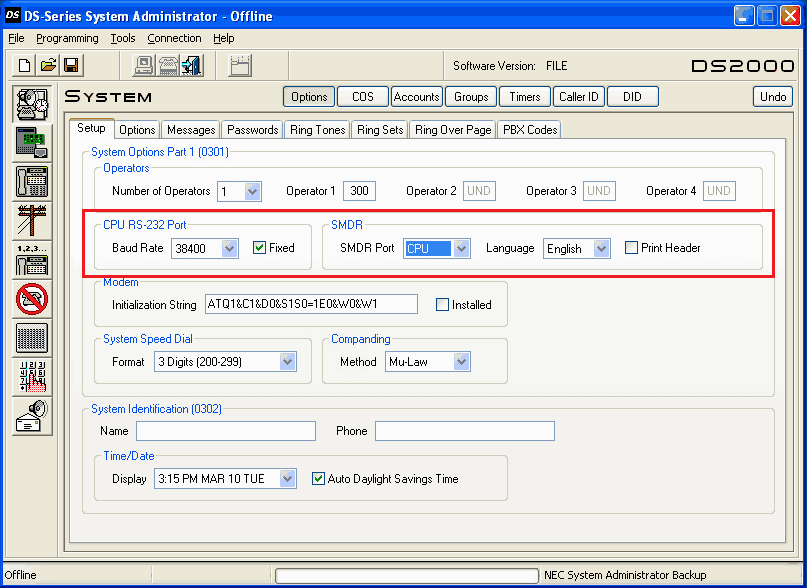
Program #0301 - Operator Options - CPU Baud Rate
- 1 (2400)
- 2 (4800)
- 3 (9600)
- 4 (19200)
- 5 (38400)
By pressing Ctr+Break you can see the available baud rates.
- SMDR Port
- set it to 1 to enable SMDR
- Print SMDR Header (optional)
- set it to N in order to skip not needed headers
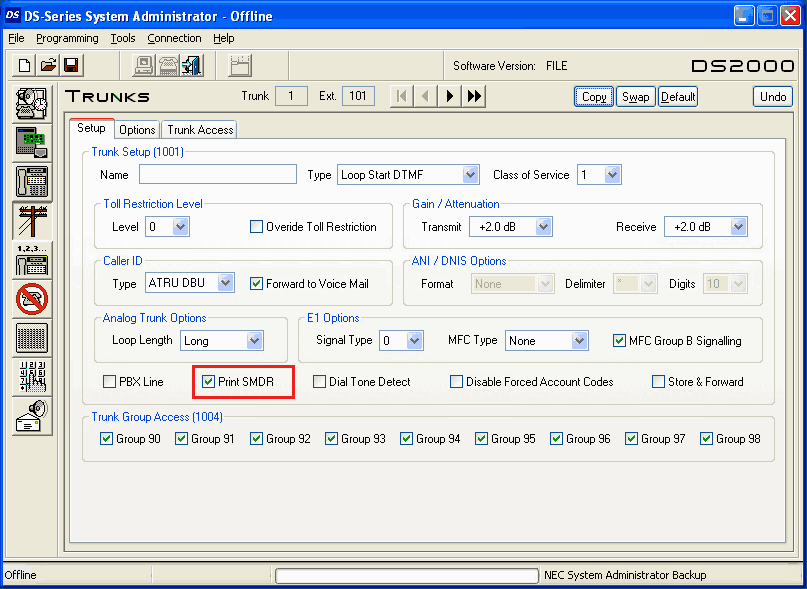
Program #10001 - Print SMDR - set it to Y in order to enable reports for calls on trunks
We mention that by default our application is disabling the CPU debug information when it opens the communication with the PBX unit in order to reduce same the storage space needed for the calls.
In our application please select the same baud rate as the pbx, new line separator CR, 8 data bits, parity none, 1 stop bit and hardware flow control.
NEC DS1000/DS2000 programming via "DS-Series System Administrator"
Data items: NEC DS2000
| Description | Data type | Column name |
|---|---|---|
| Call type | string | CALL_TYPE |
| Direction | string | DIRECTION |
| Ext | string | EXT |
| Line | string | TRUNK |
| Caller phone | string | CALLER_PHONE |
| Dialed phone | string | DIALED_PHONE |
| Account | string | ACC |
| Call time | datetime | CALL_TIME |
| Call duration | datetime | CALL_DURATION |
| Call duration (s) | integer | CALL_DURATION_S |
| Caller name | string | FLAG1 |
Sample record
As delivered by the system; phone numbers, names and public addresses are masked.
309| 02|                    Private Name|          |12:54:33P|00:00:12|IN
307| 01|                      213xxxxxxx|          |01:01:51P|00:01:08|IN
307| 01|                     ABC COMPANY|          |01:01:51P|00:01:08|IN
NEC Electra Elite IPK II
Parser: NEC Electra Elite IPK II
Connection: LAN. The PBX accepts a connection on TCP port 60010; the logger connects to the PBX IP address.
Fields extracted: 9
Printing Out SMDR Using LAN Port
1. Ensure that the SMDR license is activated on your PBX.

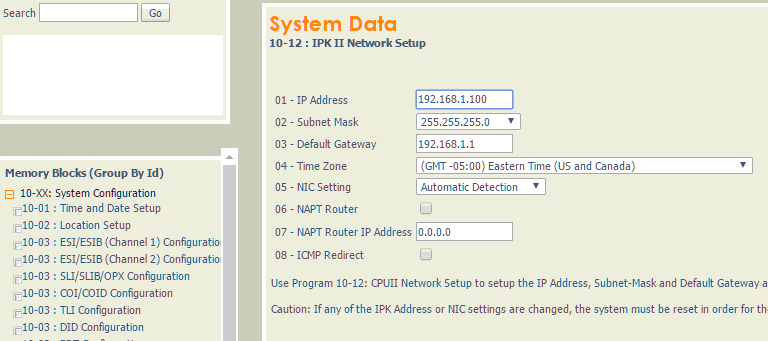
2. Go to 10-12 "Network setup" and specify a static IP address. Our logger will connect to this address.
3. Go to 35-01 "SMDR Options" and set the specified options.
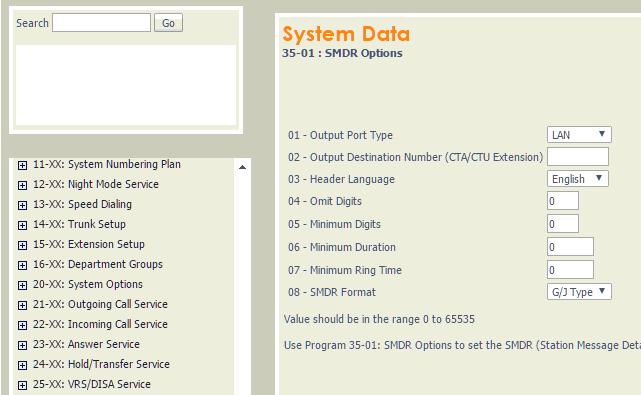
4. Go to 35-02 "SMDR Output Options".
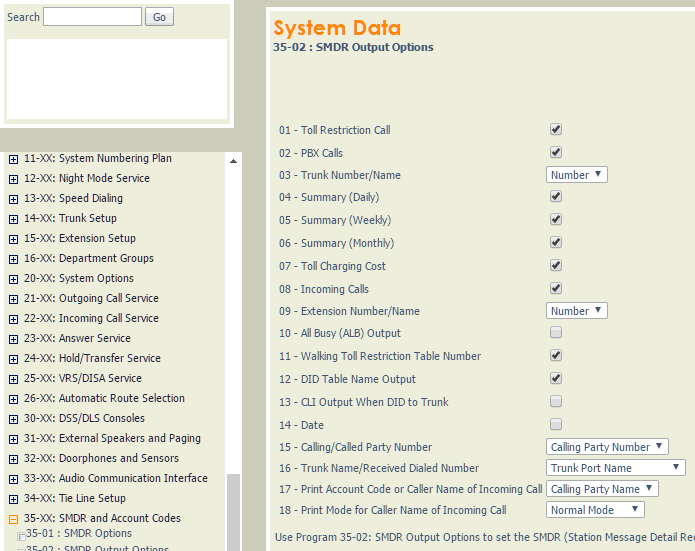
Settings from the manufacturer's documentation
Taken from NEC Electra Elite IPK - smdr reports, Tracer-SMDR-Compatibility-Guide. Values are those stated in the documentation; confirm them against your firmware release.
| Setting | Documented value |
|---|---|
| SMDR default state | Disabled |
| Required component for SMDR | Software License |
Switching SMDR output on, as documented
- Physical connection required via CTA/CTU adapter or serial port on CPUII
- LAN port requires a LAN-capable terminal program such as HyperTerminal
Record format notes
- Sample record and field table use headers CLASS/TIME/DATE/LINE/DURATION/STATION/DIALLED No./CLI/ACCOUNT with two alternate fixed-width layouts selected by Program 35-02-14 (0 or 1)
- A general compatibility guide separately documents 'NEC Electra Elite' and 'NEC IPK 1' as distinct fixed-position formats from 'NEC IPK 2'
Data items: NEC Electra Elite IPK II
| Description | Data type | Column name |
|---|---|---|
| Call type | string | CALL_TYPE |
| Direction | string | DIRECTION |
| Call time | datetime | CALL_TIME |
| Line | string | TRUNK |
| Call duration | datetime | CALL_DURATION |
| Call duration (s) | integer | CALL_DURATION_S |
| Station | string | EXT |
| Dialed phone | string | DIALED_PHONE |
| Account code | string | ACC |
Sample record
As delivered by the system; phone numbers, names and public addresses are masked.
NAME 13:11 02/12 001  00:00:30 310        713xxxxxxx
POT  13:12 02/12 023  00:00:00 310        713xxxxxxx
PTRS 13:11 02/12 001  00:00:48 344        713xxxxxxx
NEC ElectraElite IPK (CSV)
Parser: NEC ElectraElite IPK (CSV)
Connection: Serial printer port or LAN, whichever the system uses for SMDR output. The record layout identifies the format.
Fields extracted: 11
Data items: NEC ElectraElite IPK (CSV)
| Description | Data type | Column name |
|---|---|---|
| Call date | datetime | CALL_DATE |
| Call time | datetime | CALL_TIME |
| CO | string | CO |
| Line | string | TRUNK |
| Call type | string | CALL_TYPE |
| Direction | string | DIRECTION |
| Ext | string | EXT |
| Call duration | datetime | CALL_DURATION |
| Call duration (s) | integer | CALL_DURATION_S |
| Dialed phone | string | DIALED_PHONE |
| Account code | string | ACC |
Sample record
As delivered by the system; phone numbers, names and public addresses are masked.
03/19/07,15:57:57,,02,11,IT,,101,00,191,00:02:32,373xxxx,,,,,,
03/19/07,15:57:57,01,01,09,OG,,113,00,,00:02:41,241xxxx,LCR,,,,,
03/19/07,16:00:26,,01,01,IT,,190,00,101,00:00:31,,,,,,,
NEC ElectraElite IPK
Parser: NEC ElectraElite IPK
Connection: Serial printer port or LAN, whichever the system uses for SMDR output. The record layout identifies the format.
Fields extracted: 9
Data items: NEC ElectraElite IPK
| Description | Data type | Column name |
|---|---|---|
| Call time | datetime | CALL_TIME |
| Call type | string | CALL_TYPE |
| Direction | string | DIRECTION |
| CO | string | TRUNK |
| Ext | string | EXT |
| Call duration | datetime | CALL_DURATION |
| Call duration (s) | integer | CALL_DURATION_S |
| Dialed phone | string | DIALED_PHONE |
| Account code | string | ACC |
Sample record
As delivered by the system; phone numbers, names and public addresses are masked.
12/28/05 15:29    01-28 OG  513      xxxxxxxxxxxxxxxxxxxxxxxxxxxxxxxxxxxxxxxxxx00:01:10 970xxxxxxxx                             xxxxxxxxxxxxxxxxxxxxxxxxxxxxxx                 A8899xxxxxxxxxxxxxxxxxxxxxxxxxxxxxxxxxxxxxxxxxxxxxxxxxxxxxxxxx
12/28/05 15:29    01-28 OG  514      xxxxxxxxxxxxxxxxxxxxxxxxxxxxxxxxxxxxxxxxxx00:01:10 970xxxxxxxx                             xxxxxxxxxxxxxxxxxxxxxxxxxxxxxx
12/28/05 12:08    01-29 OG  514      xxxxxxxxxxxxxxxxxxxxxxxxxxxxxxxxxxxxxxxxxx00:00:56 970xxxxxxxxxxxx                     xxxxxxxxxxxxxxxxxxxxxxxxxxxxxxxxxx                 A8899xxxxxxxxxxxxxxxxxxxxxxxxxxxxxxxxxxxxxxxxxxxxxxxxxxxxxxxxx
NEC Elite Series 8000
Parser: NEC Elite Series 8000
Connection: Serial printer port or LAN, whichever the system uses for SMDR output. The record layout identifies the format.
Fields extracted: 10
Data items: NEC Elite Series 8000
| Description | Data type | Column name |
|---|---|---|
| Call date | datetime | CALL_DATE |
| Call time | datetime | CALL_TIME |
| CO | string | CO |
| Line | string | TRUNK |
| Call type | string | CALL_TYPE |
| Direction | string | DIRECTION |
| Call duration | datetime | CALL_DURATION |
| Call duration (s) | integer | CALL_DURATION_S |
| Dialed phone | string | DIALED_PHONE |
| Account code | string | ACC |
Sample record
As delivered by the system; phone numbers, names and public addresses are masked.
12/07/06,09:40:25,,01,01,IT,,208,00,301,00:00:15,,,,,,,
12/07/06,09:40:40,,01,01,IT,,123,00,208,00:00:07,313xxxxxxx,,,,,,
12/07/06,09:40:36,,01,03,IC,,302,00,,00:00:32,,,,,,,
NEC (LAN Extended Format Fixed Length)
Parser: NEC (LAN Extended Format Fixed Length)
Connection: Serial printer port or LAN, whichever the system uses for SMDR output. The record layout identifies the format.
Fields extracted: 27
Data items: NEC (LAN Extended Format Fixed Length)
| Description | Data type | Column name |
|---|---|---|
| Device number | string | DEVICE_NUMBER |
| Sequence number | string | SEQ_NUM |
| Call type | string | CALL_TYPE |
| Direction | string | DIRECTION |
| Route + Trunk | string | TRUNK |
| Calling party type | string | FLAG2 |
| Tenant number | string | FLAG3 |
| Calling party | string | EXT |
| Call time | datetime | CALL_TIME |
| Call duration | datetime | CALL_DURATION |
| Call duration (s) | integer | CALL_DURATION_S |
| Condition code | string | FLAG4 |
| Dialed number | string | DIALED_PHONE |
| Called tenant | string | FLAG5 |
| Account | string | ACC |
| Selected route | string | FLAG6 |
| First route | string | FLAG7 |
| Metering pulses | integer | PULSES |
| Call phone | string | CALLER_PHONE |
| Authorization code | string | AUTH |
| Charge unit | string | CHARGE_UNIT |
| Cost (in basic units) | float | COST |
| ATT Billing Report Indication | string | ATT_BILLING_IND |
| Billing Report ATT Number | string | ATT_BILLING_REPORT_NUM |
| Data Identification | string | DATA_ID |
| Calling Party Number or ANI Presentation Identifier | string | DATA_FLAG |
| Calling Party Number or ANI | string | ANI |
NEC (LAN Flexible Format Variable Length)
Parser: NEC (LAN Flexible Format Variable Length)
Connection: Serial printer port or LAN, whichever the system uses for SMDR output. The record layout identifies the format.
Fields extracted: 40
Data items: NEC (LAN Flexible Format Variable Length)
| Description | Data type | Column name |
|---|---|---|
| Call type | string | CALL_TYPE |
| Direction | string | DIRECTION |
| Fusion Point Code | integer | FLAG1 |
| Route + Trunk | string | TRUNK |
| Logical Outgoing Route | string | LOGICAL_ROUTE |
| Calling party type | string | FLAG2 |
| Tenant number | string | FLAG3 |
| Calling party | string | EXT |
| Call time | datetime | CALL_TIME |
| Call time end | datetime | CALL_TIME_END |
| Call duration (s) | integer | CALL_DURATION_S |
| Account | string | ACC |
| Condition code | string | FLAG4 |
| Phone | string | DIALED_PHONE |
| Caller number | string | CALLER_PHONE |
| Fusion Point Code of Calling Party | string | FPC_CALLING_PARTY |
| Fusion User Group Number of Calling Party | string | USER_GROUP |
| Called Party Identification | string | CALLED_PARTY_ID |
| Fusion Point Code that was used | string | FPC_USED |
| Fusion Point Code which was first selected | string | FPC_FIRST |
| Logical Route Number that was used | string | LOG_ROUTE_USED |
| Logical Route Number which was first selected | string | LOG_ROUTE_FIRST |
| Office Code of Calling Party | string | OFFICE_CODE_CALLING |
| Office Code of Billing Process Office | string | OFFICE_CODE_BILLED |
| Tenant | string | FLAG5 |
| Selected route | string | FLAG6 |
| First route | string | FLAG7 |
| Metering pulses | integer | PULSES |
| Authorization code | string | AUTH |
| Charge unit | string | CHARGE_UNIT |
| Cost (in basic units) | float | COST |
| ATT Billing Report Indication | string | ATT_BILLING_IND |
| Billing Report ATT Number | string | ATT_BILLING_REPORT_NUM |
| Data Identification | string | DATA_ID |
| Calling Party Number or ANI Presentation Identifier | string | DATA_FLAG |
| Converted Number | string | CONV_NUM |
| Department Code | string | DEPT_CODE |
| Calling Party Number or ANI | string | ANI |
| Calling Party Multi-Area ID | string | CALLING_PARTY_MA_ID |
| Seized Route MA-ID | string | ROUTE_MA_ID |
NEC (LAN Normal Format Fixed Length)
Parser: NEC (LAN Normal Format Fixed Length)
Connection: Serial printer port or LAN, whichever the system uses for SMDR output. The record layout identifies the format.
Fields extracted: 24
Data items: NEC (LAN Normal Format Fixed Length)
| Description | Data type | Column name |
|---|---|---|
| Device number | string | DEVICE_NUMBER |
| Sequence number | string | SEQ_NUM |
| Call type | string | CALL_TYPE |
| Direction | string | DIRECTION |
| Route + Trunk | string | TRUNK |
| Calling party type | string | FLAG2 |
| Tenant number | string | FLAG3 |
| Calling party | string | EXT |
| Call time | datetime | CALL_TIME |
| Call duration | datetime | CALL_DURATION |
| Call duration (s) | integer | CALL_DURATION_S |
| Condition code | string | FLAG4 |
| Dialed number | string | DIALED_PHONE |
| Called tenant | string | FLAG5 |
| Account | string | ACC |
| Selected route | string | FLAG6 |
| First route | string | FLAG7 |
| Metering pulses | integer | PULSES |
| Call phone | string | CALLER_PHONE |
| Authorization code | string | AUTH |
| Charge unit | string | CHARGE_UNIT |
| Cost (in basic units) | float | COST |
| ATT Billing Report Indication | string | ATT_BILLING_IND |
| Billing Report ATT Number | string | ATT_BILLING_REPORT_NUM |
NEC Neac 1400
Parser: NEC Neac 1400
Connection: Serial printer port or LAN, whichever the system uses for SMDR output. The record layout identifies the format.
Fields extracted: 8
Data items: NEC Neac 1400
| Description | Data type | Column name |
|---|---|---|
| Call type | string | CALL_TYPE |
| Direction | string | DIRECTION |
| Ext | string | EXT |
| Call time | datetime | CALL_TIME |
| Call duration | datetime | CALL_DURATION |
| Call duration (s) | integer | CALL_DURATION_S |
| Dialed phone | string | DIALED_PHONE |
| CO | string | TRUNK |
Sample record
As delivered by the system; phone numbers, names and public addresses are masked.
       OG   12345   10/27 11:22 00:00:22       990011                             54321
       IN   12345   10/27 16:22 00:01:22       880022                             54321
NEC Xen Axis (CSV)
Parser: NEC Xen Axis (CSV)
Connection: Serial printer port or LAN, whichever the system uses for SMDR output. The record layout identifies the format.
Fields extracted: 11
Data items: NEC Xen Axis (CSV)
| Description | Data type | Column name |
|---|---|---|
| Call date | datetime | CALL_DATE |
| Call time | datetime | CALL_TIME |
| CO | string | CO |
| Line | string | TRUNK |
| Call type | string | CALL_TYPE |
| Direction | string | DIRECTION |
| Ext | string | EXT |
| Call duration | datetime | CALL_DURATION |
| Call duration (s) | integer | CALL_DURATION_S |
| Dialed phone | string | DIALED_PHONE |
| Account code | string | ACC |
Sample record
As delivered by the system; phone numbers, names and public addresses are masked.
01/07/15,16:03:56,01,01,03,OG,,105,00,,00:00:02,928xxxxx,,,,,,
01/07/15,16:04:57,,01,01,IC,,100,00,,00:00:09,,,,,,,
01/07/15,16:04:54,01,01,03,OG,,109,00,,00:00:13,928xxxxx,,,,,,
NEC XN 120
Parser: NEC XN 120
Connection: Serial printer port or LAN, whichever the system uses for SMDR output. The record layout identifies the format.
Fields extracted: 10
Capturing data via IP
Look at settings for NEC SL1000.
Data items: NEC XN 120
| Description | Data type | Column name |
|---|---|---|
| Call type | string | CALL_TYPE |
| Direction | string | DIRECTION |
| Call time | datetime | CALL_TIME |
| CO | string | TRUNK |
| Call duration | datetime | CALL_DURATION |
| Call duration (s) | integer | CALL_DURATION_S |
| Ext | string | EXT |
| Dialed phone | string | DIALED_PHONE |
| Ring | datetime | RING |
| Account | string | ACC |
Sample record
As delivered by the system; phone numbers, names and public addresses are masked.
17 PTRS  09:48 LINE 005   00:00:12 203                         0:08
18 PTRS  09:48 LINE 022   00:00:08 203                         0:03
19 PIN   09:49 LINE 001   00:00:25 303                         0:05
Reports and a database
Once records arrive, the logger writes them to a text file or to any ODBC database in real time, or hands them to the PBX Reports utility for manual, scheduled and e-mailed reports with a built-in web server. See exporting call log data to a database for the database setup.
Related NEC systems with their own setup pages
NEC 2400NEC Aspire (Format2,Date)
NEC Aspire V2
NEC Aspire
NEC DSX 160
NEC DSX 80
NEC Electra Elite IPK II (no date)
NEC NEAX2000 IPS
NEC NEAX7400 ICS m100
NEC SL1000
NEC SL1100
Nec SOPHO iS3000 (RS232, FDCR Format 4)
Note: Products and companies mentioned here are used only for definition and identification purposes and can be trademarks and/or registered trademarks of the respective companies.