
Nec SOPHO iS3000 (RS232, FDCR Format 4) SMDR/CDR format
This page shows how to get call records out of the Nec SOPHO iS3000 (RS232, FDCR Format 4) into Advanced PBX Data Logger: the connection settings, the parser to select and the 14 fields the logger extracts for reports or a database. The settings apply to our logger; other call accounting software may expect a different configuration.
Quick facts
| Item | Nec SOPHO iS3000 (RS232, FDCR Format 4) |
|---|---|
| Interface | LAN. The PBX accepts a connection on TCP port 2599; the logger connects to the PBX IP address. |
| Port | 2599 |
| Parser to select | Nec SOPHO iS3000 (RS232, FDCR Format 4) |
| Fields extracted | 14 |
| Other Nec systems | NEC Electra Elite, Aspire, DS2000, XN120 SMDR formats |
| Default OM command-group passwords (system security, not a single login) (documented) | RISKI, CONFID, SYSTEM |
| SSM local toll-ticketing/printer-output baud rate (SSM/TT context, not confirmed to be the FDCR port) (documented) | 19200 baud (local) |
PBX settings
FDCR over IP features "real-time" FDCR information over a TCP/IP interface. FDCR information is also available over a V.24 (RS232) interface. Either one of the two interfaces (TCP/IP or RS232) is active. It is not possible to use FDCR on both interfaces at the same time.
FCDR over RS232
The port to which the external call logging device is connected to must be projected with equipment type 25: FDCR (ASCII format).
FCDR over IP
To activate FDCR over IP, first FDCR must be started, using OM command STRTFR. System option LOSYSOP 60 (FDCR INSTEAD OF TOLL TICKETING) must be TRUE, else FDCR over IP can not be started. When LOSYSOP 60 is changed, it has no immediate effect. Only when the FDCR is started, the changed option will have effect.
For FDCR over IP, the FDCR IP device has to be assigned, using OM command ASDEVC (equipment type 33). The FDCR IP device is assigned to the same port (SHELF, BRD, CRT) as the V.24 FDCR device.
When (new) FDCR information is present, this information is sent to the connected user. The user must acknowledge each received FDCR record.
The FDCR record is prefixed by the record number (00 .. 99). This prefixed record number is not packed; the rest of the FDCR message is packed (just like with V.24). This record number is returned with the FDCR acknowledge, so the corresponding FDCR record can be removed.
Settings from the manufacturer's documentation
Taken from NEC SOPHO iS3000 Manual 201701. Values are those stated in the documentation; confirm them against your firmware release.
| Setting | Documented value |
|---|---|
| FDCR-over-IP TCP port (fixed, not configurable) | 2599 |
| Default OM command-group passwords (system security, not a single login) | RISKI, CONFID, SYSTEM |
| SSM local toll-ticketing/printer-output baud rate (SSM/TT context, not confirmed to be the FDCR port) | 19200 baud (local) |
| CPU remote-maintenance modem V.24 port settings (a different device from the FDCR port; not confirmed to apply to FDCR) | asynchronous, 8 bits/character, 1 stop bit, no parity, full duplex |
Switching SMDR output on, as documented
- RS232/V.24 port must be projected as equipment type 25 (FDCR ASCII) to output FDCR
- FDCR over IP requires FDCR started via STRTFR and LOSYSOP 60 TRUE; FDCR IP device assigned via ASDEVC equipment type 33 on same port as the V.24 FDCR device
- An alternative binary-format equipment type also exists (not ASCII/type 25)
Record format notes
- Manual's term is 'FDCR output format version' (0-4); page title's 'Format 4' maps to output format version 4
- Version 4 = version 3 plus Group Call performance and seconds-resolution start time (new in SIP@Net 6.2); version 3 adds Cradle to Grave (SIP@Net 5.1)
- Record type value for the standard record in v4 is hex 8
- Record data is BCD-packed (2 digits per byte); only the IP-prefix record number is unpacked
- Party A/B type codes in v4 add Agent(6) and IVR line(7) to a base set of extension/operator/PSTN-tie-line/DPNSS/paging
- Accounting record password-indication codes: 0 normal, 1 password call, 2 call back call
Configuring PBX Data Logger as a TCP client
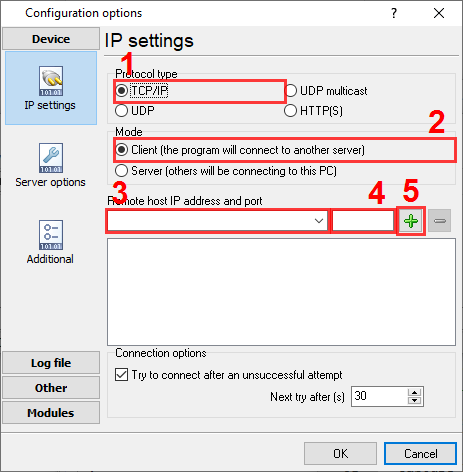
Our software should work in the TCP client mode. It means that our software will initiate connection with the PBX and the PBX will work as a server. Add one or several PBX IP addresses here (the IP address of the Nec SOPHO iS3000). The port number should match the port that you have defined within the PBX (2599 in the example below).
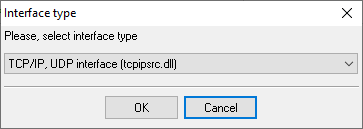
1. Add a new configuration with the TCP data source (if you didn't it before).
2. Configure the TCP settings as shown below.
192.168.1.220
2599
192.168.1.220:2599
Selecting the correct parser for Nec SOPHO iS3000 (RS232, FDCR Format 4)

Nec SOPHO iS3000 (RS232, FDCR Format 4)
Nec SOPHO iS3000 (RS232, FDCR Format 4)
Data items
| Description | Data type | Column name |
|---|---|---|
| Unit number | string | FLAG4 |
| Sequence number | string | FLAG5 |
| Call type | string | CALL_TYPE |
| Direction | string | DIRECTION |
| Extension | string | EXT |
| Trunk | string | TRUNK |
| Call time | datetime | CALL_TIME |
| Caller number | string | CALLER_PHONE |
| Dialed number | string | DIALED_PHONE |
| Is answered | string | ISANSWERED |
| Ring duration (s) | integer | RING_S |
| Ring duration | datetime | RING |
| Call duration (sec) | integer | CALL_DURATION_S |
| Call duration | datetime | CALL_DURATION |
Reports and a database
Once records arrive, the logger writes them to a text file or to any ODBC database in real time, or hands them to the PBX Reports utility for manual, scheduled and e-mailed reports with a built-in web server. See exporting call log data to a database for the database setup.
Related Nec systems
NEC Xen Axis (CSV)NEC XN 120
Netas Diginet DX-1,2,3
NeutralPoint
NEC Electra Elite, Aspire, DS2000, XN120 SMDR formats
All supported PBX systems
Note: Products and companies mentioned here are used only for definition and identification purposes and can be trademarks and/or registered trademarks of the respective companies.
Related topics: Advanced PBX Data Logger
hereCall logging Call accounting SMDR to SQL SMDR Listener Cables and signals