
Panasonic KX-TD816 SMDR setup and CDR format
This page shows how to get call records out of the Panasonic KX-TD816 into Advanced PBX Data Logger: the connection settings, the parser to select and the 12 fields the logger extracts for reports or a database. The settings apply to our logger; other call accounting software may expect a different configuration.
Quick facts
| Item | Panasonic KX-TD816 |
|---|---|
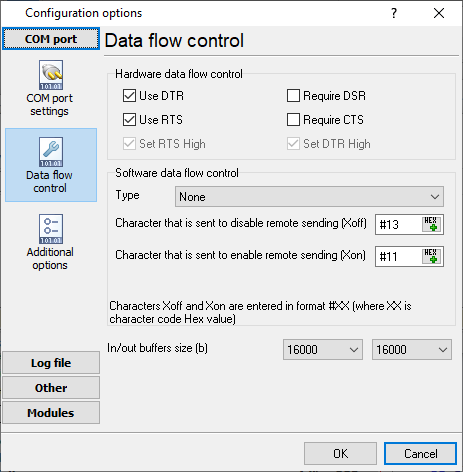
| Interface | Serial. The SMDR or printer port of the PBX is connected to a COM port; speed, data bits, parity and flow control must match the PBX. |
| Parser to select | Panasonic KX-TD816 |
| Fields extracted | 12 |
| Other Panasonic systems | Panasonic KX-TDA30, TDA100, TDA200, TDA600 SMDR setup, Panasonic KX-T, KX-TD500, DBS and 576/816 SMDR formats |
Pinout and wiring
| PBX (25 pin male) | PC (9 pin female) | PC (25 pin female) |
|---|---|---|
| 1 | GND | 1 |
| 2 | 2 | 3 |
| 3 | 3 | 2 |
| 4 | 7 | 4 |
| 5,6 | 4 | 20 |
| 7 | 5 | 7 |
| 20 | 1, 6, 8 | 5, 6, 8 |
Settings from the manufacturer's documentation
Taken from smdr pinout. Values are those stated in the documentation; confirm them against your firmware release.
| Setting | Documented value |
|---|---|
| cable or pinout | PBX (25 pin male) pin1(gnd)->PC25 pin1; pin2->PC9 pin2->PC25 pin3; pin3->PC9 pin3->PC25 pin2; pin4->PC9 pin7->PC25 pin4; pin5,6->PC9 pin4->PC25 pin20; pin7->PC9 pin5->PC25 pin7; pin20->PC9 pins1,6,8->PC25 pins5,6,8. |
Configuring a COM port
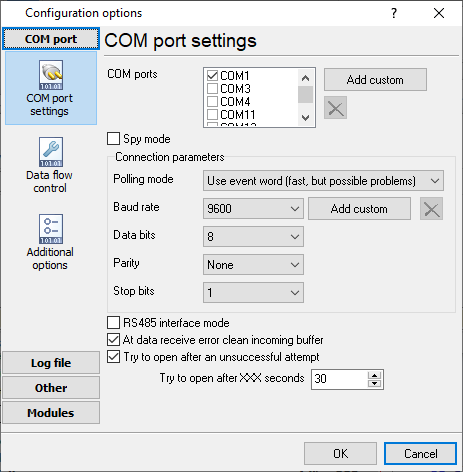
The COM port number should match the number in your system. You can check the correct port number in Devices Manager → Ports.
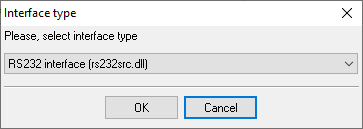
1. Add a new configuration with the RS232 data source (if you didn't it before).
2. Select the COM port and configure the communication settings for your PBX corresponding to your PBX settings.
Selecting the correct parser for Panasonic KX-TD816

Panasonic KX-TD816
Panasonic KX-TD816
Data items
| Description | Data type | Column name |
|---|---|---|
| Call time | datetime | CALL_TIME |
| External | string | EXT |
| CO | string | TRUNK |
| Direction | string | DIRECTION |
| Dialed number | string | DIALED_PHONE |
| Caller | string | CALLER_PHONE |
| Ring | datetime | RING |
| Call duration | datetime | CALL_DURATION |
| Call duration (s) | integer | CALL_DURATION_S |
| Cost | float | COST |
| Account | string | ACC |
| CD | string | FLAG1 |
Sample record
As delivered by the system; phone numbers, names and public addresses are masked.
02/11/04 11:08AM   102 03 834xxxxxxxx                    00:00'28
02/11/04 11:34AM   207 03 834xxxxxxxx                    00:02'09
02/11/04 11:37AM   203 04 621268                         00:05'45
Reports and a database
Once records arrive, the logger writes them to a text file or to any ODBC database in real time, or hands them to the PBX Reports utility for manual, scheduled and e-mailed reports with a built-in web server. See exporting call log data to a database for the database setup.
Related Panasonic systems
Panasonic KX-TD612Panasonic KX-TD500
Panasonic KX-TDA100 (cost)
Panasonic KX-TDA100 (ring)
Panasonic KX-TDA30, TDA100, TDA200, TDA600 SMDR setup
Panasonic KX-T, KX-TD500, DBS and 576/816 SMDR formats
All supported PBX systems
Note: Products and companies mentioned here are used only for definition and identification purposes and can be trademarks and/or registered trademarks of the respective companies.
Related topics: Advanced PBX Data Logger
hereCall logging Call accounting SMDR to SQL SMDR Listener Cables and signals