
Samsung SKP-36HX SMDR setup and CDR format
This page shows how to get call records out of the Samsung SKP-36HX into Advanced PBX Data Logger: the connection settings, the parser to select and the 7 fields the logger extracts for reports or a database. The settings apply to our logger; other call accounting software may expect a different configuration.
Quick facts
| Item | Samsung SKP-36HX |
|---|---|
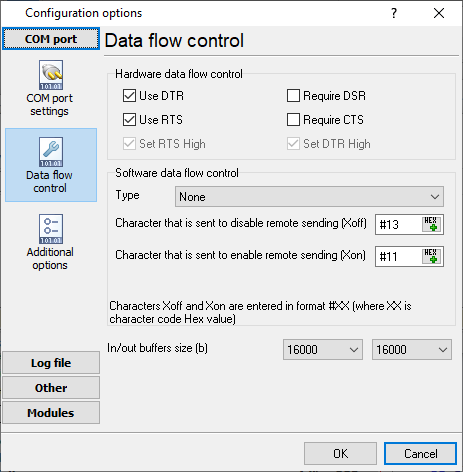
| Interface | Serial. The SMDR or printer port of the PBX is connected to a COM port; speed, data bits, parity and flow control must match the PBX. |
| Parser to select | Samsung SKP-36HX |
| Fields extracted | 7 |
| Other Samsung systems | Samsung DCS, iDCS, SKP and NX SMDR formats |
Pinout and wiring
| ATC-AMF | MDF -A | PC (9 pin female) | PC (25 pin female) |
|---|---|---|---|
| 39 (RXD) | 27 | 2 | 3 |
| 14 (TXD) | 28 | 3 | 2 |
| 38,13 (GND) | 25,26 | 7 | 5 |
Settings from the manufacturer's documentation
Taken from SMDR - some formats. Values are those stated in the documentation; confirm them against your firmware release.
Record format notes
- The general Samsung DCS/iDCS/SKP family report has columns T EXT AUTH TRK MM/DD STT.TIME DURATION FG DIALED_DIGIT ACCOUNT_CODE CID/ANI_NUMBER CID/ANI_NAME, matching the page's own SKP-36HX report columns (EXT, TRK, MM/DD, STT.TIME, DURATION, DIALED NO, STATUS).
- Documented two-letter status/flag codes for the family include O (outgoing), I (incoming), A (abandoned), IA (incoming ring time before answer), T (transferred call terminated), IT (incoming transfer) and OT (outgoing transferred); the page's own STATUS column instead spells these out as OUTGOING, INCOMING and TRANSFER.
Configuring a COM port
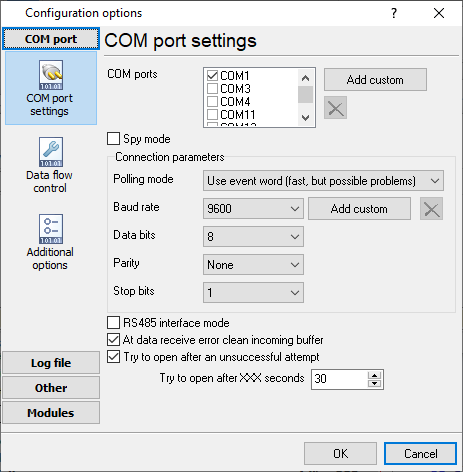
The COM port number should match the number in your system. You can check the correct port number in Devices Manager → Ports.
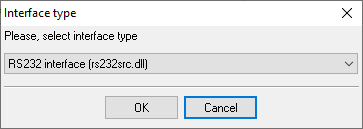
1. Add a new configuration with the RS232 data source (if you didn't it before).
2. Select the COM port and configure the communication settings for your PBX corresponding to your PBX settings.
Selecting the correct parser for Samsung SKP-36HX

Samsung SKP-36HX
Samsung SKP-36HX
Data items
| Description | Data type | Column name |
|---|---|---|
| External | string | EXT |
| Trunk | string | TRUNK |
| Call time | datetime | CALL_TIME |
| Call duration | datetime | CALL_DURATION |
| Call duration (s) | integer | CALL_DURATION_S |
| Phone | string | DIALED_PHONE |
| Direction | string | DIRECTION |
Sample record
As delivered by the system; phone numbers, names and public addresses are masked.
               << STATION MESSAGE DETAILED RECORDING >> [{ SKP-36HX }]
==============================================================================
   EXT   TRK   MM/DD   STT.TIME   DURATION  DIALED NO           STATUS
==============================================================================
   41    61    09/10   15:39:07   00:00:14  60669               OUTGOING
   37    62    09/10   15:37:57   00:01:55  777516              OUTGOING
   23    66    09/10   15:39:17   00:00:39                      INCOMING
   22    66    09/10   15:39:58   00:00:16                      TRANSFER
   43    62    09/10   15:41:08   00:00:07  246598              OUTGOING
   22    62    09/10   15:41:43   00:00:10                      INCOMING
   42    63    09/10   15:40:13   00:01:45  1607                OUTGOING
   41    61    09/10   15:42:38   00:00:16  60603               OUTGOING
   31    62    09/10   15:41:53   00:02:49                      TRANSFER
   31    61    09/10   15:46:34   00:00:19  60426               OUTGOING
   22    61    09/10   15:48:04   00:00:25                      INCOMING
   40    61    09/10   15:48:34   00:00:34                      TRANSFER
   22    61    09/10   15:49:09   00:00:07                      INCOMING
   22    62    09/10   15:49:34   00:00:14                      INCOMING
   42    63    09/10   15:49:24   00:00:42  415*                OUTGOING
   31    62    09/10   15:49:49   00:00:40                      TRANSFER
   22    62    09/10   15:50:39   00:00:07                      INCOMING
   35    61    09/10   15:49:19   00:02:03                      TRANSFER
   22    61    09/10   15:51:39   00:00:30                      INCOMING
   30    61    09/10   15:52:09   00:01:19                      TRANSFER
   31    66    09/10   15:52:55   00:00:58  20093               OUTGOING
Reports and a database
Once records arrive, the logger writes them to a text file or to any ODBC database in real time, or hands them to the PBX Reports utility for manual, scheduled and e-mailed reports with a built-in web server. See exporting call log data to a database for the database setup.
Related Samsung systems
Samsung OfficeServ 7400Samsung OfficeServ 7200
Samsung SKP-56_120
Samsung SKP-816 (fixed pos)
Samsung DCS, iDCS, SKP and NX SMDR formats
All supported PBX systems
Note: Products and companies mentioned here are used only for definition and identification purposes and can be trademarks and/or registered trademarks of the respective companies.
Related topics: Advanced PBX Data Logger
hereCall logging Call accounting SMDR to SQL SMDR Listener Cables and signals