
Toshiba IP Edge SMDR setup and CDR format
This page shows how to get call records out of the Toshiba IP Edge into Advanced PBX Data Logger: the connection settings, the parser to select and the 22 fields the logger extracts for reports or a database. The settings apply to our logger; other call accounting software may expect a different configuration.
Quick facts
| Item | Toshiba IP Edge |
|---|---|
| Interface | LAN. The PBX sends records to the logger PC; the logger listens on TCP port 7000. |
| Port | 7000 |
| Parser to select | Toshiba IP Edge |
| Fields extracted | 22 |
| Other Toshiba systems | Toshiba Strata DK SMDR formats |
PBX Settings
You can easily change the setting using the web interface.
1. Open your favorite browser.
2. Navigate to the http://192.168.5.220/ (replace the IP address with the address of your PBX)
3. Login as Administrator.
4. Select System → IO Device from the top menu.
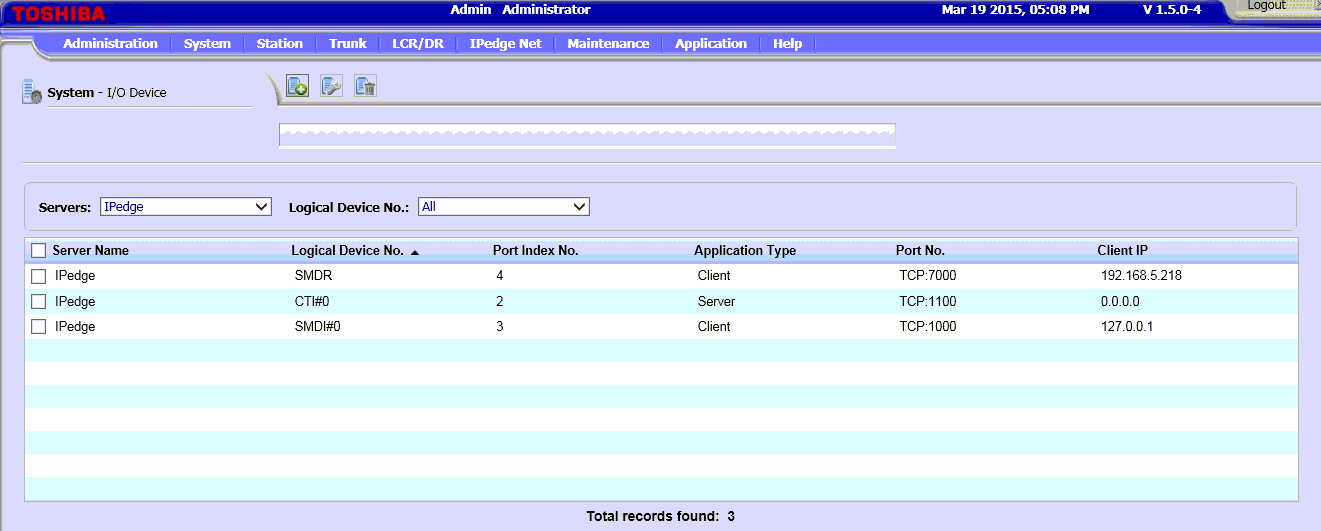
5. Double-click over the SMDR record in the table.
6. The new page will be opened. Change the settings as showed below. Note: you should specify the IP address of the computer where Advanced PBX Data Logger is installed. This computer must have a static IP address.
7. Save the settings on this page.
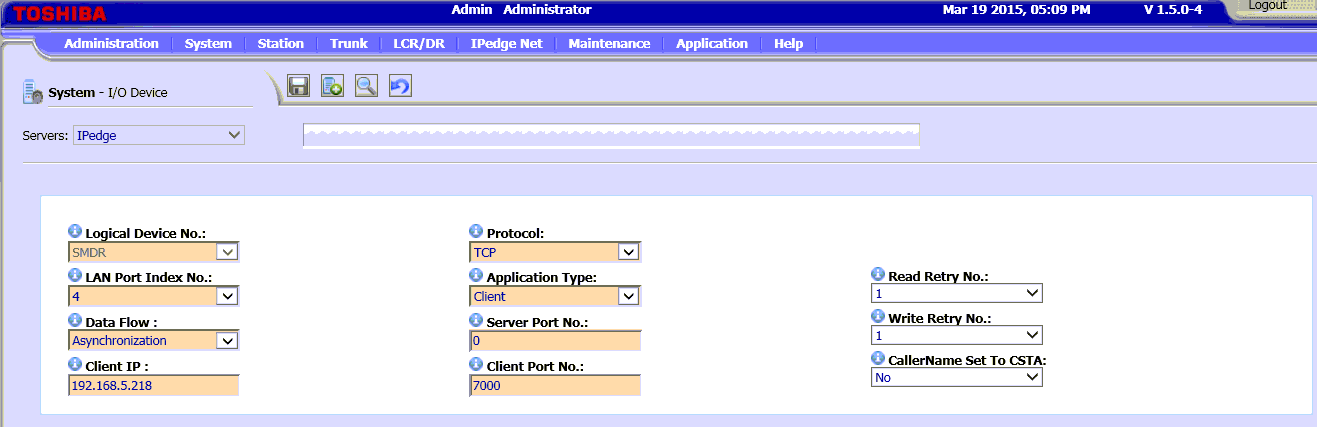
8. Select System → SMDR from the top menu.
9. Change the settings as showed below.
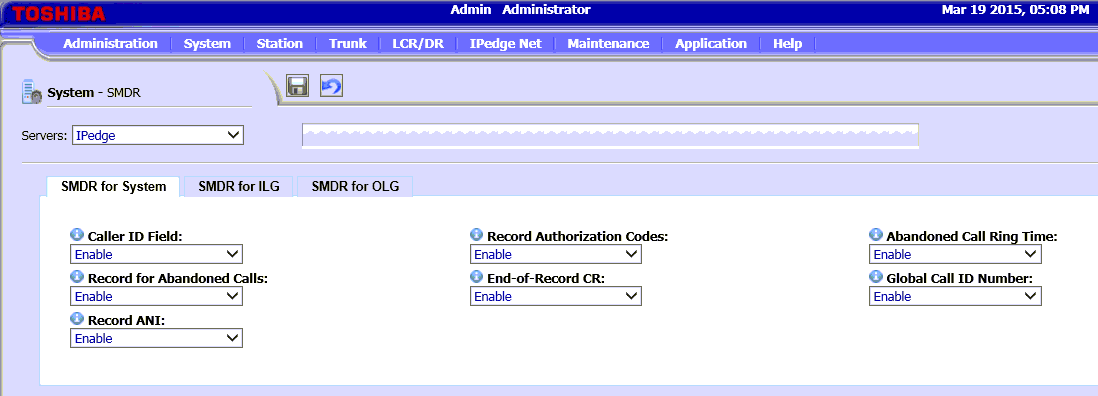
10. Save the changed setting and reboot the PBX if it is necessary.
Settings from the manufacturer's documentation
Taken from toshiba-ipedge-SMDR FeatureDifference With CIX. Values are those stated in the documentation; confirm them against your firmware release.
| Setting | Documented value |
|---|---|
| output destination | LAN only; RS-232 serial SMDR is not supported on IP edge |
Record format notes
- IP edge SMDR is not byte-compatible with CIX SMDR; a receiving application must detect which system type sent the record.
- Originate/Terminate party ID fields are 10 digits wide on IP edge vs 9 digits on CIX, because IP edge addresses up to 440 channels per server instead of 24.
- IP edge does not emit the CIX 'Q' (QoS) record type; QoS must instead be read from the IP endpoint/GEM rather than from SMDR.
- IP edge channel numbers in the Originate/Terminate party ID field run 000-439 (single server, 440 channels) versus 00-23 on CIX (MIPU, 24 channels).
Configuring Advanced PBX Data Logger as a TCP server
Advanced PBX Data Logger should be configured to the TCP server mode and listen on 0.0.0.0:7000 (see below). The IP address 0.0.0.0 allows receiving data from all network connections on your computer. The port number should match the value from the SMDR settings in your Toshiba IP Edge.
1. Add a new configuration with the TCP data source (if you didn't it before).
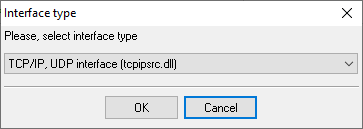
2. Configure the TCP settings as shown below.
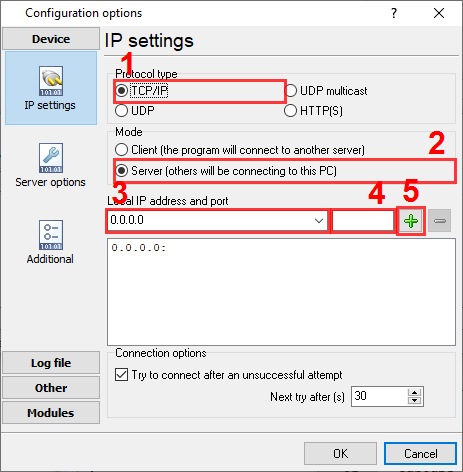
7000
7000
Selecting the correct parser for Toshiba IP Edge

Toshiba IP Edge
Toshiba IP Edge
Data items
| Description | Data type | Column name |
|---|---|---|
| Record type | string | CALL_TYPE |
| Record type name | string | RECORD_TYPE_NAME |
| Record ID | string | FLAG1 |
| Node ID | string | FLAG2 |
| Source | string | FLAG3 |
| Destination | string | FLAG4 |
| Trunk | string | TRUNK |
| Extension | string | EXT |
| Call time | datetime | CALL_TIME |
| Call duration | datetime | CALL_DURATION |
| Call duration (s) | integer | CALL_DURATION_S |
| Call direction | string | DIRECTION |
| Phone | string | DIALED_PHONE |
| Phone (w/o city code) | string | DIALED_PHONE2 |
| Caller phone | string | CALLER_PHONE |
| DISA | string | DISA |
| ANI | string | ANI |
| DNIS | string | DNIS |
| AUXID1 | string | AUXID1 |
| AUXID2 | string | AUXID2 |
| Ringing time | datetime | RING |
| VM-CallId | string | CALLID |
Sample record
As delivered by the system; phone numbers, names and public addresses are masked.
N 029 75     DN2002     A002xxxxxx 01/29 15:49:31 00:00:06.0 719xxxxxxxxxx
N 030 75     DN2002     A002xxxxxx 01/29 15:49:37 00:00:05.0 719xxxxxxxxxx
N 031 75     DN2002     A002xxxxxx 01/29 15:51:59 00:00:02.0 719xxxxxxxxxx
Reports and a database
Once records arrive, the logger writes them to a text file or to any ODBC database in real time, or hands them to the PBX Reports utility for manual, scheduled and e-mailed reports with a built-in web server. See exporting call log data to a database for the database setup.
Related Toshiba systems
Tennyson SOXTelrad
Toshiba Strata CIX
Toshiba Strata CTX
Toshiba Strata DK SMDR formats
All supported PBX systems
Note: Products and companies mentioned here are used only for definition and identification purposes and can be trademarks and/or registered trademarks of the respective companies.