
Mitel 5000 CP SMDR setup and CDR format
This page shows how to get call records out of the Mitel 5000 CP into Advanced PBX Data Logger: the connection settings, the parser to select and the 13 fields the logger extracts for reports or a database. The settings apply to our logger; other call accounting software may expect a different configuration.
Quick facts
| Item | Mitel 5000 CP |
|---|---|
| Interface | LAN. The PBX accepts a connection on TCP port 4000; the logger connects to the PBX IP address. |
| Port | 4000 |
| Parser to select | Mitel 5000 CP |
| Fields extracted | 13 |
| Other Mitel systems | Mitel SX-200D, CS-5000 and Inter-Tel SMDR formats |
| SMDR login handshake (documented) | <Byte_Count><Socket_Type=0x84><Password>0x00, byte count is 4 bytes little-endian, password up to 15 ASCII chars null-terminated |
| SMDR password location (documented) | Database Programming, System\Sockets |
MiVoice 250, Mitel 5000 CP SMDR settings
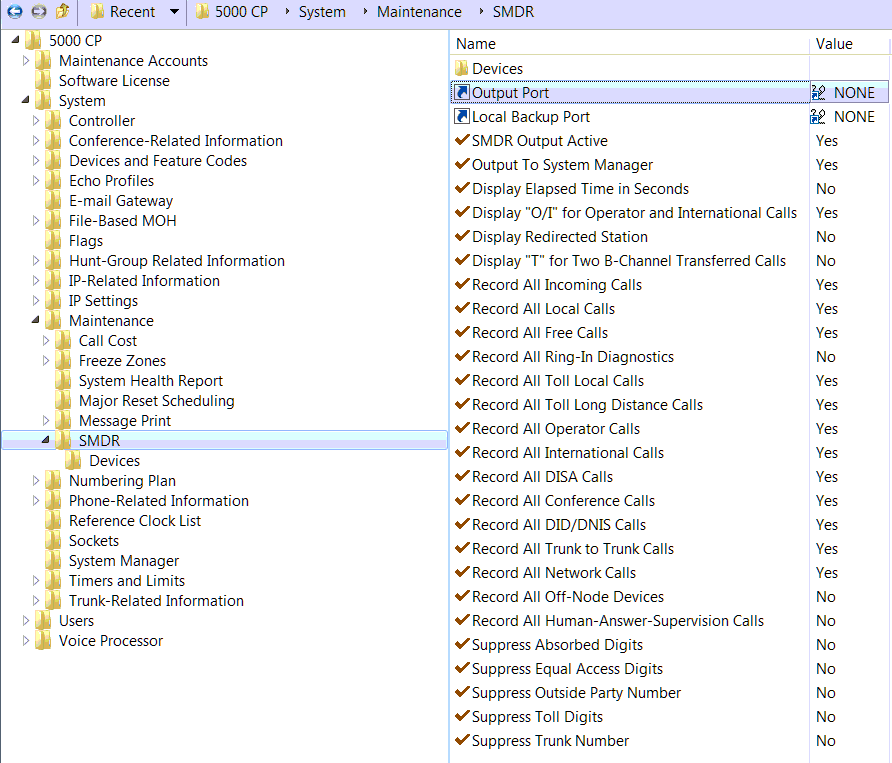
1. Open the "Mitel DB Programming" utility (fig. 1)
2. Go to System > Sockets.
3. Select the "SMDR" row in the right pane.
4. Clear the "Password" column.
5. Select "Yes" in the "Enable" column.
6. Change the "SMDR" value to "Yes".
7. Go to System > IP Settings.
8. Check "Listening Port (Unsecured)" is 4000.
9. Check "Listening Port (Unsecured) Enabled" is YES.
10. Go to System > Maintenance > SMDR.
11. Change the settings as showed below (fig. 1)
Go to the "Modules > Query Parse Filter" page and select the "Mitel 5000 CP" plug-in in the "Query" and "Parser" drop-down boxes.
If you do not see outgoing calls
Check the Devices folder in SMDR and make sure there's the default Extension List All Phones is there to cover everybody, or if it's custom make sure the Answering phones are added to the list.
The only other thing I can think of is if you use ARS to dial out on another node's trunk group, that remote node will end up with the outgoing call records since that's where the trunks reside making the call.
Settings from the manufacturer's documentation
Taken from Mitel 5000 CP SMDR Connection Guide, Mitel 5000 CP v5.1 Features and Programmming Guide, Mitel CallAccounting InstallationGuide. Values are those stated in the documentation; confirm them against your firmware release.
| Setting | Documented value |
|---|---|
| SMDR TCP socket port | 4000 |
| SMDR login handshake | <Byte_Count><Socket_Type=0x84><Password>0x00, byte count is 4 bytes little-endian, password up to 15 ASCII chars null-terminated |
| SMDR password location | Database Programming, System\Sockets |
| SMDR Output Active default state | enabled by default |
| Listening Port for socket connections | 4000, under System > IP Settings |
| record framing | 80 ASCII characters plus CR/LF |
Switching SMDR output on, as documented
- Select System > Sockets > <socket option> and check the Value box to enable the SMDR socket connection.
- Select System > Sockets > SMDR, right-click the Password column and click Edit Password to set or clear the socket password.
- Select System > Maintenance > SMDR > Devices to add the phones and trunks to be included in the SMDR output.
Record format notes
- At connection or at the start of each day the 5000 CP sends a two-line header before records: a title/time line and a column-header line.
- Normal call record layout: TYP EXT TRUNK DIALED-DIGITS START ELAPSED COST ACCOUNT-CODE, fixed columns, space-separated.
- A separate ring-record format is used for unanswered calls, without cost/account fields.
- Elapsed time can be programmed to display in seconds (S=XXXXXX) instead of HH:MM for calls up to 999,999 seconds.
- A trailing character can appear at end of record: * = trunk-side disconnect, R = Human-Answer-Supervision call not accepted, T = Two B-Channel Transfer involved.
Configuring PBX Data Logger as a TCP client
Our software should work in the TCP client mode. It means that our software will initiate connection with the PBX and the PBX will work as a server. Add one or several PBX IP addresses here (the IP address of the Mitel 5000 CP). The port number should match the port that you have defined within the PBX (4000 in the example below).
1. Add a new configuration with the TCP data source (if you didn't it before).
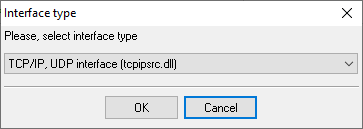
2. Configure the TCP settings as shown below.
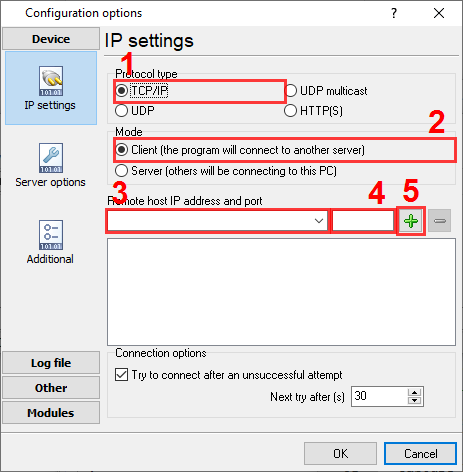
192.168.1.220
4000
192.168.1.220:4000
Selecting the correct parser for Mitel 5000 CP

Mitel 5000 CP
Mitel 5000 CP
Data items
| Description | Data type | Column name |
|---|---|---|
| Call type | string | CALL_TYPE |
| Direction | string | DIRECTION |
| External | string | EXT |
| Trunk | string | TRUNK |
| Call date and time | datetime | CALL_TIME |
| Call duration (s) | integer | CALL_DURATION_S |
| Call duration | datetime | CALL_DURATION |
| Caller phone | string | CALLER_PHONE |
| DNIS | string | DNIS |
| Dialed number | string | DIALED_PHONE |
| Cost | float | COST |
| Account | string | ACC |
| Result | string | FLAG1 |
Reports and a database
Once records arrive, the logger writes them to a text file or to any ODBC database in real time, or hands them to the PBX Reports utility for manual, scheduled and e-mailed reports with a built-in web server. See exporting call log data to a database for the database setup.
Related Mitel systems
Mitel 3300 ICP (Universal)Mitel 3300 ICP (Standard Full)
Mitel 5000
Mitel CS-5000
Mitel SX-200D, CS-5000 and Inter-Tel SMDR formats
All supported PBX systems
Note: Products and companies mentioned here are used only for definition and identification purposes and can be trademarks and/or registered trademarks of the respective companies.
Related topics: Advanced PBX Data Logger
hereCall logging Call accounting SMDR to SQL SMDR Listener Cables and signals