
Mitel SX-200D, CS-5000 and Inter-Tel SMDR formats
Advanced PBX Data Logger includes 4 parsers for Mitel and Inter-Tel systems. This page gathers them in one place. For each system you will find how the call records reach the logger, the parser to select, and the 47 fields in total that these parsers extract for PBX Reports or a database. Of these, 1 over TCP client; the rest are identified by their record layout and can arrive over a serial port or a LAN connection. The settings apply to our logger; other call accounting software may expect a different configuration.
Systems on this page
- Mitel CS-5000 · Serial or TCP, 9 fields
- Mitel SX 200D · Serial or TCP, 18 fields
- Inter-Tel 5000 · TCP client, 9 fields
- InterTel Axxess · Serial or TCP, 11 fields
Connecting the logger
Add a data source in PBX Data Logger that matches the interface named in each section: RS232 for a serial SMDR port, TCP client when the PBX accepts connections, TCP server when the PBX pushes records to the logger, or FTP for systems that write CDR files. Then open Modules → Query Parse Filter → Data query, click Setup and select the parser named in the section. The general steps are shown on the SMDR listener page; every other supported system is listed on the supported PBX index.
Mitel CS-5000
Parser: Mitel CS-5000
Connection: Serial printer port or LAN, whichever the system uses for SMDR output. The record layout identifies the format.
Fields extracted: 9
Data items: Mitel CS-5000
| Description | Data type | Column name |
|---|---|---|
| Call type | string | CALL_TYPE |
| External | string | EXT |
| Trunk | string | TRUNK |
| Phone | string | DIALED_PHONE |
| Call time | datetime | CALL_TIME |
| Call duration | datetime | CALL_DURATION |
| Call duration (s) | integer | CALL_DURATION_S |
| Cost | float | COST |
| Account | string | ACC |
Sample record
As delivered by the system; phone numbers, names and public addresses are masked.
Just to let you know that the Mitel CS-5000 works correctly with APDL if
#06#00#00#00#84#00
the #06#00#00#00 is a 4 byte big endian with the data length in it. #84
Mitel SX 200D
Parser: Mitel SX 200D
Connection: Serial printer port or LAN, whichever the system uses for SMDR output. The record layout identifies the format.
Fields extracted: 18
Settings from the manufacturer's documentation
Taken from Mitel SX-200D SMDR, Mitel SX-200 ICP Rev 3-1 Tech Handbook, Mitel CallAccounting InstallationGuide. Values are those stated in the documentation; confirm them against your firmware release.
| Setting | Documented value |
|---|---|
| output interface (SX-200D, 1986 Generic 1000/1001 manual) | RS-232 output port only; no LAN/IP option is described in this manual |
| record length | 85 or 88 characters (88 when a 3-digit system identifier is used) |
| default SMDR/CDE IP socket (on the newer SX-200 ICP MX, a different/successor model) | 61328 |
| default Directed I/O printout type for SMDR | Autoprint = NO by default |
Switching SMDR output on, as documented
- On the COS Define Form, enable Extended SMDR or the system will truncate call record data.
- On the COS Define Form, set the SMDR - Records Incoming Calls option to ENABLED for every Class of Service currently in use.
- On the Trunk Group Form, select the SMDR option so SMDR records are collected for outbound calls.
- On the Directed I/O Form, set the printer port to Autoprint and set GUARANTEED to Yes for the SMDR entry so records print without loss.
Record format notes
- Call Completion Status codes: A = answer supervision, B = busy, E = caller/reorder error, T = TAFAS answered.
- Trunk numbers are reported as Tnnn (CO trunk) or Xnnn (non-CO trunk) to distinguish trunk types in the calling/called party fields.
- Start time is reported in 24-hour format only (this 1986 manual does not describe a 12-hour option).
- COS options controlling SMDR content on the related SX-200 ICP platform include 246 SMDR-Extended Record, 247 SMDR-Record Meter Pulses, 702 SMDR-Overwrite Buffer, 806 SMDR-Record Incoming Calls, 814 SMDR-Record ANI/DNIS/CLASS.
Data items: Mitel SX 200D
| Description | Data type | Column name |
|---|---|---|
| Flag 1 | string | FLAG1 |
| Call time | datetime | CALL_TIME |
| Call duration | datetime | CALL_DURATION |
| Call duration (s) | integer | CALL_DURATION_S |
| Attendant | string | FLAG2 |
| Call direction | string | DIRECTION |
| Trunk | string | TRUNK |
| Extension | string | EXT |
| Ring duration (s) | integer | RING_S |
| Ring duration | datetime | RING |
| Phone | string | DIALED_PHONE |
| Access code | string | FLAG3 |
| Call type | string | CALL_TYPE |
| Call flags | string | FLAG4 |
| Transfer-conference call | string | FLAG5 |
| Third party | string | FLAG6 |
| Account code | string | ACC |
| System ID | string | SYSID |
Inter-Tel 5000
Parser: Inter-Tel 5000
Connection: LAN. The PBX accepts a connection on TCP port 4000; the logger connects to the PBX IP address.
Fields extracted: 9
Configuring a data parser
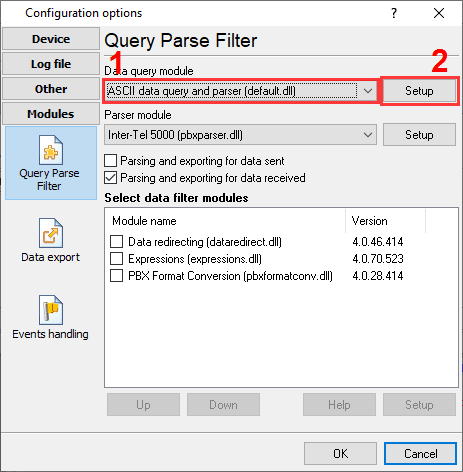
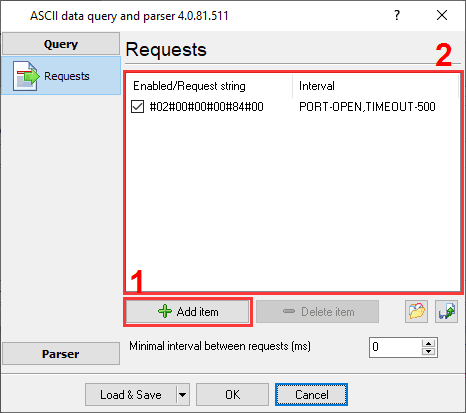
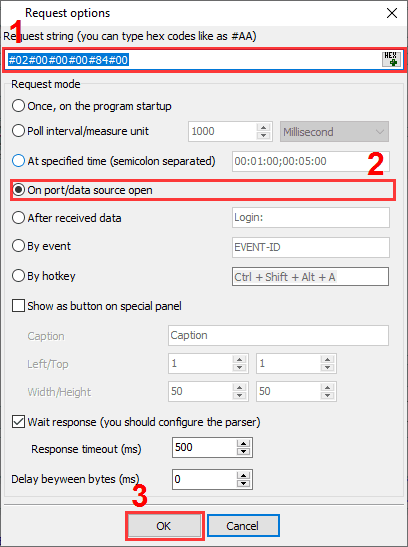
You need to activate the "ASCII data query plugin" and specify the password request. Please remove the password on your PBX because the request string depends on this password. The request string for the empty password is:
#02#00#00#00#84#00
Settings from the manufacturer's documentation
Taken from InterTel 5000 SMDR, InterTel 5000 or Axxess SMDR, Mitel 5000 CP SMDR Connection Guide. Values are those stated in the documentation; confirm them against your firmware release.
| Setting | Documented value |
|---|---|
| SMDR TCP socket port | 4000 (same underlying platform as the Mitel 5000 CP) |
| empty-password login request string | #02#00#00#00#84#00 |
Switching SMDR output on, as documented
- Activate the ASCII data query plugin and set the request line to match the password (or lack of one) configured on the PBX.
- If no password is set on the PBX, use the request string #02#00#00#00#84#00 to log in to the SMDR socket.
Record format notes
- The login request string's 0x84 byte is the SMDR socket type marker used by the 5000 CP connection protocol; #02#00#00#00 is the little-endian byte count for an empty password.
Data items: Inter-Tel 5000
| Description | Data type | Column name |
|---|---|---|
| Call type | string | CALL_TYPE |
| External | string | EXT |
| Trunk | string | TRUNK |
| Phone | string | DIALED_PHONE |
| Call time | datetime | CALL_TIME |
| Call duration | datetime | CALL_DURATION |
| Call duration (s) | integer | CALL_DURATION_S |
| Cost | float | COST |
| Account | string | ACC |
InterTel Axxess
Parser: InterTel Axxess
Connection: Serial printer port or LAN, whichever the system uses for SMDR output. The record layout identifies the format.
Fields extracted: 11
Data items: InterTel Axxess
| Description | Data type | Column name |
|---|---|---|
| Call type | string | CALL_TYPE |
| Direction | string | DIRECTION |
| Call date and time | datetime | CALL_TIME |
| Call duration | datetime | CALL_DURATION |
| Call duration (s) | integer | CALL_DURATION_S |
| Ext | string | EXT |
| CO | string | TRUNK |
| Phone | string | DIALED_PHONE |
| Caller | string | CALLER_PHONE |
| Cost | float | COST |
| Account code | string | ACC |
Sample record
As delivered by the system; phone numbers, names and public addresses are masked.
<201xxxxxxxxxxx.328>    2500  94129 RG 888-xxx-xxxx         2856 11:36 00:00:16
IN  2500  94129 888-xxx-xxxx            2856 11:36 00:00:12 $00.00             *
<201xxxxxxxxxxx.250>    1104  94129 RG 810-xxx-xxxx         6200 11:48 00:00:04
IN  1104  94129 810-xxx-xxxx            6200 11:48 00:01:02 $00.00
<201xxxxxxxxxxx.234>    ***** 94129 RG 586-xxx-xxxx         5600 11:53 00:00:02                    *
<201xxxxxxxxxxx.578>    1114  94129 RG 586-xxx-xxxx         6200 11:54 00:00:07
IN  1114  94129 586-xxx-xxxx            6200 11:54 00:00:24 $00.00
<201xxxxxxxxxxx.203>    1107  94130 RG 734-xxx-xxxx         6200 11:48 00:00:11
IN  1107  94130 734-xxx-xxxx            6200 11:48 00:08:04 $00.00
<201xxxxxxxxxxx.015>TLC 1111  941xx xxx-xxxx                     12:04 00:00:51 $00.00
<201xxxxxxxxxxx.046>    1114  94130 RG 586-xxx-xxxx         5600 12:10 00:00:08
IN  1114  94130 586-xxx-xxxx            5600 12:10 00:01:03 $00.00
<201xxxxxxxxxxx.468>    1114  94130 RG 770-xxx-xxxx         6202 12:12 00:00:12
IN  1114  94130 770-xxx-xxxx            6202 12:13 00:00:40 $00.00             *
<201xxxxxxxxxxx.906>    1104  94129 RG 586-xxx-xxxx         6200 12:10 00:00:05
IN  1104  94129 586-xxx-xxxx            6200 12:10 00:09:52 $00.00
<201xxxxxxxxxxx.984>    2500  94130 RG 888-xxx-xxxx         2856 12:20 00:00:16
IN  2500  94130 888-xxx-xxxx            2856 12:20 00:00:11 $00.00             *
<201xxxxxxxxxxx.640>    1104  94129 RG 734-xxx-xxxx         6200 12:29 00:00:05
IN  1104  94129 734-xxx-xxxx            6200 12:29 00:00:20 $00.00
<201xxxxxxxxxxx.703>    1125  94130 RG 313-xxx-xxxx         5600 12:41 00:00:13
IN  1125  94130 313-xxx-xxxx            5600 12:41 00:05:48 $00.00
<201xxxxxxxxxxx.359>    1103  94129 RG 313-xxx-xxxx         6200 12:29 00:00:07
IN  1107  94129 313-xxx-xxxx            6200 12:30 00:18:38 $00.00
<201xxxxxxxxxxx.687>    1104  94129 RG 313-xxx-xxxx         5600 13:00 00:00:05
Reports and a database
Once records arrive, the logger writes them to a text file or to any ODBC database in real time, or hands them to the PBX Reports utility for manual, scheduled and e-mailed reports with a built-in web server. See exporting call log data to a database for the database setup.
Related Mitel and Inter-Tel systems with their own setup pages
Mitel 3000Mitel 3300 ICP (Standard Format)
Mitel 3300 ICP (Standard Full)
Mitel 3300 ICP (Universal)
Mitel 5000 CP
Mitel 5000
Mitel MiVoice Office 400
Mitel SX 200 EL
Mitel SX 2000
Note: Products and companies mentioned here are used only for definition and identification purposes and can be trademarks and/or registered trademarks of the respective companies.